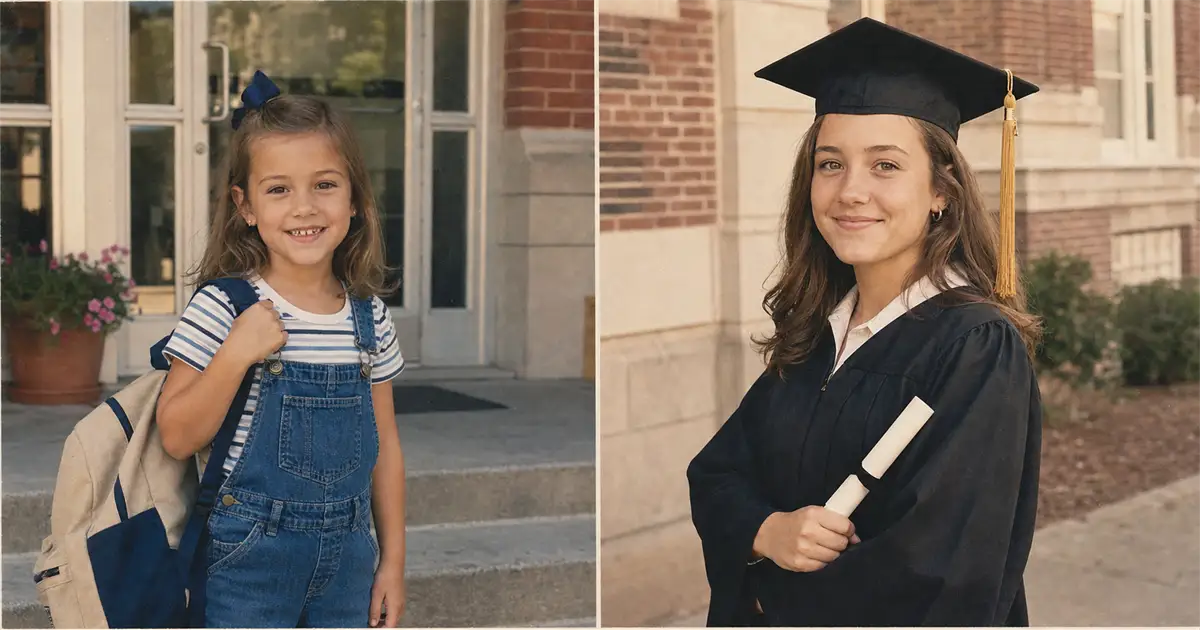
A mother sits at her kitchen table on a Tuesday in late May, two weeks out from her oldest’s high-school graduation. Her phone is open in two windows. On the left, a 2013 daycare snap of a five-year-old with a too-big backpack, soft focus, slight yellow cast, a faint center crease. On the right, last weekend’s cap-and-gown selfie, 4K iPhone sharp, edge-to-edge. She tries to drop both into a Canva diptych. The two panels look like two different children. That is the whole problem this article fixes.
Why the June side-by-side never matches
The post is a known shape. First day of kindergarten on the left. Last day of senior year on the right. Same kid, thirteen years apart, in one frame, on Instagram or Facebook, the morning of the ceremony.
The visual mismatch is older than AI. A 2013 phone camera rolled in a heavy yellow or magenta cast, soft focus, and a small sensor that handled indoor light by guessing. A 2026 iPhone shoots a 48-megapixel image with edge-to-edge sharpness and accurate color out of the camera. Drop the two next to each other, and the panels disagree at the camera-era level. The 2013 photo looks like memory. The 2026 photo looks like a screenshot.
That disagreement is what kills the post. The reader’s eye does not see “same kid, thirteen years apart.” It sees “two different image qualities.” The emotional beat the parent was trying to land, the one that pulls a relative back into a thirteen-year arc in three seconds, never lands.
Parents solve this in one of three ways. They accept the ugly mismatch and post it anyway. They pay an Etsy “milestone collage” seller $80 to $200 to manually grade the two photos by hand, and they wait three days to two weeks for the file back. Or they give up and post a single graduation photo without the kindergarten side, and they lose the time-jump beat entirely. The Etsy market for then_and_now_graduation collages has been a recurring bestseller for years, which is itself the proof that the problem is real and that parents are already paying to solve it.1
The two panels need to look like one family album, two pages. And the AI does that in one paste, not in Canva.
The two jobs the AI does
The instinct most parents have is to make the old photo as sharp as the new one. That is the wrong move. If you sharpen the 2013 daycare snap up to 4K iPhone clarity, the kindergarten panel ends up looking AI-generated. The child loses the period feel. The image stops looking like a memory of 2013 and starts looking like a 2026 render of a fake kindergartener.
The fix is symmetric. Restore the old photo up. Grade the new photo down. Meet in the middle.
The figure below shows the move in one frame. On the left, the raw pair the parent is starting from: a faded 2013 daycare snap next to a sharp 2026 iPhone selfie, two image qualities, two children’s worth of disagreement. On the right, the same two photos after the prompt runs: the 2013 print cleaned up to a readable scan, the 2026 selfie graded down to the same warmth, same grain, same paper-print micro-texture. One album, two pages.
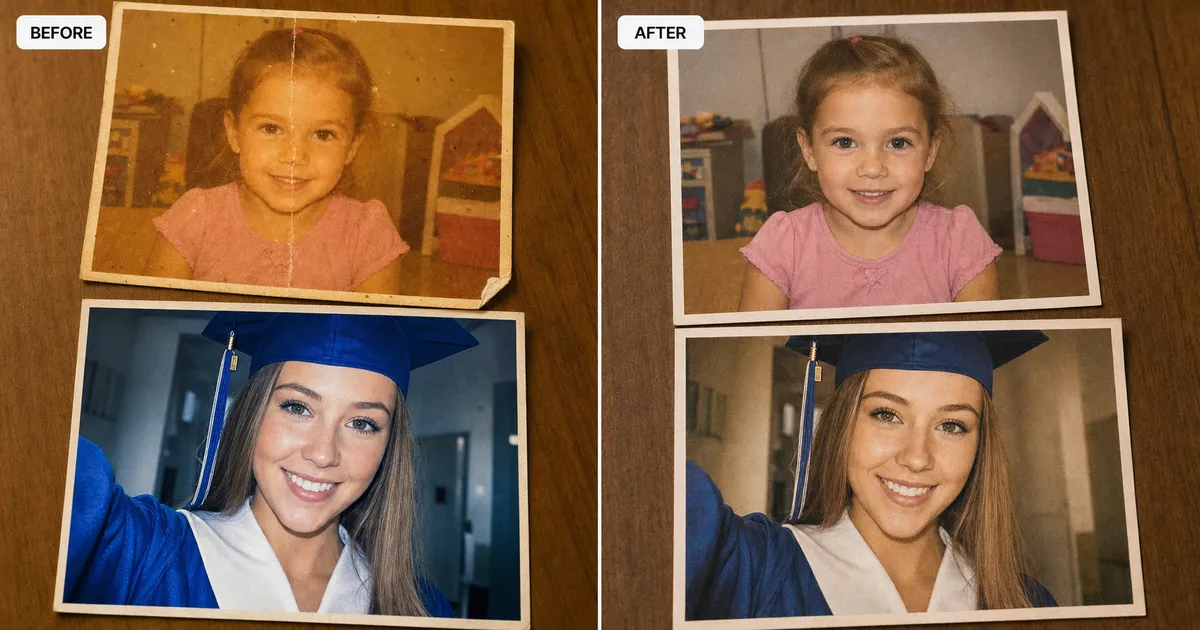
The left panel gets the same restoration move our standalone family-photo prompt runs. Clean the yellow cast. Repair the crease. Soften the dust spots. Hold the period: the 2013 backpack styling, the 2013 hair, the 2013 classroom door. The identity stays locked to the original face, which is the whole reason most AI photo tools change Grandma’s face when they “improve” old prints. The restoration in our diptych prompt forbids that drift on the left panel.
The right panel gets the reverse move. The 2026 cap-and-gown selfie comes in with edge-to-edge sharpness and accurate color. The prompt asks the AI to soften the sharpness toward a clean print-scan look, apply the same warm highlight grade as the left panel, add the same natural film grain, and add the same paper-print micro-texture. The face stays the same. The grade does not.
Identity-lock is the load-bearing rule on both sides. The prompt repeats it at the start and again at the end of the block, because language models pay more attention to the first and last tokens of a prompt than to the middle. The five-year-old on the left and the eighteen-year-old on the right have to read as the same person, with plausible aging from age five to age eighteen. Same eye shape. Same micro-asymmetry around the mouth. Same bone structure under the cheekbones.
The result is not a before-and-after restoration. The result is one family album spread that finally honors the thirteen years.
The paste-ready diptych prompt
Upload two photos: the kindergarten first-day photo and the cap-and-gown photo. Then paste the block below into ChatGPT, Claude, or Gemini, and swap the two era hints for your decade pair. The defaults render a 2013-kindergarten to 2026-graduation diptych.
Show the full promptTap to expand
Generate this image:
A horizontal 16:9 family-album diptych: two equal panels separated by a thin warm-white seam, the same person identity-locked across both panels, the two panels color-graded to match each other so they read as one family album spread, not two different photographs. Identity preservation is the highest-priority constraint. Match the bone structure, eye shape, nose, lip shape, hairline, skin tone, and any freckles or moles from BOTH uploaded photos, with plausible age progression from the left-panel age to the right-panel age; the LEFT panel must read as unmistakably the same person as the RIGHT panel, just younger. The LEFT panel is restored from the uploaded {LEFT_PHOTO} (faded / yellowed / soft-focus / creased / dusty old print): clean the damage, hold the era. The RIGHT panel is rendered from the uploaded {RIGHT_PHOTO} (sharp modern selfie) and color-graded down to meet the left panel’s warmth, grain, and paper-print micro-texture. The two panels must look like they were printed in the same year, by the same lab, on the same paper. {LEFT_ERA_HINT} on the left. {RIGHT_ERA_HINT} on the right. Both panels: editorial photography style, subject occupies roughly 55-60% of panel height, head sitting on the upper third per the rule of thirds, warm-neutral palette, soft amber-warm highlights, deep desaturated shadows. The seam down the middle is hairline-thin, warm-white. Final output is a single composed 16:9 horizontal diptych: one image, two panels, one album spread.
Rules the AI must follow:
- Aspect ratio: 16:9 horizontal, strict, locked at start and end
- Identity-lock from BOTH uploaded reference photos is the highest-priority constraint; the left and right faces must read as the same person at two ages, with plausible aging; preserve skin tone, eye shape, nose shape, lip shape, hairline, freckles, and moles from each upload
- Restoration on the LEFT panel: clean the damage typical of an aged print (yellowing, fading, color shift, scratches, dust, soft creases, mild blur) and rebuild the era. Keep period-correct hairstyles, clothing, accessories, backpack styling, classroom setting; do not modernize the kindergartener
- Match-grading on the RIGHT panel: soften the edge-to-edge modern-iPhone sharpness toward a clean naturally-detailed print-scan look (sharp but not surgical); apply the same warm highlight grade, the same natural film grain, and the same paper-print micro-texture as the left panel, so the two panels read as one album, not two photographs
- Render visible skin pores, natural micro-asymmetry, freckles, and moles on BOTH faces. No porcelain AI skin, no plastic smoothing, no airbrushed look, on either panel
- Describe the school setting by architectural and decor type only. Never render a school logo, school crest, school name, banner, wordmark, Greek letters, fraternity insignia, or any readable signage of any kind
- No Lorem Ipsum, no garbled text, no fake text, no date stamps, no captions, no watermarks. The only acceptable text in the image is none at all
- Single image output: one composed two-panel diptych, no moodboard, no contact sheet, no variant grid, no before/after split inside a panel
- Realistic imperfection required: natural cap-and-gown fabric wrinkles, slight tassel sway, period-correct fabric drape on the kindergartener’s clothing, realistic paper-print micro-texture on both panels
- Output the image directly without explaining the prompt back
- All text in English Latin script (but render NO text in the image itself)
Replace these placeholders with your details:
- ⚠️ REQUIRED, upload BEFORE pasting: TWO photos.
{LEFT_PHOTO}= the kindergarten / first-school-day photo (the old, faded, possibly damaged one).{RIGHT_PHOTO}= the recent cap-and-gown selfie (the sharp modern one). Without both uploads, the AI will hallucinate a different child entirely on one or both sides. {LEFT_ERA_HINT}=a five-year-old on the first day of kindergarten in late August 2013, oversized backpack, period-correct kindergartener styling, standing on the front step of a suburban elementary school, late-summer afternoon light, rendered as a clean 2013 print scan with natural film grain and faint paper-print texture(or replace 2013 with your decade, e.g. “1998”, “2005”, “2010”, or “2017”){RIGHT_ERA_HINT}=the same person eighteen years old on graduation day in late May 2026, standard black bachelor's cap and gown with gold tassel hanging to the right of the mortarboard, white shirt collar visible at the V-neck, holding a rolled diploma, standing in front of a brick American high-school facade, late-afternoon spring light, color-graded down to match the warmth and grain of the left panel(or replace 2026 with the actual graduation year and adjust the regalia line if it’s a college graduation, master’s, or PhD; see bonus tips below for hood-color variants)
Bonus tips. This is for you, not the AI. The prompt above produces the classic K/12 diptych. Here are paste-ready swaps for the most common variants.
Want a Baby-K-12 triptych? Replace the opening line “A horizontal 16:9 family-album diptych: two equal panels” with “A horizontal 16:9 family-album spread split into THREE equal vertical panels separated by two thin warm-white seams.” Upload three photos. Add a third placeholder: {MIDDLE_ERA_HINT} and put your kindergarten line there; move the {LEFT_ERA_HINT} to the newborn line (e.g., “a newborn in a hospital bassinet in October 2008, soft white knit hat, rendered as a clean late-2000s digital snapshot with mild noise typical of pre-iPhone-4 small-sensor cameras”).
Want the parent-and-child generational reveal? Upload one photo of YOU at age five (the LEFT panel) and one photo of YOUR KID on graduation day (the RIGHT panel). Change the identity-lock rule to: “The LEFT and RIGHT faces are NOT the same person but must read as visibly related, same family across two generations, with recognizable resemblance in the eye shape, cheekbones, and smile asymmetry.” Update {LEFT_ERA_HINT} for your kindergarten decade (1988, 1995, 2002, etc.). The match-grade rule stays the same; the two panels still need to look like one family album.
Want a 2:3 vertical for Pinterest instead of 16:9 for Instagram or print? Change “horizontal 16:9 family-album diptych: two equal panels separated by a thin warm-white seam” to “vertical 2:3 family-album spread, one panel stacked on top of the other, separated by a thin warm-white horizontal seam, top panel = kindergarten, bottom panel = graduation.”
Want a different graduation level? For college, master’s, or PhD, replace the “standard black bachelor’s cap and gown with gold tassel” line in {RIGHT_ERA_HINT} with the right regalia: master’s = hood with field-specific color visible at the neck; PhD = soft velvet tam (six-cornered) and a doctoral robe with three velvet bars on each sleeve. The hood color is field-specific: nursing apricot, sciences gold, humanities white, law purple, medicine green. The AI will not render the school’s wordmark; that’s fine. The regalia silhouette is enough.
Want overcast moody instead of warm golden hour? Change both era hints’ lighting line to “soft overcast diffused daylight, cool slightly-desaturated editorial grade, no hard shadows.” The match between panels still holds; it’s just a different mood.
Three things to know about that block before you paste it.
Both uploads are required. The AI cannot generate the kindergarten panel from memory; without the actual upload it draws a generic five-year-old from 2013, which is not your kid. The identity-lock rule depends on having both reference photos on the same paste.
The two era hints are where the work happens. {LEFT_ERA_HINT} carries the kindergarten decade and the period-correct styling (the backpack, the classroom door, the light). {RIGHT_ERA_HINT} carries the graduation year and the regalia line. The middle of the prompt does the matching automatically once both era hints are filled in.
Regenerate until both rules hold. The first generation usually lands the identity-lock cleanly and gets the grade-match 80% there. The second or third generation closes the gap on the right-panel sharpness and the left-panel warmth. The prompt is paste-and-go, not one-shot.
One paste-ready AI move a week. The kind you can use on a Tuesday or a Sunday. Subscribe to the newsletter.
Three variants, same prompt, different reveal
The shape of the prompt is the shape of the answer. Swap one line in the era hints, and the reveal changes; the album feel does not.
Classic K/12 diptych
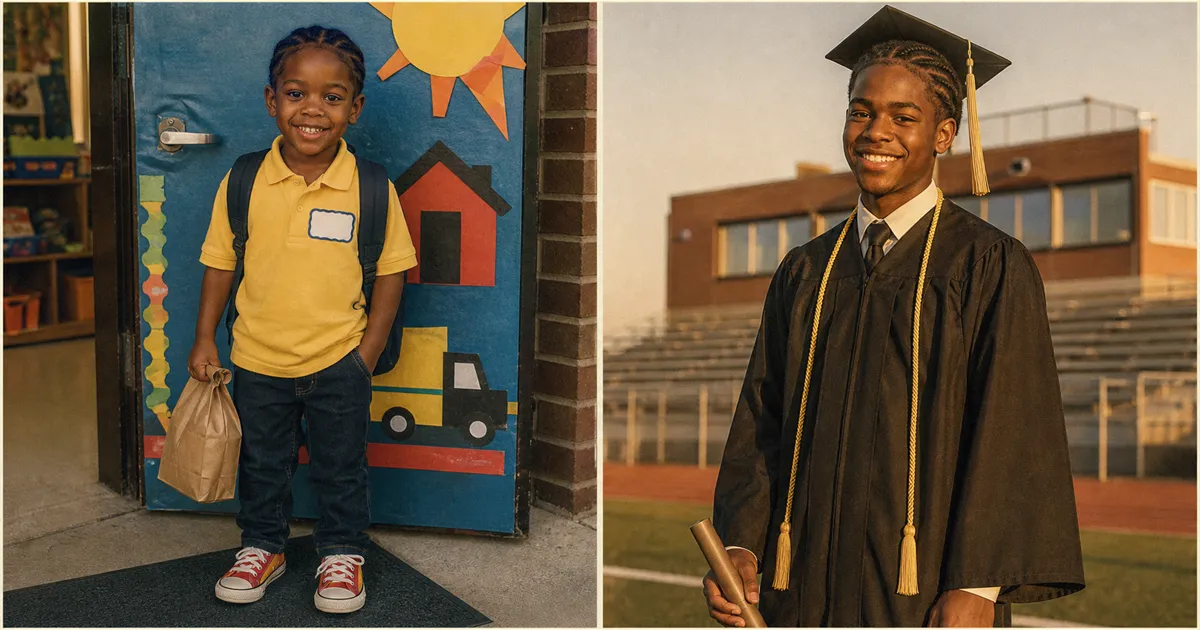
The default. Two panels, the same kid at five and eighteen, the two photos matched into one album spread. {LEFT_ERA_HINT} carries the kindergarten decade and the period-correct styling. {RIGHT_ERA_HINT} carries the graduation year and the standard cap-and-gown regalia. This is the post 80% of parents are trying to make in June. The other two variants are the post 20% of parents wish they had thought of.
Baby-K-12 triptych
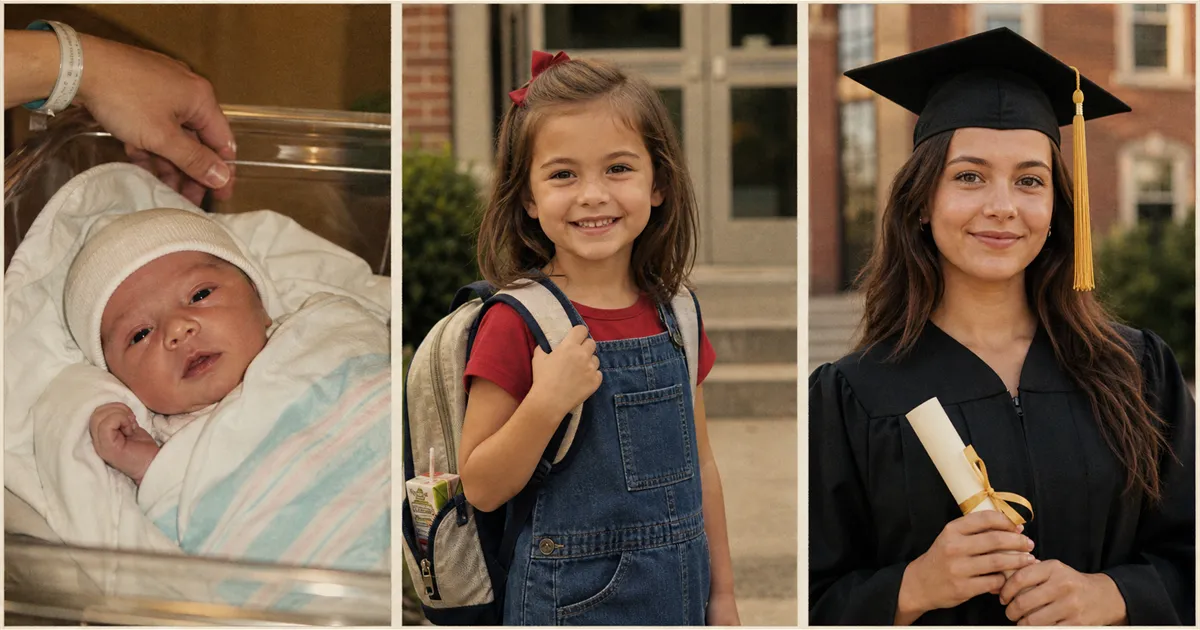
Upload three photos instead of two. Change the opening line of the prompt from “two equal panels” to “three equal vertical panels.” Add a third placeholder, {MIDDLE_ERA_HINT}, for the kindergarten panel, and move {LEFT_ERA_HINT} to the newborn line. The hardest part is finding the newborn photo from 2008 in your camera roll. The match-grade rule pulls all three eras (2008 hospital camera, 2013 phone, 2026 iPhone) into the same warmth, the same grain, and the same paper-print micro-texture. You end up with three pages of one album.
Parent + child generational diptych
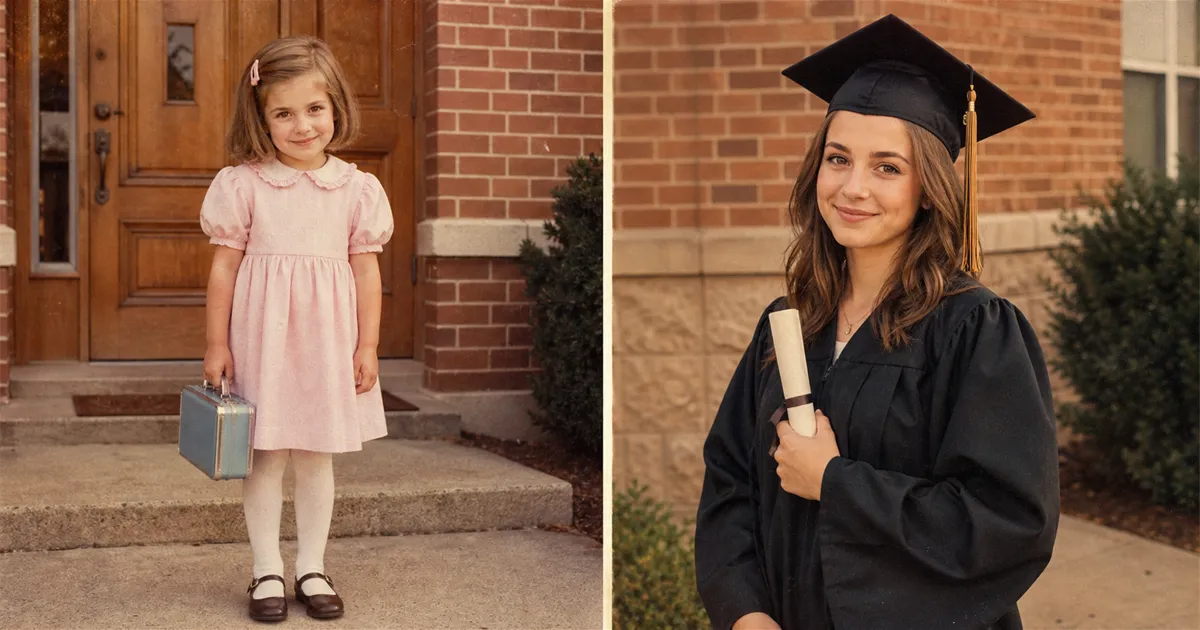
This is the variant that hits hardest at the graduation party. Upload your own kindergarten photo from 1988 or 1995 or 2002 as the left panel. Upload your child’s cap-and-gown photo as the right panel. Change the identity-lock rule from “the same person at two ages” to “visibly related but not identical, same family across two generations, recognizable resemblance in the eye shape, cheekbones, and smile asymmetry.” The match-grade rule stays the same. The two panels still need to look like one family album.
What lands is the resemblance reveal. Your mother’s friends see the diptych and say her name twice. Once for the left panel and once for the right.
Print at 11×14, frame, mantel
The last hour is mechanical.
Download the diptych as PNG, not JPEG. The matched-grain texture between the two panels lives in the gradients, and JPEG compression eats them. Print at 11×14 from Target’s same-day photo service or Walgreens for around $8 to $12, depending on the location. Frame in an 11×14 from Target or Michaels for $20 to $30. Total spend lands under fifty dollars.
Here’s where the $200 you don’t pay an Etsy collage seller actually goes.
| The diptych prompt ($0 with the AI you already have) | The full pack ($19, paste-ready) | Canva DIY ($0, but you’re the designer) | Etsy “milestone collage” seller | |
|---|---|---|---|---|
| Cost | $0 with the AI image tool you already have | $19 one-time for the full pack of 125 prompts | $0 + your Saturday afternoon | $80–$200 per print, mid-band around $120 |
| Turnaround | About an hour, including print pickup | About an hour | 2–5 hours of layout fiddling | 3 days to 2 weeks, depending on seller queue |
| Matched grade between panels | Yes, the prompt’s the entire point | Same prompt, same match | No, unless you know how to grade in Photoshop | Yes, usually (it’s why people pay) |
| Identity locked across panels | Yes, on both faces | Same lock | n/a (Canva can’t change a face) | Yes, by hand |
| Iterations | Unlimited until the album reads as one spread | Unlimited | Unlimited, but each is a re-do | One round of revision, sometimes two |
| Best for | Parents two weeks out from the ceremony with both photos already on their phone | Same job, plus the next 124 family-photo jobs | Parents who already know Canva and only want a layout, not a fix | Parents who want to pay someone else and have three weeks to wait |
| Worst for | Whole-face-missing damage on the kindergarten photo (use a hand retoucher) | Same | Anyone whose two panels disagree at the camera-era level (Canva can’t restore or grade) | Anyone two weeks out from the ceremony who doesn’t have three weeks to wait |
The thing the table doesn’t show is the time gap. The Etsy seller takes three days to two weeks. The diptych prompt takes about an hour. Two weeks out from the ceremony, that gap is the entire decision. A parent two weeks out cannot wait three weeks for a Saturday-morning post.
The diptych on the mantel and the post on the feed come from the same one paste.
FAQ
Q: What if the kindergarten photo is the only print I have and there’s no digital version?
A: A phone snapshot of the print is enough. Lay it on a flat surface in good even light, take a straight-on photo with your phone, and upload that as the left-panel reference. The prompt asks the AI to work from the uploaded photo, not a high-resolution scan. The only failure mode at this step is glare or a steep camera angle, and both are easy to spot in the preview before you paste. If the kindergarten print is heavily damaged (deep creases, missing corner, magenta-burned), the restoration line in the prompt’s left-panel rules handles it; the mechanics are the same as the standalone restoration prompt in our family-photo library.
Q: Can I use this prompt for two siblings or twins, not just one kid?
A: Yes. The prompt locks identity on each uploaded reference photo independently, so a two-sibling diptych works if you upload two separate kindergarten photos and two separate graduation photos, then describe the panel as “the two siblings side by side” in each era hint. The match-grade rule still holds; both panels still need to read as one album. For twins specifically, add a sentence to the identity-lock block that says “preserve the distinguishing features between the two siblings; they are not interchangeable.” Otherwise the AI will average them toward the same face.
Q: Why does the prompt ask me to upload BOTH photos? Can’t the AI just generate the kindergarten side from memory?
A: It can, and it will look like a stranger from 2013. AI image tools have a quiet habit of generating a generic-cute child when asked for “a five-year-old in 2013”; without the actual upload, the face the AI draws is not your kid. The identity-lock rule in the prompt is the whole reason the left and right panels read as the same person at two ages. Both uploads are required. The graduation photo on its own is not enough. The AI can age a face up, but it cannot invent the specific gap-tooth smile your daughter had in kindergarten.
Q: Can I do this prompt before the ceremony, with the cap-and-gown photo I’ll take next week?
A: Wait for the ceremony photo. The match-grade move on the right panel depends on the actual graduation lighting and the actual cap-and-gown drape, not a stand-in. A senior portrait taken at school earlier in the year works fine as a substitute if the ceremony shot won’t be ready in time for the post, but a generic “any teen in any gown” stock image will not. The diptych is identity-locked. The identity has to be there on both sides.
Key Takeaways
- The June side-by-side post fails because the 2013 daycare snap and the 2026 cap-and-gown selfie disagree at the camera-era level. Canva cannot fix that. The fix is at the prompt layer, not the layout layer.
- The AI does two jobs at once. It restores the old photo up. It grades the new photo down. The two panels meet in the middle on the same warmth, the same grain, and the same paper-print micro-texture.
- Identity-lock is the load-bearing rule. The prompt repeats it at the start and at the end, where language models pay the most attention. The five-year-old and the eighteen-year-old must read as the same person with plausible aging.
- One prompt, three variants. Classic K/12 diptych. Baby-K-12 triptych. Parent-and-child generational diptych. Each is a one-line swap in the era hints.
- The cost gap is a quarter of the Etsy collage seller’s quote. $0 in the AI tool you already have or $19 for the full pack of prompts, against $80 to $200 mid-banded around $120 for a hand-Photoshop seller, plus three days to two weeks of waiting. The diptych prompt finishes in an hour.
What the album finally says
The post goes up on Sunday morning. Your mother-in-law screenshots it before noon. The 11×14 sits on the mantel by the time the graduate’s friends arrive for the party.
The diptych is not the point. The album finally agreeing with itself is the point. Two pages, one paper, one kid, thirteen years.
The diptych is one June graduation post. If the graduate is also worth a portrait at the school they’re headed to or just left, the same identity-lock trick puts them in cap and gown at any iconic campus, from the Harvard steps to their own.
For about $19, the full Image Prompt Pack carries this diptych prompt plus 124 more, covering portraits, gifts, listings, and wallpapers, all shipped as one paste-ready library.
The photo your daughter (or son) will look at when she is the one whose own kid is graduating is the one on the mantel.
Footnotes
-
Etsy
then_and_now_graduationmarket: recurring bestseller category across multiple seller formats (digital templates, hand-composited prints, oil-painting-style portraits, framed mantel pieces). Pricing spread across the category runs $25-$200 depending on whether the seller is selling a Canva template, a hand-composited render, or a printed-and-framed final. https://www.etsy.com/market/then_and_now_graduation ↩