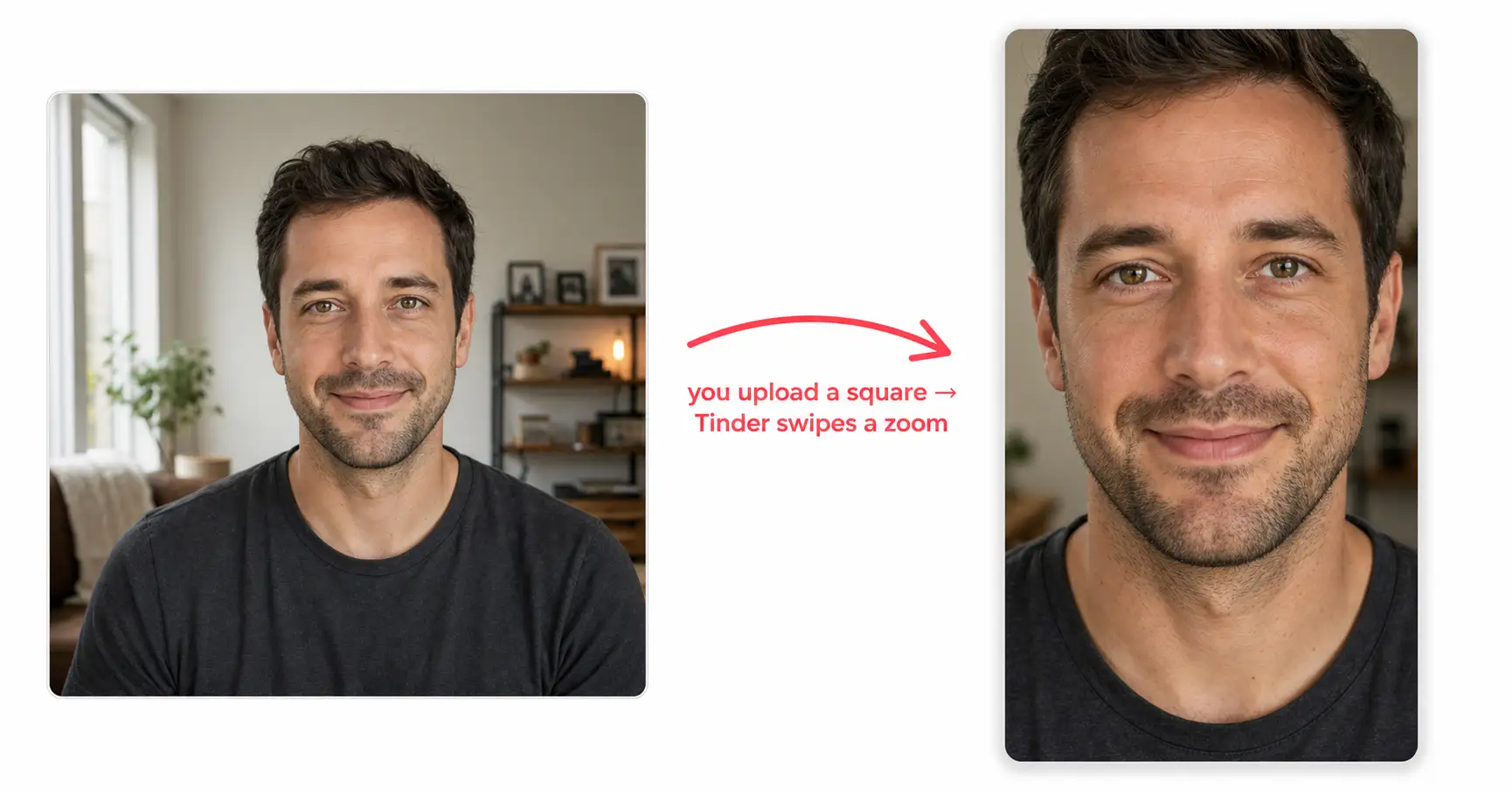
A guy uploads his sharpest selfie to Tinder on a Sunday night. He cropped it to a clean square, face centered, good light. In the upload preview it looks great. Then the swipes go quiet for a week, and he decides it must be his face. It isn’t his face. The photo a swiper sees in the deck is not the photo he approved in the editor, because Tinder zoomed in after he hit save.
What should the first photo on Tinder be? The best photo for Tinder is a solo, eye-level shot where your face is centered in the square and fills no more than about 70 percent of the frame, with headroom above your head and your shoulders in, so that when Tinder zooms into the center of your square for the swipe deck, the zoom lands on a warm, readable face instead of cropping it. That is the whole rule. Everything below is why the zoom happens and how to shoot for it tonight.
The best photo for Tinder isn’t the one you uploaded
Tinder is the dating app that hides a second crop from you. On upload it asks for a 1:1 square. Most people stop thinking about framing there. Then the swipe deck does something you didn’t plan for: it zooms into the center of that square and shows your photo as a tall card, taller than it is wide — closer to the portrait frame Hinge leads with, but reached by a crop you never chose.
Photofeeler, the photo-testing platform whose research blog has run more than ten million peer-rated photo tests, measured the deck card at roughly 600 by 848 pixels, an aspect ratio near 0.7:1. The math is unforgiving. A square cannot become a tall rectangle without losing something, and what it loses is the edges. The top of your head, your shoulders, the room around you: the zoom eats them and pushes your face forward.
So the photo a swiper judges is a tighter slice of the photo you saved. The one you approved in the editor was the square. The one that decides the swipe is the zoom.
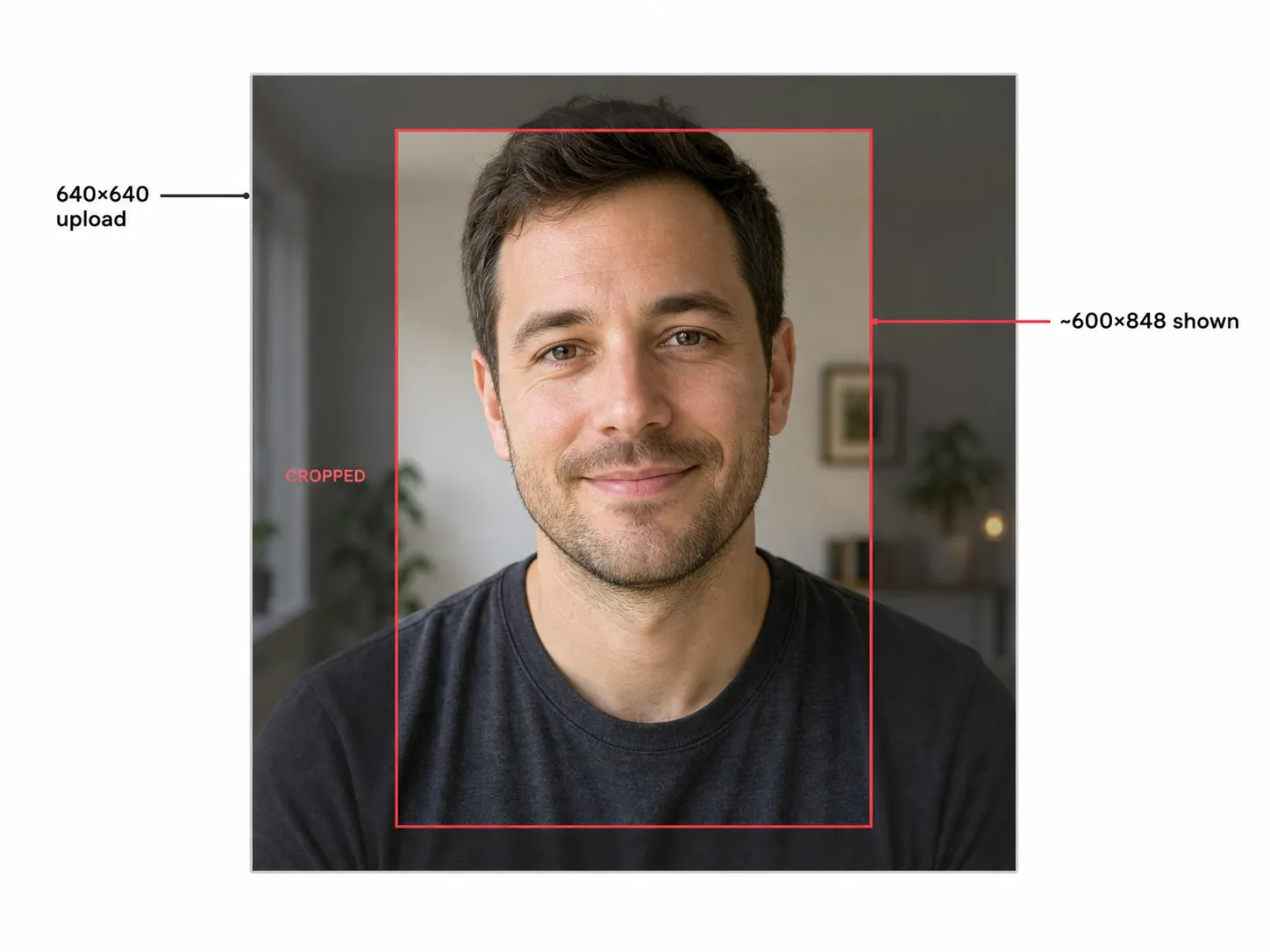
The first fix is not a better face. It is composing for the slice Tinder actually swipes.
The Deck-Zoom Rule
The rule that survives the zoom has one job: leave the zoom somewhere to go. Write it as one passage, because it is one composition decision, not a checklist.
The Deck-Zoom Rule. Center your face in the square so the deck-zoom keeps it. Hold your face to 70 percent of the frame or less, with clear headroom above your head and your shoulders in the shot, because the zoom tightens everything after you upload. A photo that fills the frame in the editor becomes a cropped, claustrophobic close-up in the deck. A photo that leaves room to spare becomes a clean, warm portrait. The room you leave is the room the zoom takes.
Eddie Hernandez, a dating-profile photographer who publishes the platform photo specs for a living, puts the ceiling plainly: if your face takes up 85 to 95 percent of the frame, you are too close, scoot back. Include your shoulders. No floating heads. He is describing the upload, before Tinder zooms in further. Leave the headroom on upload and the zoom lands on your face. Fill the frame on upload and the zoom lands on your forehead.

Center, headroom, shoulders. That is the named primitive, and on Tinder it is the whole game.
A tenth of a second
The zoom decides what the swiper sees. The next thing decides what they feel about it, and it happens faster than most people believe.
In 2006, Princeton psychologists Janine Willis and Alexander Todorov ran a study, published in Psychological Science, on how fast people judge a face. They showed strangers photographs for 100 milliseconds, a tenth of a second, then asked for a verdict on traits like trustworthiness and likeability. The startling result: the snap judgment at 100 milliseconds matched the judgment people made with unlimited time. More looking did not change the verdict. It only made people more confident in the one they had already reached. Of all the traits, trustworthiness was read the fastest.
A swipe is that tenth of a second. The zoomed slice has one beat to read as a person a stranger would trust, and trust is built from the things the tight close-up kills: eye contact, a real smile, an unhidden face. Photofeeler’s testing, across years of peer-rated data, found the lead photo with eye contact and a genuine smile beats the same person in sunglasses or in a group — photos that score higher on trustworthy and authentic out-perform photos that score higher on attractive, and eye contact with no smile is the one combination that actively backfires. OkCupid’s 2010 “4 Big Myths of Profile Pictures” argued the contrarian opposite, but its conclusion did not survive a larger dataset.
So warmth is not a nice-to-have on Tinder. It is the thing the zoom has to deliver in a tenth of a second.
Same face, zoom-wrecked or zoom-safe
The fail and the fix are the same person, the same week, the same camera roll. Only the framing changes.
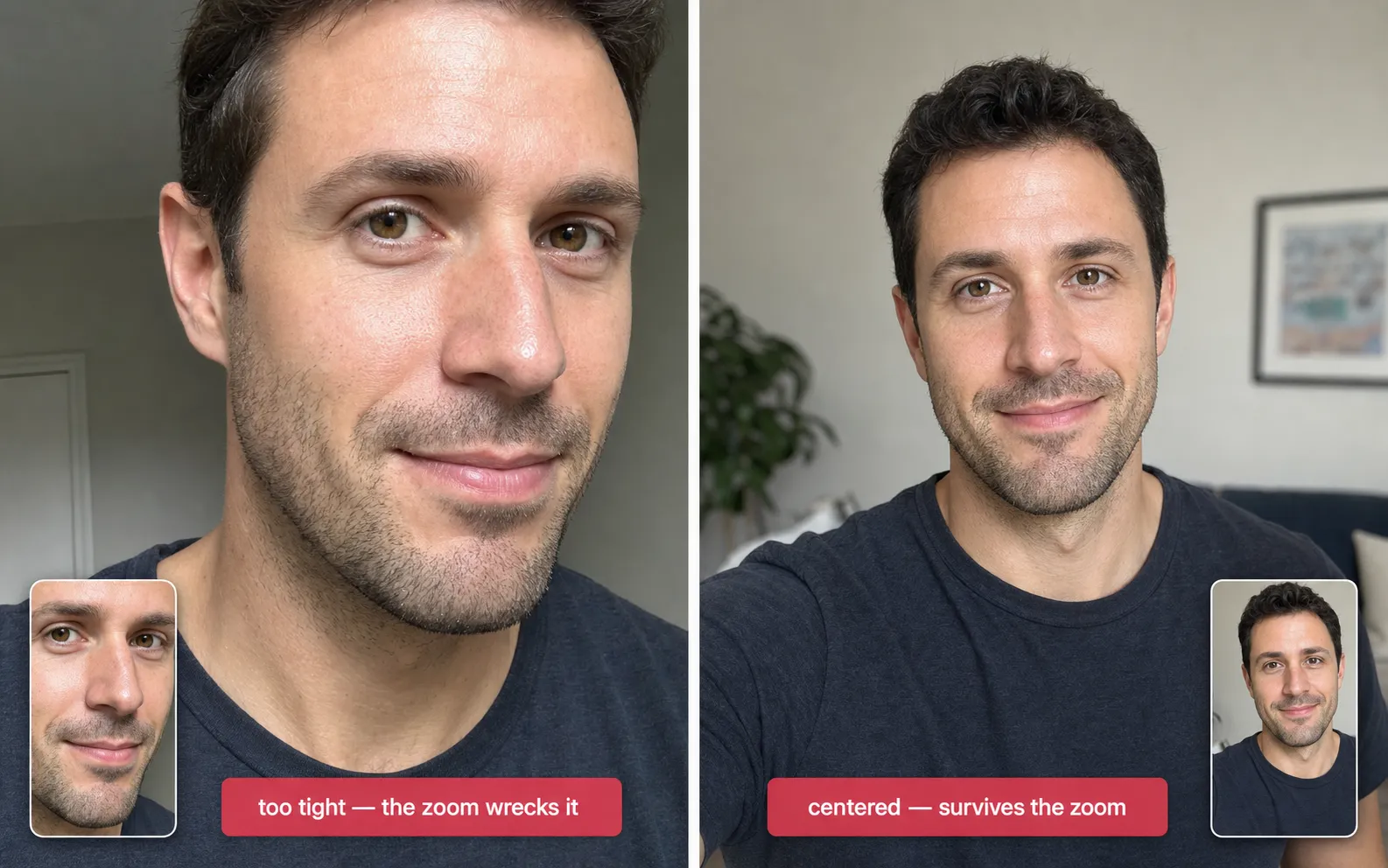
The left photo is what most quiet profiles do: phone at arm’s length, face crammed edge to edge, taken alone in a moment that felt close enough. The zoom takes the little room that was left and the swiper meets a forehead. The right photo left the zoom somewhere to go.
Two paths get you the photo on the right tonight. Path one is the one you already have. Open your camera roll, find the shot where your face is centered with room above your head and your shoulders in the frame, taken at eye level in real light, no sunglasses. Crop it to a square but resist filling that square. Leave the headroom. That is your lead.
Path two is the one most quiet profiles do not have a camera roll for yet: render it. If pasting a prompt is not your thing, Dream Photo Studio does the job from one selfie. Upload a single clear photo of your face and it returns a centered, zoom-safe lead with the framing handled, nothing to paste. The version below is the same job as a prompt, with the Deck-Zoom Rule already baked into the rules block.
Show the full promptTap to expand
Paste this into your AI (ChatGPT, Gemini, or any AI image tool).
REQUIRED upload before pasting: one clear, well-lit, front-facing photo of your face.
The realism rules in the prompt are what keep the result from looking obviously AI.
Generate this image:
A single photoreal 1:1 square dating-profile lead photo of the person in the uploaded reference image, composed so it survives a center-zoom into a 0.7:1 portrait swipe-deck card. Match their bone structure, eyes, nose, lips, proportions, and skin tone exactly so the subject is unmistakably the same person. The face is centered in the square, both horizontally and vertically, and occupies about 60 percent of the frame so a center-zoom still leaves headroom. The subject holds the phone at eye level for a casual selfie feel, not a studio headshot, with a real warm half-smile and direct eye contact, shoulders in the frame. Soft natural window light comes from front-and-slightly-left. The backdrop is a real, softly blurred interior. Skin shows visible pores, fine micro-asymmetry, faint stubble or flyaways, the faintest grain of a phone front camera.
Rules the AI must follow:
- Aspect ratio 1:1 square, locked. The face is centered and occupies 55 to 65 percent of the frame, never more than 70 percent, with clear headroom above the head and shoulders in, so a center-zoom into 0.7:1 lands on the face and not the forehead.
- Identity preservation is the highest-priority constraint: match the uploaded reference photo’s bone structure, eyes, nose, lips, proportions, and skin tone exactly.
- Read as a real phone selfie, not a studio headshot: eye-level angle, soft natural window light, no harsh overhead key.
- Realistic skin texture: visible pores, micro-asymmetry, faint flyaways. No porcelain smoothing, no waxy AI-plastic surface, no beauty filter.
- Solo subject only: no sunglasses, no hat, no second person.
- No text, captions, watermarks, logos, or app UI anywhere in the frame.
- Output one 1:1 square image only. No grid, no variant sheet, no before/after split.
Replace these placeholders with your details:
{CASUAL_TOP}= a plain charcoal tee, OR a soft chambray shirt over a white tee, OR an oatmeal crew sweatshirt{INTERIOR}= a softly blurred living-room corner, OR a quiet home-office wall, OR a sunlit kitchen counter
One paste-ready AI move a week, plus the Independent Brand Visual Kit the moment you join: twelve copy-ready prompts that cover the photo jobs most readers paste next, from this dating lead to a LinkedIn headshot. Subscribe to the newsletter.
Tinder also added an AI Photo Selector in 2024 that digs through your camera roll to surface your strongest real photos. The platform wants the person in the picture to be you, which is exactly what an identity-locked render of your own face delivers.
FAQ
Q: What is the best first photo for Tinder?
A: A solo, eye-level shot where your face is centered in the square and fills no more than about 70 percent of the frame, with headroom above your head and your shoulders in. Tinder zooms into the center of your uploaded square for the swipe deck, so leaving room is what keeps the zoom from cropping your face into a tight close-up. Warmth matters more than a flattering angle, because a swiper reads the face in about a tenth of a second.
Q: Does Tinder crop or zoom your photos?
A: Both. Tinder makes you crop to a 1:1 square on upload, then zooms into the center of that square to fill the taller swipe-deck card, which Photofeeler measured at roughly 600 by 848 pixels. The photo a swiper sees is a tighter, center-zoomed slice of the square you saved, so the edges of your upload, including the top of your head, can disappear. Pre-crop with headroom to keep control of what the zoom keeps.
Q: Should your first Tinder photo be a selfie?
A: Yes, if it follows the Deck-Zoom Rule. A real eye-level selfie in soft natural light, face centered with headroom and shoulders in, outperforms most posed photos in the lead slot. What loses is the arm’s-length selfie that fills the whole frame, because Tinder’s zoom turns it into a cropped floating head. The selfie is not the problem. The edge-to-edge crop is.
Q: How much of the frame should your face take up on Tinder?
A: About 65 percent, and no more than 70 percent. Dating-profile photographer Eddie Hernandez puts the ceiling at 85 to 95 percent being too close, scoot back. That ceiling is for the upload, before Tinder zooms in. Because the deck-zoom tightens the framing further, leaving your face at two-thirds of the square with headroom is what lands a clean portrait instead of a claustrophobic one.
Q: Are AI photos allowed on Tinder?
A: An AI photo of your own face is fine. Tinder’s guidelines forbid catfishing, which means photos of someone who is not you or photos edited to misrepresent how you look. An identity-locked render of your real face, in clothes you wear, in a scene that matches your life, does not cross that line. Tinder’s own 2024 AI Photo Selector exists to surface your strongest real photos, a signal the platform wants the person in the picture to be you.
Key Takeaways
- You upload a square, but Tinder swipes a zoom. The app zooms into the center of your 1:1 upload to fill a taller swipe-deck card near 600 by 848 pixels, so the photo a swiper judges is a tighter slice than the one you saved.
- The Deck-Zoom Rule is the fix: center your face, hold it to 70 percent of the frame or less, leave headroom above your head, keep your shoulders in. The room you leave is the room the zoom takes.
- The swipe verdict lands in about a tenth of a second, the window Princeton’s Willis and Todorov measured for a lasting face impression. Warmth and eye contact win that beat, not a tight close-up.
- If your camera roll has no centered, zoom-safe lead, one selfie renders one tonight on the same face you already have.
The lead photo in your deck right now
Open Tinder and look at your lead, but look at it in the deck, not in the editor. Is your face centered? Is there room above your head? Or has the zoom already cropped you to a forehead and a chin? The square is what you upload. The zoom is what gets swiped. Fix the second one and the same face starts landing.
The Tinder lead-photo prompt, and the rest of the five-photo dating pack it sits inside, lives in the $19 Image Prompt Pack, one of 125 prompts for the photo jobs that come up across a normal year. Or skip the prompt entirely: Dream Photo Studio renders a centered, zoom-safe lead from a single selfie, nothing to paste.