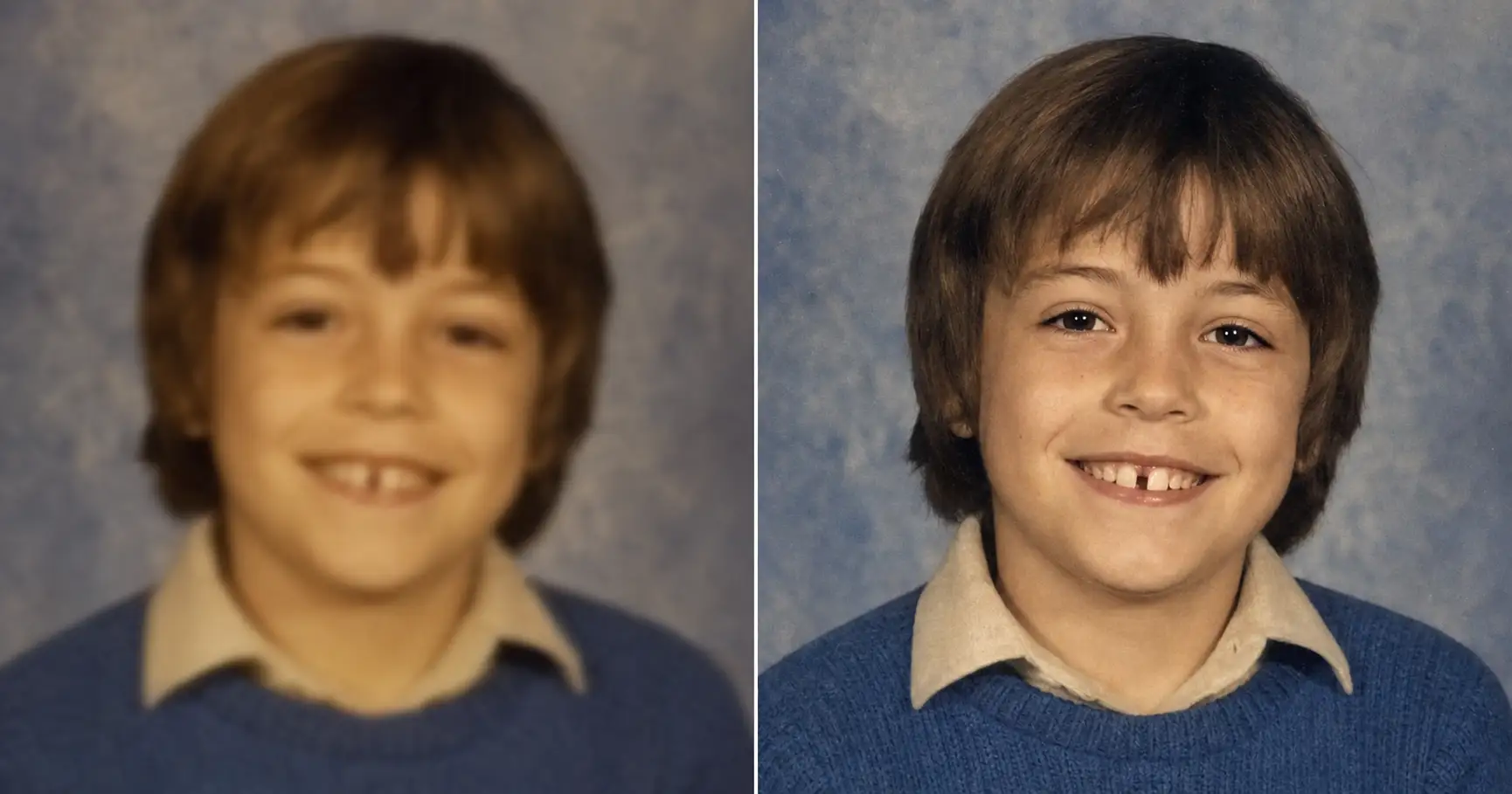
A mother runs her son’s blurry 1983 school photo through a free “enhance” app and gets back a sharp, smiling boy who is not her son. The teeth are too even. The eyelashes are too long. The kid in the result is the right age in the right sweater, and he is a stranger. The reason the next try works is one line in the prompt: reconstruct only the detail that was genuinely there, and never invent. The app guessed. The prompt is forbidden from guessing.
Why every “enhance” app turns a blurry photo into a sharp stranger
A blurry photo is missing detail. An upscaler’s job is to put detail back. The quiet problem is how it does that.
The app does not recover the detail that the blur erased, because that detail is gone. Instead it predicts the detail. It was trained on millions of sharp faces, so when it meets a soft one it fills the gap with the most statistically likely sharp face it knows. Even teeth. Long eyelashes. Smooth, poreless skin. The result is genuinely sharper. It is also genuinely someone else.
The name for that is invented detail, and it is a close cousin of the thing that makes most AI photos look fake in the first place: the model leans on the boring center of its training data and quietly redraws the person into something more generic. On a fresh selfie that drift is annoying. On a blurry photo of your grandfather, it is the entire reason the “fix” doesn’t land. You wanted him in focus. You got a focused stranger.
This is why a one-click “enhance” button tends to come back wrong on the photos you care about most. The tool is doing what it was built to do. It improves the image by guessing. The part you do not want guessed is the face.
Which is why the fix isn’t a sharper upscaler. It’s a rule the upscaler doesn’t have.
What you need before you start
Three things, all of which you already have.
- The blurry photo, exactly as it is. Do not run it through a one-click app first. Pre-sharpening bakes in invented edges that the AI then treats as real. A plain phone snapshot of the soft print, taken in good light, is the right input.
- The prompt below. Paste-and-go. Two placeholders to swap.
- An AI image tool you’ve opened at least once. ChatGPT, Claude, Gemini, or any other tool that accepts a photo upload and returns an image.
The work isn’t in a fancier scanner. It’s in two lines of the prompt.
The prompt: paste, swap two lines, upload
Upload the blurry photo as-is, paste the block below into ChatGPT (or Claude, Gemini, or any AI image tool), and swap the two placeholders for your photo’s era and the kind of blur it has.
Show the full promptTap to expand
Paste this into your AI (ChatGPT, Claude, Gemini, …).
REQUIRED upload before pasting: the original blurry / soft / low-resolution photo, unedited. A plain phone snapshot of the print is fine, and do not pre-sharpen it in another app first.
Swap {ERA_HINT} for your photo’s decade and {BLUR_NOTES} for the kind of blur it has.
Generate this image:
A single photoreal clarified version of the uploaded blurry photograph, returned in the same aspect ratio and composition as the original. Identity preservation is the highest-priority constraint: match every person in the uploaded photo’s bone structure, eyes, nose, lips, proportions, hairline, teeth, and skin tone exactly as they appear under the blur; do not invent new facial features, do not add teeth, eyelashes, freckles, or pores that are not implied by the original, do not modernize anyone’s appearance, do not change anyone’s age. Bring the {ERA_HINT} up to a clear, naturally detailed print by reconstructing only the detail that was genuinely there in the original and is merely obscured by softness, motion, or low resolution; sharpen and upscale the real structure of the image, never hallucinate new content. Address {BLUR_NOTES} specifically. Keep the period correct, with the same hairstyles, clothing, accessories, furniture, and background as the original. Sharpness is brought up to a clear, naturally detailed print, not over-sharpened, not airbrushed, not glossy-modern. Preserve authentic film grain, paper-print micro-texture, and a faint period-correct softness where it existed in the original, so the result reads as a well-focused version of the same old photograph. Where motion blur carries the life of a candid moment, soften it without erasing it. The final image is one clear photo at the same aspect ratio as the original, identity-locked.
Rules the AI must follow:
- Aspect ratio: match the uploaded photo’s original aspect ratio exactly; do not crop, do not re-frame, do not change the composition; stated at the start and the end of this prompt.
- Identity is the highest-priority constraint: every face must remain unmistakably the same person; do not “prettify” anyone, do not adjust noses, jaws, or eye shapes, do not change ages, do not remove glasses, beards, moles, or scars.
- Reconstruct only real detail: sharpen and upscale the structure that is genuinely present under the blur; never invent teeth, eyelashes, pores, hair strands, or background objects that are not implied by the original. If a region is too blurred to recover honestly, leave it softly rendered rather than fabricating crisp detail.
- Realistic film and paper texture required: preserve natural film grain, subtle paper grain, and natural skin micro-texture (visible pores, fine lines, slight asymmetry); no AI-plastic smoothing, no porcelain skin, no airbrushed look.
- Period accuracy: keep hairstyles, clothing styles, fabrics, jewelry, makeup, eyewear, furniture, and background details consistent with the original era; no modern updates.
- Do not colorize a black-and-white photo unless explicitly asked in
{BLUR_NOTES}; keep the original tonal palette. - No text, no captions, no watermarks, no date stamps added; if a date, studio name, or handwriting exists on the original, preserve it exactly as it appears.
- Single image output: one clarified photo, same aspect ratio as the original; no before/after split, no side-by-side comparison, no contact sheet.
- Output the image directly without explaining the prompt back.
- All text in English Latin script if any incidental signage appears.
Replace these placeholders with your details:
{ERA_HINT}= 1980s color school portrait (or pick yours, e.g. “1990s candid party photo”, “1970s outdoor color print”, “1960s black-and-white studio portrait”){BLUR_NOTES}= the whole photo is soft and out of focus, low resolution, faces a little mushy (or describe yours, e.g. “strong sideways motion blur on the face, leave a little motion in the hair”, “tiny low-resolution scan, pixelated and blocky”, “soft-focus and faded, no edge is crisp”)
Bonus tips. To print larger than 8x10, add to {BLUR_NOTES}: “upscale resolution to print-ready quality at 11x14 while keeping authentic grain and softness.” If the AI over-sharpens into a plastic look, regenerate and add: “less sharpening, keep more of the original softness and grain.” And if a face is genuinely too blurred to recover, that is the prompt telling you the truth: the detail is not there to reconstruct. See the “wrong tool” section.
Three things to know about that block before you paste it.
- The upload is required, and unedited. Without the original photograph attached, the AI has nothing to anchor on and will generate a different photo entirely. And the softer the honest version you give it, the more of the result traces back to real detail instead of a guess.
- {ERA_HINT} keeps the period correct. “1980s color school portrait” works. “1970s outdoor color print” works. The hint locks the hairstyles, the clothing, and the film look to the right decade so the AI doesn’t modernize while it sharpens.
- {BLUR_NOTES} tells the AI which kind of blur to undo. “Strong sideways motion blur on the face.” “Tiny low-resolution scan, pixelated and blocky.” “Soft-focus and faded, no edge is crisp.” The more specific the blur, the less the AI improvises.
Those two lines do the work a restoration shop wants $200 for.
Why this prompt doesn’t invent a sharper stranger
The methodology is four rules. Each one does a specific job. Drop any one and the AI sharpens the person into someone else.
- Reconstruct only real detail. This is the rule the one-click apps don’t have. The prompt sharpens and upscales the structure that is genuinely present under the blur, and is forbidden from inventing teeth, eyelashes, pores, hair strands, or background objects that were never captured. If a region is too blurred to recover honestly, the prompt leaves it soft rather than fabricate.
- Identity preservation is the highest-priority constraint. Bone structure, eyes, nose, lips, proportions, hairline, and the real teeth are matched to the upload exactly. Not approximately. Exactly.
- Real film and paper texture is required. Natural film grain, paper grain, and natural skin micro-texture stay. No AI-plastic smoothing, no porcelain skin. Real photographs have pores, and a sharpened photo that lost them reads as fake.
- Period accuracy is locked. Hairstyles, fabrics, eyewear, furniture: all stay in the era of the original. The AI is told not to modernize anyone while it clarifies them.
The shorthand is this. The prompt is allowed to bring the photo into focus, and only into focus. Skip the reconstruct-only rule and the AI invents. Skip the identity rule and it averages. Together, the four rules are what separate sharpened from redrawn.
One paste-ready AI move a week. The kind you can use on a Tuesday or a Sunday. Subscribe to the newsletter.
Three kinds of blur and what to write in {BLUR_NOTES}
Same prompt. Three different blur profiles. The shape of the prompt is the shape of the answer. What changes between them is one line.
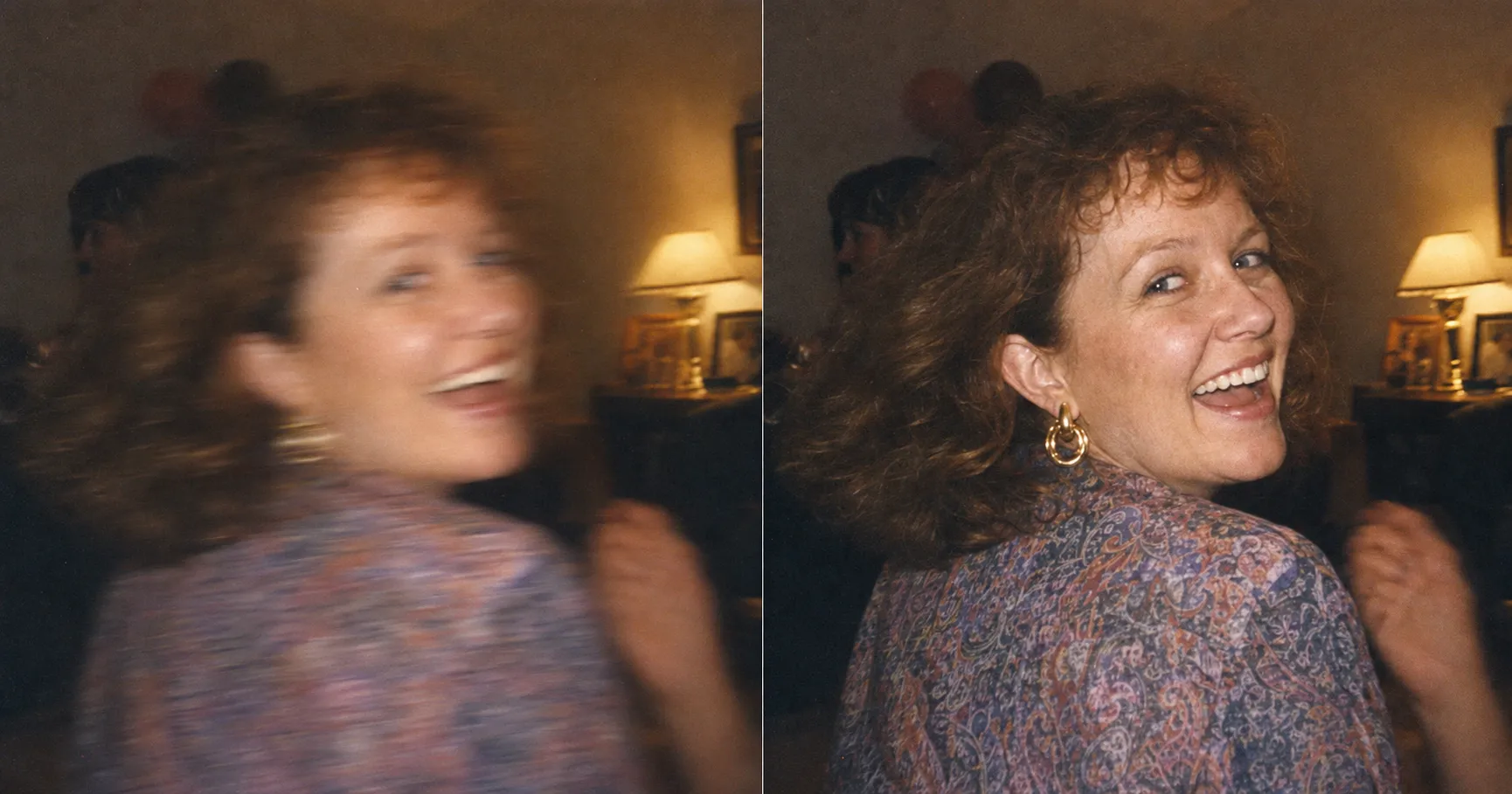
Motion blur
{BLUR_NOTES} = “strong sideways motion blur smearing the face and hair, warm party color, leave a faint trace of motion in the hair and hands.” The point is that motion blur is not always damage. Sometimes it is the proof that she was laughing and turning when the shutter fired. The prompt is told to clarify the face and soften the smear, not to freeze her into a stiff portrait that never happened.
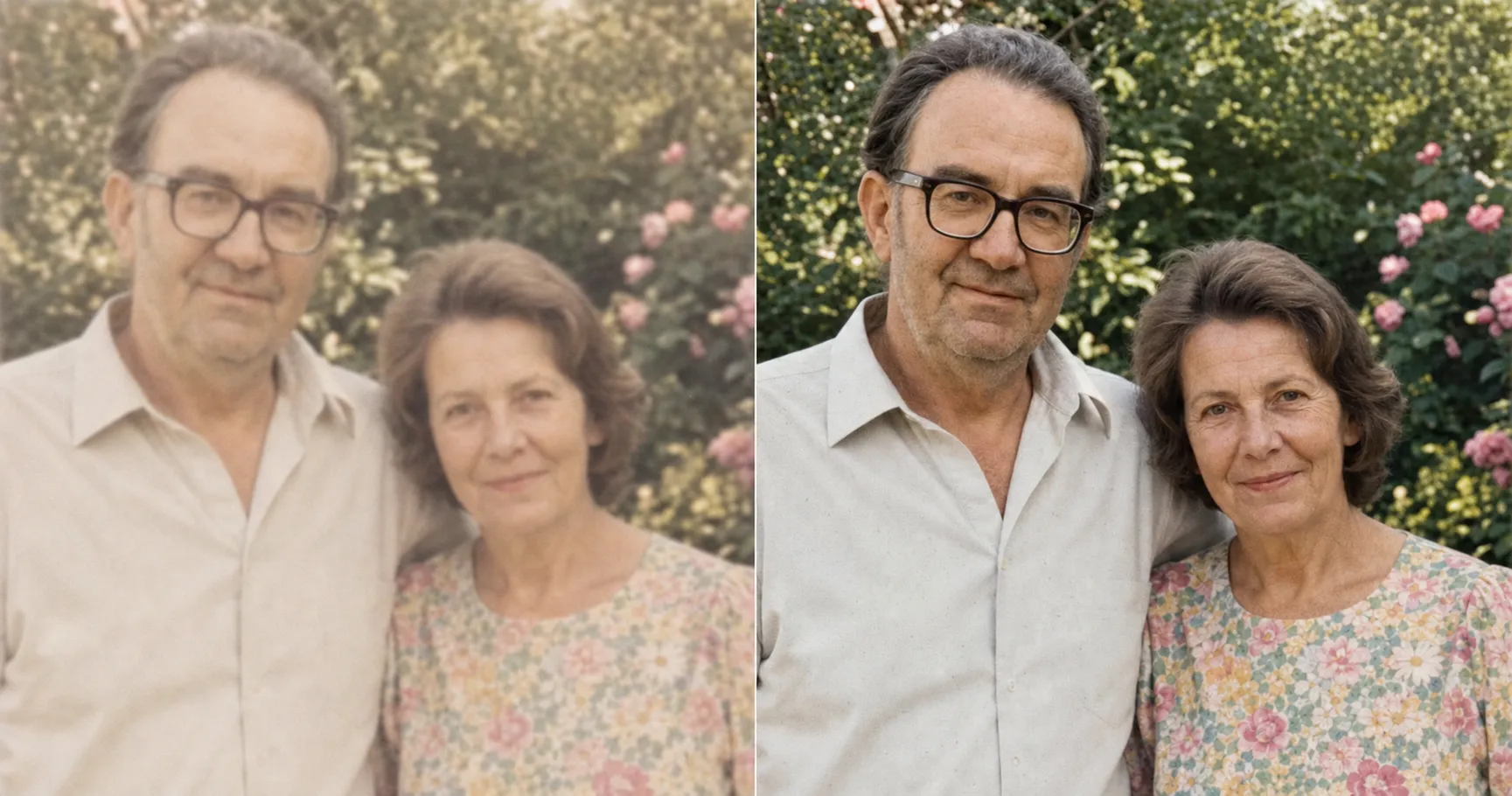
Soft-focus and low-resolution
{BLUR_NOTES} = “the whole photo is soft-focus and low resolution, faded pastel color, no edge is crisp, keep the wrinkles and the man’s stubble exactly.” The note that does the most work is the last clause. Without it, the AI reads soft skin as a target to smooth and quietly erases the very wrinkles that make them look like themselves. The couple on the right is sharper and seventy, not sharper and forty.
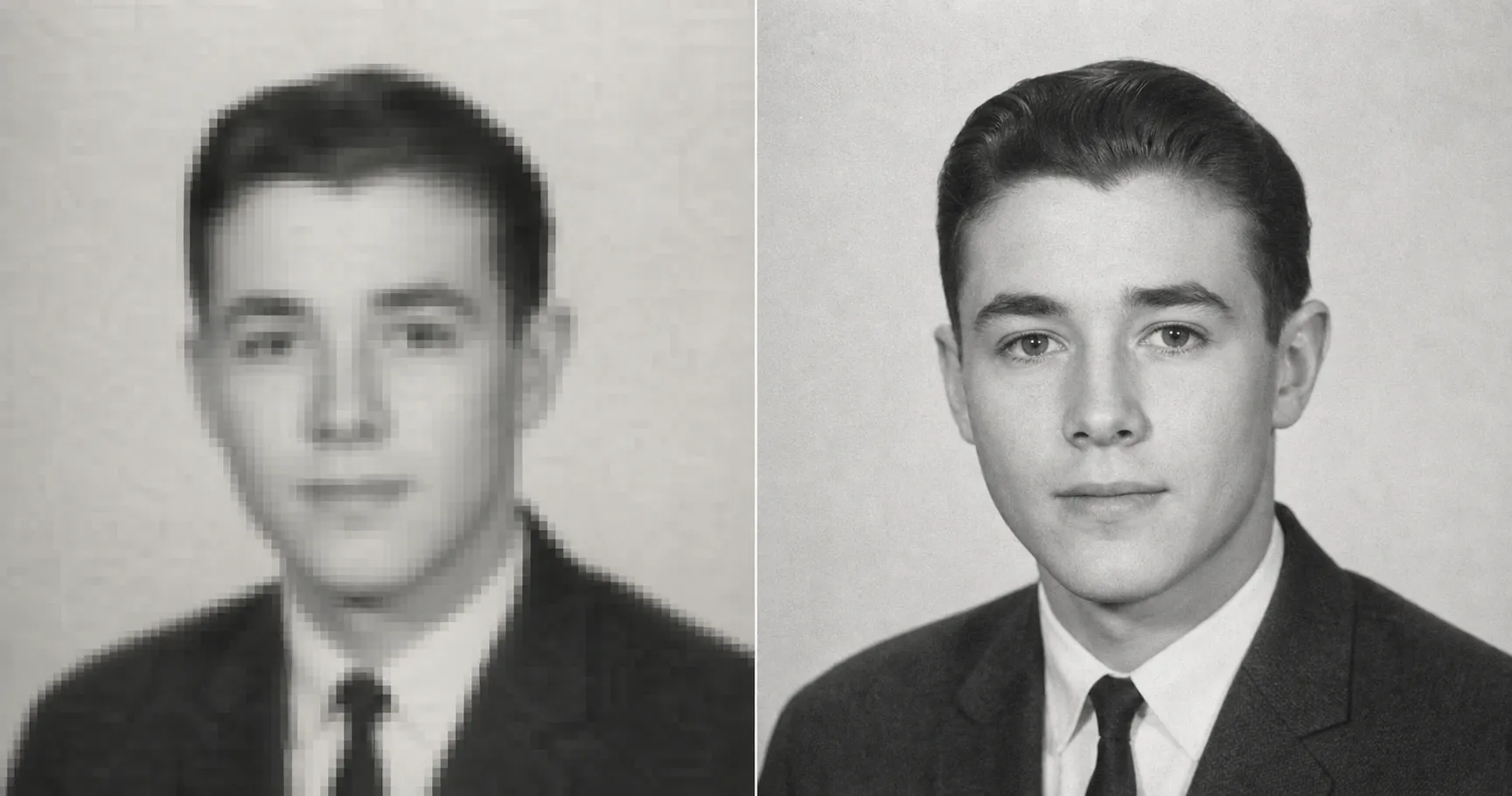
Tiny low-resolution scan
{BLUR_NOTES} = “very small low-resolution scan, pixelated and blocky, slightly out of focus, keep the photo black-and-white.” That last clause matters as much as the resolution one. A low-res black-and-white scan tempts the AI to both invent detail and quietly colorize. The prompt is told to upscale the real structure and leave the photo in pure black-and-white silver-gelatin tones, so you get more pixels of the same man, not a colorized guess at him.
One block. Three swaps. Screenshot the next card and send it to the sibling who has a shoebox of soft prints too.
The cost gap is real. Here is where the $200 you don’t spend goes when you don’t spend it, and why the one-click apps that fill the search results aren’t the cheap option they look like.
| The prompt ($0 if you have ChatGPT) | The pack ($19, paste-ready) | One-click “enhance” app | Local restoration shop | |
|---|---|---|---|---|
| Cost | $0 with the AI image tool you already have | $19 one-time for the full pack of 125 prompts | Free preview, then a monthly subscription to download HD | $50–$300 per photo, mid-band around $200 |
| Turnaround | ~10 minutes | ~10 minutes once you’ve pasted | Seconds, but credits run out | 1–4 weeks |
| Invents fake detail? | No, the prompt forbids it | No, same rule baked in | Often. This is the whole problem: teeth, eyelashes, plastic skin | Depends on the retoucher’s judgment |
| Keeps the real face | Locked by the prompt’s first rule | Same prompt, same lock | The default that changes Grandma’s face | Usually, if the retoucher is good |
| Iterations | Unlimited until the face reads as them | Unlimited | Limited by credits or subscription tier | None. You get what they send. |
| Best for | A soft, motion-blurred, or low-res print where the face is still readable | The same job + 124 other family-photo and gift prompts | A quick low-stakes share where you don’t care about the face | Severe blur where the detail is genuinely gone |
If you’d rather not paste a prompt at all, sharpen it in the Studio from one snapshot, with the reconstruct-only-real-detail and identity locks handled for you. Or if you’d rather paste-and-go on the next old-photo job, the unblur prompt and 124 more like it sit inside the $19 image prompt pack, every one baked with the same reconstruct-only-real-detail and identity-lock rules.
When this prompt is the wrong tool
Honesty saves the spend on a job the prompt was never going to win.
- The face is an unrecoverable smear. If the blur has dissolved a face into a smooth blob with no edges, there is no real structure left to sharpen. The prompt will leave it soft, on purpose, because the alternative is inventing a face that was never captured. That job belongs to a hand retoucher who can reference other photos of the person.
- The photo is tiny and almost featureless. A thumbnail-sized scan with a few dozen pixels across the face cannot be upscaled into a real likeness. More pixels of a guess is still a guess.
- You want it sharp and colorized and reframed all at once. The prompt does one job: clarify the blur while keeping the person real. Stacking three asks at once is how you reintroduce the invention you were trying to avoid. Do them one at a time.
Knowing the line is the same insight as the prompt itself. The AI can only sharpen what was genuinely there. When it wasn’t there, no prompt can honestly put it back.
FAQ
Q: Can an old blurry photo actually be fixed?
A: Yes, with one honest limit. If the photo is soft, motion-blurred, or low-resolution but you can still tell who the person is, the detail is mostly there and merely obscured, and AI can reconstruct it into a clear print. What AI cannot do is recover detail that was never captured. A face blurred into a smooth smear has no structure left to sharpen, and a prompt that respects that will leave it soft rather than invent a new face. The rule of thumb is simple. If you can recognize them, the prompt can sharpen them. If you cannot, neither can the AI, and pretending otherwise is exactly how you get a stranger.
Q: Why does the AI change the face when I try to sharpen a photo?
A: Because the default behavior of an upscaler is to guess. It was trained to produce a sharp image, and when the real detail is missing it fills the gap with the most statistically average sharp face it knows. That means new teeth, new eyelashes, smoothed skin, a modernized jaw. The result is sharp and wrong. This prompt fixes it by making identity preservation the highest-priority constraint and adding one rule the one-click apps do not have: reconstruct only the detail that was genuinely there, and never invent. The AI is allowed to bring the photo into focus. It is not allowed to redraw the person.
Q: How do I unblur an old photo for free?
A: Use an AI image tool you already have an account on. ChatGPT, Claude, and Gemini all accept a photo upload and return an image, and the prompt in this article is tool-agnostic, so whichever one you already use is fine. You upload the blurry photo as it is, paste the prompt, swap two lines for your era and the kind of blur, and generate. There is no app to install and no subscription to start. If your particular tool throttles image generation on the free tier, the workaround is patience, not a new monthly plan.
Q: Can I enhance an old photo to HD and print it large?
A: Usually, yes. Most AI image tools return a clarified photo that prints cleanly at 5x7 or 8x10, around 1,500 by 2,100 pixels at 300 dpi, which is the standard for photo-quality printing. The catch specific to blurry sources is that resolution and real detail are not the same thing. The prompt can upscale the pixel count, but it will only reconstruct detail that was genuinely there. To go larger than 8x10, add a line to your blur notes asking for print-ready quality at 11x14 while keeping authentic grain and softness.
Q: Should I sharpen the photo in another app first, then use the prompt?
A: No. Pre-sharpening in a one-click app bakes in invented detail and crunchy edges that the AI then treats as real, and you end up reconstructing on top of a guess. Upload the original blurry photo exactly as it is, even straight from a phone snapshot of the print. The prompt works best on the softest honest version of the image, because then every piece of detail it reconstructs traces back to something that was actually in the photograph.
Q: Is it different from restoring a torn or faded photo?
A: It overlaps, but blur has its own trap. A torn or faded photo is missing color or a chunk of the print, and the repair is reconstruction of a clearly damaged area. A blurry photo looks complete but is missing sharpness, which tempts the AI to invent fine detail everywhere at once. That is why the unblur prompt leans so hard on the reconstruct-only-real rule. If your photo is also torn, stained, or faded, the all-purpose restore prompt in the main guide handles those, and you can describe the blur in the same paste.
Key Takeaways
- A blurry photo isn’t missing resolution so much as it is tempting the AI to invent. One-click “enhance” apps sharpen by guessing, so they add teeth, eyelashes, and plastic skin that were never in the original. The failure has a name. Invented detail.
- The fix is a rule, not a sharper app. The load-bearing line is reconstruct only the detail that was genuinely there, never invent, paired with identity preservation as the highest-priority constraint.
- Same prompt handles three different blur profiles: motion blur, soft-focus low-resolution, and a tiny pixelated scan. One line in
{BLUR_NOTES}swaps between them, and the shape of the prompt stays the shape of the answer. - The cost gap is a fraction of the alternatives: $0 in the tool you already have or $19 for the full pack of prompts, versus a monthly upscaler subscription, versus $50–$300 mid-banded at $200 for a restoration shop. The honesty gap is a face that’s clear and still theirs, versus a face that’s clear and someone else’s.
What’s the soft photo in your shoebox?
There is usually one. The school photo that came out soft. The candid where everyone moved. The wallet-sized scan you can barely make out. Find that one, upload it unedited, and run it through the pack of prompts built on the same reconstruct-only-real rule. The question the prompt keeps asking is the only one worth asking yourself first: is this still them, or is the AI just guessing? Keep regenerating until the answer is them.