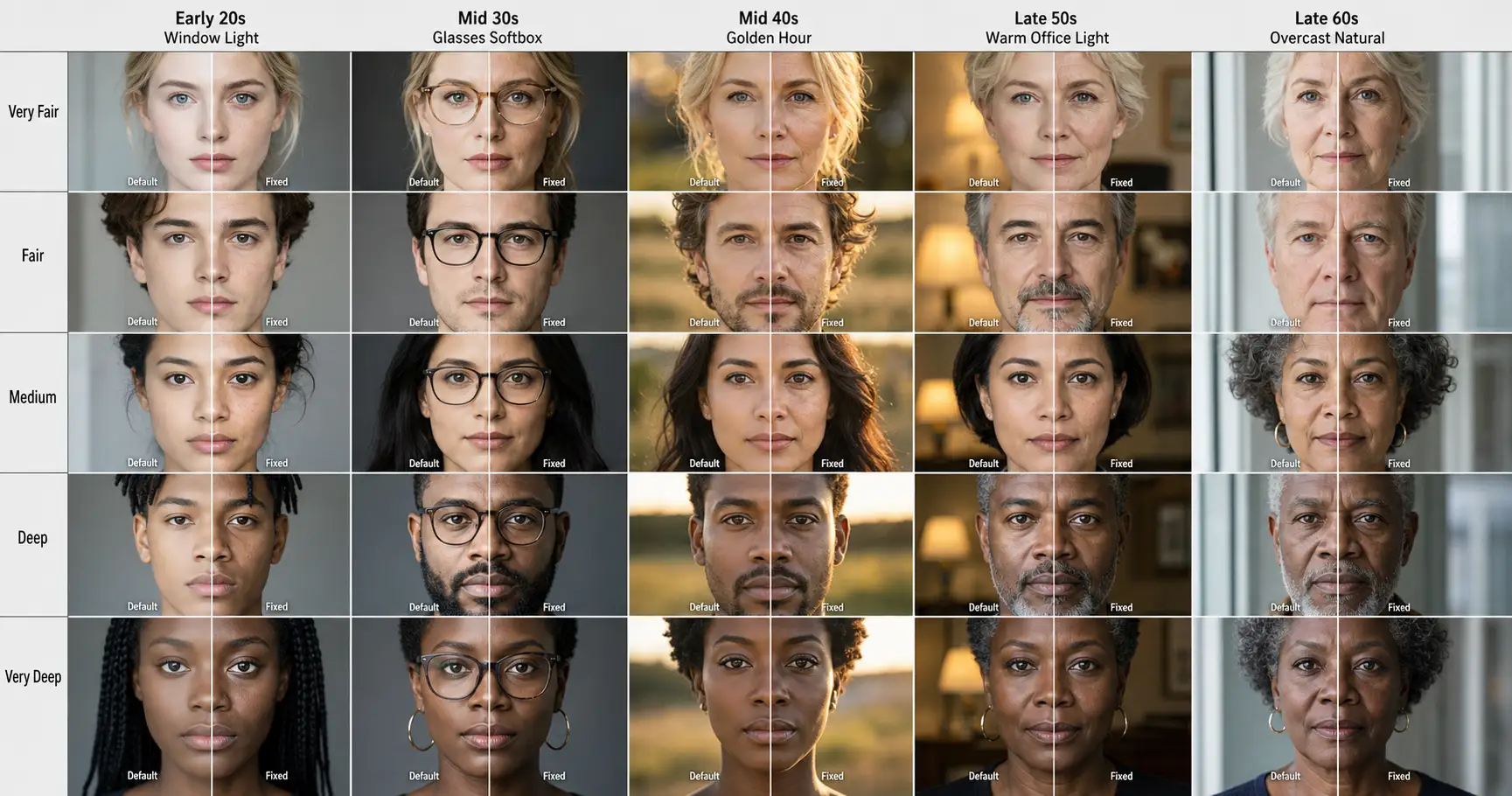
You generated the AI portrait. You stared at it. The skin is too smooth. The cheeks have no pores. The face is symmetric in a way no human face has ever been. It looks like a wax figure that figured out lighting. You typed in the same prompt your friend used, on the same tool, and somehow yours came back looking like a silicone doll auditioning for a Madame Tussauds reboot. This is AI plastic, the most cited fake-look failure mode of AI portraits in 2026, and the fix is three words long.
Why every AI portrait in 2026 starts as a wax figure
Here is a thing nobody tells you when you start generating AI portraits. There is no “good” AI image tool you can switch to that gets skin right out of the box. There is no premium tier where the wax figure goes away. Every leading model in 2026 returns the same fake skin by default, because they were all trained on roughly the same kind of data and they all learned the same lesson from it: skin should look smooth.
The 2026 lineup at the top of the leaderboard is four models. OpenAI shipped GPT-Image-2 earlier this year. It is currently the top-ranked image model on the LMArena image leaderboard, and the one most readers will recognize because it sits inside ChatGPT. Google followed with Nano Banana Pro, the consumer-facing name for Gemini 3 Pro Image from Google DeepMind. Midjourney pushed v8.1 at the end of April. Black Forest Labs holds the photorealism corner with Flux 2 Pro. Four labs, four roadmaps, four different teams pretending they have nothing in common.
Run the same naive portrait prompt across all four. You get four versions of the same wax figure. Smooth where the cheek should have texture. Symmetric where the face should be asymmetric. Lit from a flat front so there is nowhere for the bone structure to live. The thing you notice in your gut, the part that goes “this is AI,” is happening four times in a row, across four labs that wouldn’t agree on what day it is.
So name it. AI plastic is the named failure mode. Porcelain skin default is the structural pattern underneath it: what every major model returns when no skin-texture language is supplied. Once you can name them, you can fight back.
Where the porcelain default actually comes from
The reason every model has the same default is not because they share an architecture. They don’t. The reason is they share a kind of data.
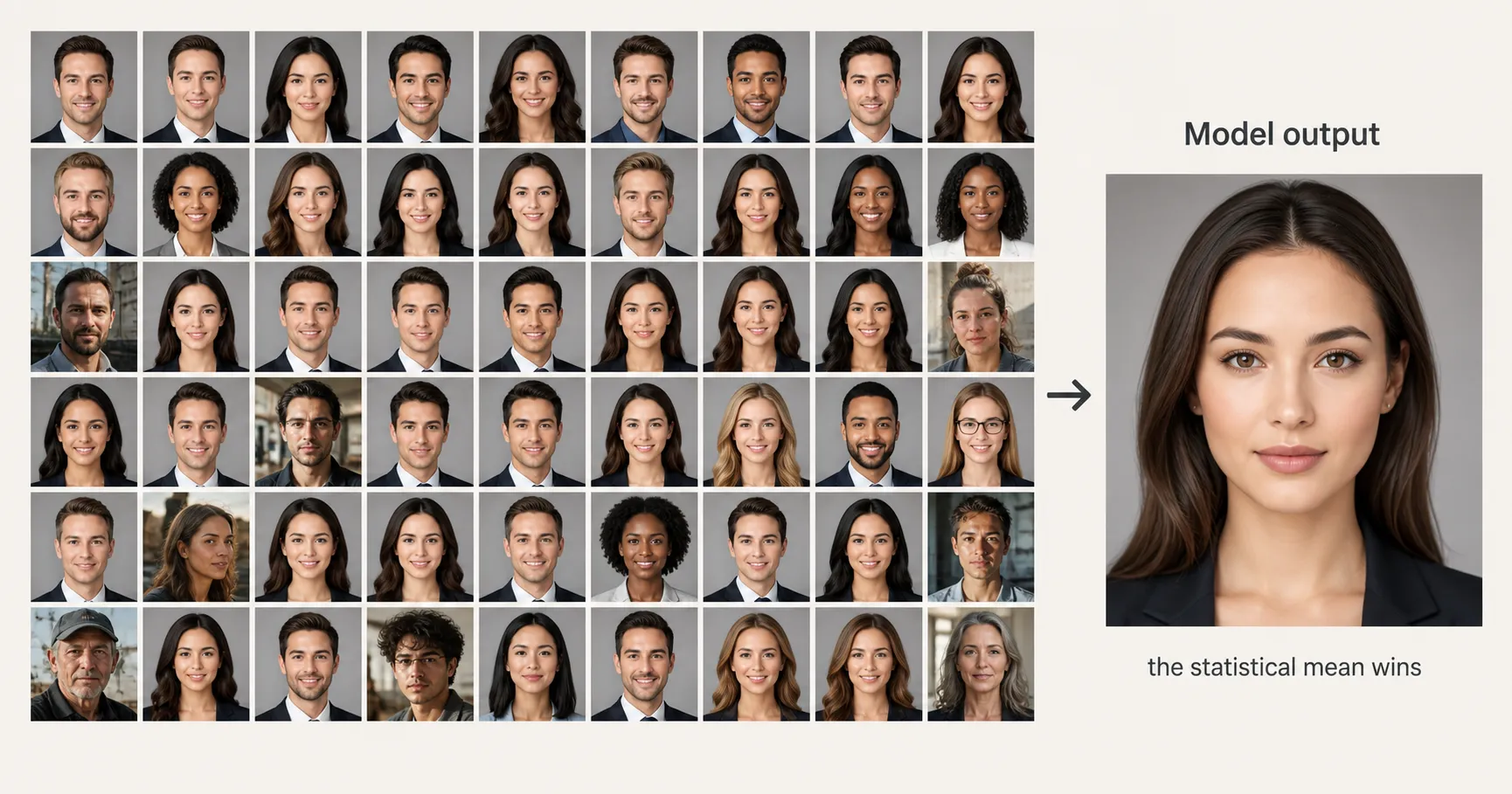
Every image model is, at heart, an averaging machine. It takes the distribution of labeled images you trained it on and produces, when you ask for a face, something close to the statistical mean of all the faces it has seen. The trick is that the labeled face data that ended up in those training distributions was not a random sample of human faces. It was, overwhelmingly, the kind of photography that already had a budget behind it: editorial stock portraits, advertising headshots, magazine covers, agency reels. Categories where airbrushing had already won the editorial battle a full decade before the model existed.
Stock photography platforms were already operating in a retouched-by-default regime by the early 2020s. A photographer uploads a portrait, the platform’s house style nudges them toward retouched skin, the buyer prefers retouched skin because retouched skin sells, and the resulting library of “what a portrait looks like” gets uploaded back into the public pool. By the time AI labs scraped that pool, the pores were already gone. The model never had a fair fight.
So when the prompt says “portrait of a person” with no other texture language, the model returns the averaged mean of that distribution. Which is poreless. Which is symmetric. Which looks like a wax figure that figured out lighting. The fingerprint is structural: same data shape across labs, same default skin across models. Across our 125 production prompts in 2026 we tested this on every major model, and the porcelain default was identical in shape on all four. The fix isn’t to switch models. It’s to give whatever model you have a target specific enough that the mean stops winning.
The three-word phrase that overrides it on every model
The fix is the micro-imperfection trio: visible pores, micro-asymmetry, film grain. Three phrases, written as a literal substring inside the prompt body, on whichever model you happen to be using.
The three terms work together as a unit. Visible pores fixes the surface. It gives the model a texture target at the macro level, which forces it to render skin as a thing made of follicles instead of a thing made of smoothing. Micro-asymmetry fixes the doll-face fingerprint. It pulls one eye slightly higher, one corner of the mouth a few millimeters above the other, one eyebrow with a slightly different arch, all the small unevennesses that distinguish a face from a mask. Film grain breaks the digital glossiness across the whole frame. It overlays the subtle photographic noise that real cameras produce and that synthetic rendering does not.
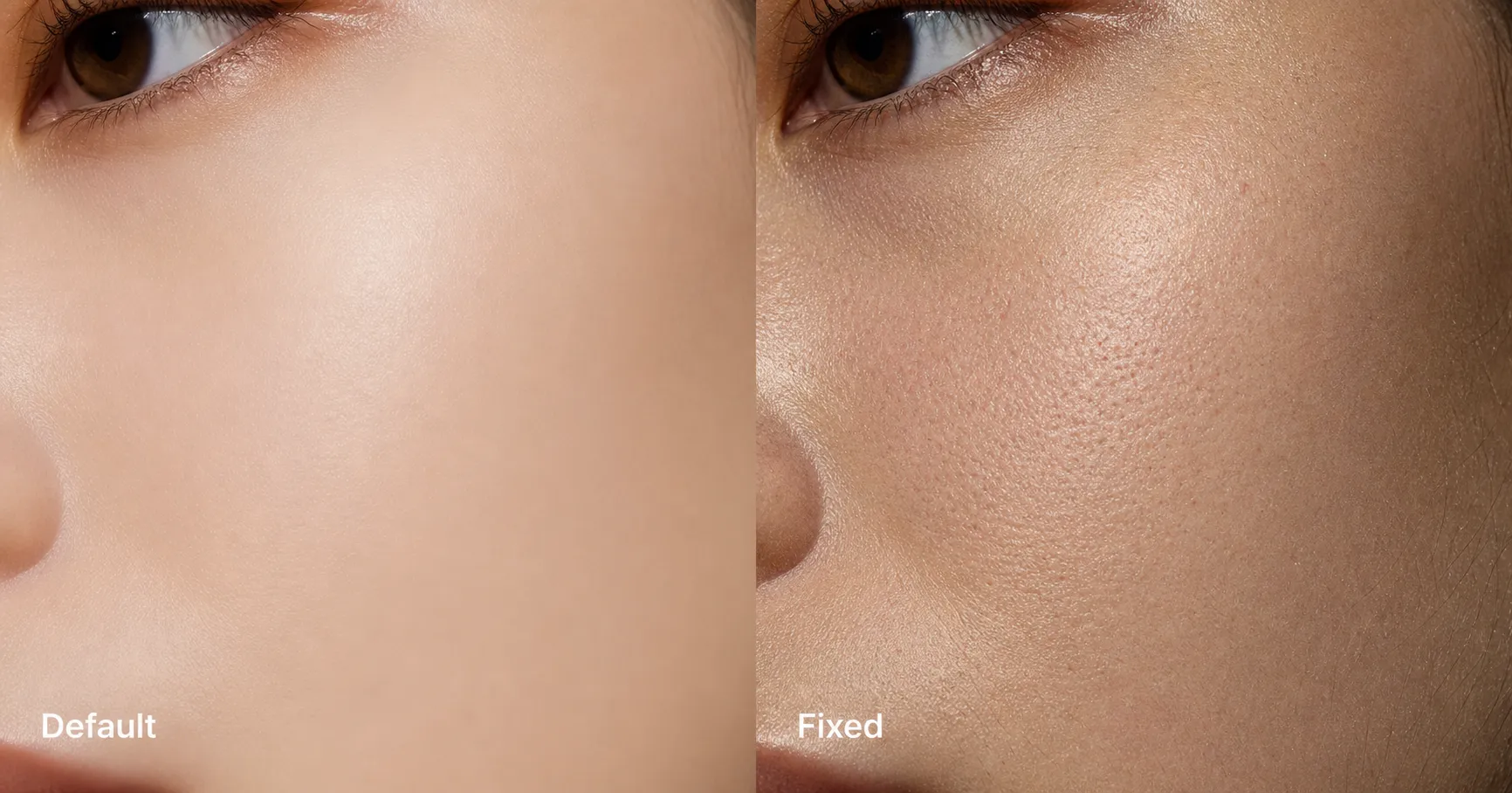
Drop any one of the three and the porcelain default reasserts itself. Visible pores alone gives you a textured face that is still doll-symmetric. Micro-asymmetry alone gives you a slightly uneven wax figure. Film grain alone gives you a sharp poreless face with photographic noise overlaid on top, which is somehow even more uncanny. The phrase has to be all three.
Below is the paste-ready version. Drop it at the end of any portrait prompt body, on any leading 2026 model, and the silicone-doll problem goes away inside one generation.
Show the full promptTap to expand
Paste this anti-plastic snippet into the end of any portrait prompt body, on any 2026 image model (GPT-Image-2, Nano Banana Pro, Midjourney v8.1, Flux 2 Pro).
REQUIRED upload before pasting: one clear front-facing photo of the person whose portrait you want generated.
The three load-bearing phrases are the micro-imperfection trio: visible pores, micro-asymmetry, and film grain. Keep all three together. The trio works as a unit.
Generate this image:
A photoreal editorial portrait of {SUBJECT}, shot on 35mm film, with visible pores in close detail, micro-asymmetry across the face (one eye slightly higher, one corner of the mouth a few millimeters above the other, one eyebrow with a slightly different arch), subtle film grain across the whole frame, natural asymmetric skin tone variation, soft directional natural light from upper-left at 45 degrees with a real shadow falloff on the shadow side, one or two stray hairs out of place. Aspect ratio 1200x1500, vertical portrait.
Rules the AI must follow:
- Aspect ratio: 1200x1500, strict, locked at start and end
- Realistic imperfection required: visible pores, micro-asymmetry, film grain are all mandatory
- No porcelain smoothing, no AI-default flat lighting, no symmetric doll-smooth rendering
- Single image output, no moodboard or contact sheet
- Output the image directly without explaining the prompt back
- All text in English Latin script
- Identity preservation is the highest-priority constraint
Replace these placeholders with your details:
{SUBJECT}= a 38-year-old woman with shoulder-length brown hair, wearing a charcoal blazer over a crisp white open-collar shirt
Bonus tips. Print or screen close-ups (anything zoomed past about 600 px wide) need the trio plus a directional light tag and a tighter aperture in the prose body. Write “macro detail, 85mm at f/4, directional 45-degree key light” alongside the trio. If the face drifts across regenerations, the failure is not skin. It is identity drift, and the fix is the Identity-Lock structure, not more skin language.
Two notes that come up immediately. First, write the trio in plain English, not as a JSON object, not as a bullet list, not as a “negative prompt” appendix. The model attends to the prose body, and the trio belongs in the prose body alongside whatever subject you’re rendering. Second, write it as one of the first language anchors after identity. Per the eight ironclad prompt rules from our 125-prompt build, real material and micro-imperfection always written explicitly is the primary defense against AI-plastic output. Sequence it in the prose body next to your subject, not buried at the end.
One phrase, four models: the comparison strip
The test that matters is whether the trio survives a model swap. Same identity, same default prompt across GPT-Image-2, Nano Banana Pro, Midjourney v8.1, and Flux 2 Pro: four wax figures. Same identity, same fix prompt with the trio added across all four: four photoreal faces with visible pores.
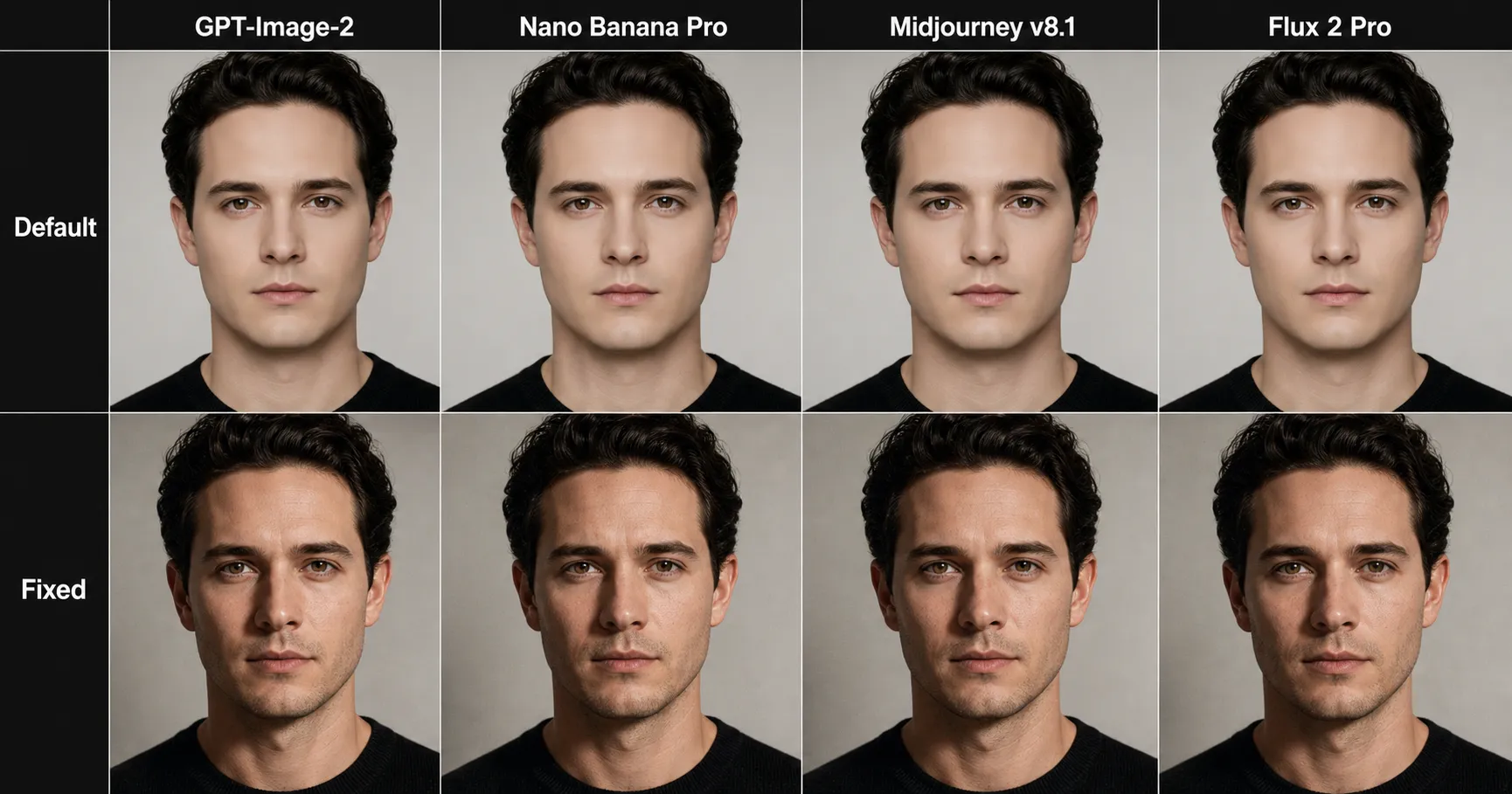
The trio works across models because it doesn’t argue with any one model’s quirks. It argues with the training distribution every model inherits. GPT-Image-2 ships from a different lab than Flux 2 Pro and runs on a different architecture than Midjourney v8.1, but all four ate roughly the same diet of airbrushed editorial stock. Same diet, same default. Same fix language, same override.
A compact text version of the same result, in case you’re skimming for the LLM-extractor-friendly form:
| Model (2026) | Default skin output | Output after the micro-imperfection trio |
|---|---|---|
| GPT-Image-2 | Porcelain, poreless, airbrushed | Visible pores, micro-asymmetry, film grain |
| Nano Banana Pro (Gemini 3 Pro Image) | Porcelain, poreless, airbrushed | Visible pores, micro-asymmetry, film grain |
| Midjourney v8.1 | Porcelain, poreless, airbrushed | Visible pores, micro-asymmetry, film grain |
| Flux 2 Pro | Porcelain, poreless, airbrushed | Visible pores, micro-asymmetry, film grain |
What the table doesn’t show is the per-model failure-rate percentages. Those live in our upcoming model benchmark, not this article. Here the claim is qualitative and universal: the trio worked on all four. For the benchmark numbers across the five named failure modes, see the comparison piece linked below.
When the trio isn’t enough: what to combine it with
The trio fixes skin texture. It does not fix two related failure modes that look like skin problems but aren’t.
The first is identity drift. You apply the trio, the skin looks right, but across three regenerations the face slowly stops looking like the person you started with. That’s not a skin problem. That’s the model’s identity-anchor washing out across the prompt’s middle tokens, and the fix is structural. Open the prompt with identity-lock language before any transformation phrases, close it with identity restated, sandwich the rest. For the four-line prompt structure that operationalizes this across every transformation, see the spoke on the Identity-Lock technique, which sits inside the same AI image quality cluster as this article.
The second is macro close-ups. The trio is calibrated for editorial portrait scale, where the head occupies roughly 1/7 of the frame. Print shops and retouchers who blow images up past 600 pixels wide for skin-level zoom need the trio plus a directional light tag and a tighter aperture in the prose body: “macro detail, 85mm at f/4, directional 45-degree key light, real shadow falloff.” Same skin-texture floor, more lighting and depth-of-field information on top.
If you want the full taxonomy of the other failure modes that hide under “this looks plastic” but are actually their own named bugs (aspect-bleed, prompt-leakage, AI-default symmetry, rendered lighting), the 12 failure modes of AI image generation is the encyclopedia, and the plastic-skin entry there cross-references back here for the long-form mechanism.
The micro-imperfection trio is the floor. Identity-Lock is the next lever when the floor isn’t enough. Directional light at named focal length is the lever after that. Stack them in the order the failure shows up.
FAQ
Q: Why does AI skin look so smooth?
A: Because the training distribution every leading image model was averaged across was dominated by airbrushed editorial stock portraits. Retouching had already wiped pores off most labeled face data before the model ever saw it, so the model’s statistical mean for skin is poreless by default. The fix is to give the model concrete texture targets in the prompt body so the language overrides the mean.
Q: Does the micro-imperfection trio work on every AI image model?
A: Yes, across the four leading 2026 models we tested (GPT-Image-2, Nano Banana Pro, Midjourney v8.1, Flux 2 Pro), the same three phrases written into the prompt body produced visible-pore output on all four. The trio targets the training distribution, not any one model’s quirks, which is why it survives a model swap.
Q: What is the three-word phrase that fixes AI plastic skin?
A: Visible pores, micro-asymmetry, film grain. Written as a literal substring inside the prompt body. The three terms work together: pores fix the surface, micro-asymmetry fixes the doll-face fingerprint, and film grain breaks the digital glossiness across the whole frame. Drop any one and the porcelain default reasserts itself.
Q: Why does AI plastic skin happen on every model?
A: Because porcelain skin default is not a per-model bug. Every leading model was trained on a labeled face distribution where airbrushed stock portraits dominated. When the prompt does not fight back with explicit texture language, the model returns the averaged mean of that distribution, which is poreless and symmetric. Same root cause means same fix across models.
Q: Can I just ask the AI for realistic skin?
A: Asking for good skin, smooth skin, beautiful face, or realistic skin makes the problem worse. Those phrases sit close to the same airbrushed cluster in the model’s training distribution and pull the output further toward porcelain. The override has to be specific and concrete: name the pores, name the asymmetry, name the film grain.
Key Takeaways
- AI plastic is the named failure mode. Porcelain skin default is the structural cause. Once you can name them, you can fix them.
- The micro-imperfection trio (visible pores, micro-asymmetry, film grain) is the three-word phrase that overrides the default. It belongs in the prose body, written as plain English, sequenced near identity.
- The trio survives a model swap. Across GPT-Image-2, Nano Banana Pro, Midjourney v8.1, and Flux 2 Pro in 2026, the same three phrases produced visible-pore output on all four.
- The trio fixes skin texture. It does not fix identity drift or macro close-ups; those need Identity-Lock and directional light, layered on top.
Close
You don’t need a better model. You don’t need a paid tool. You need a phrase. Visible pores. Micro-asymmetry. Film grain. Paste it in. Stop staring at your wax figure.
The same trio sits inside every portrait prompt in our 125-prompt image pack, which is where the AI plastic skin fix and the rest of the anti-plastic methodology come pre-baked, so you can skip the manual rewrite step on whichever portrait you’re trying to ship next.