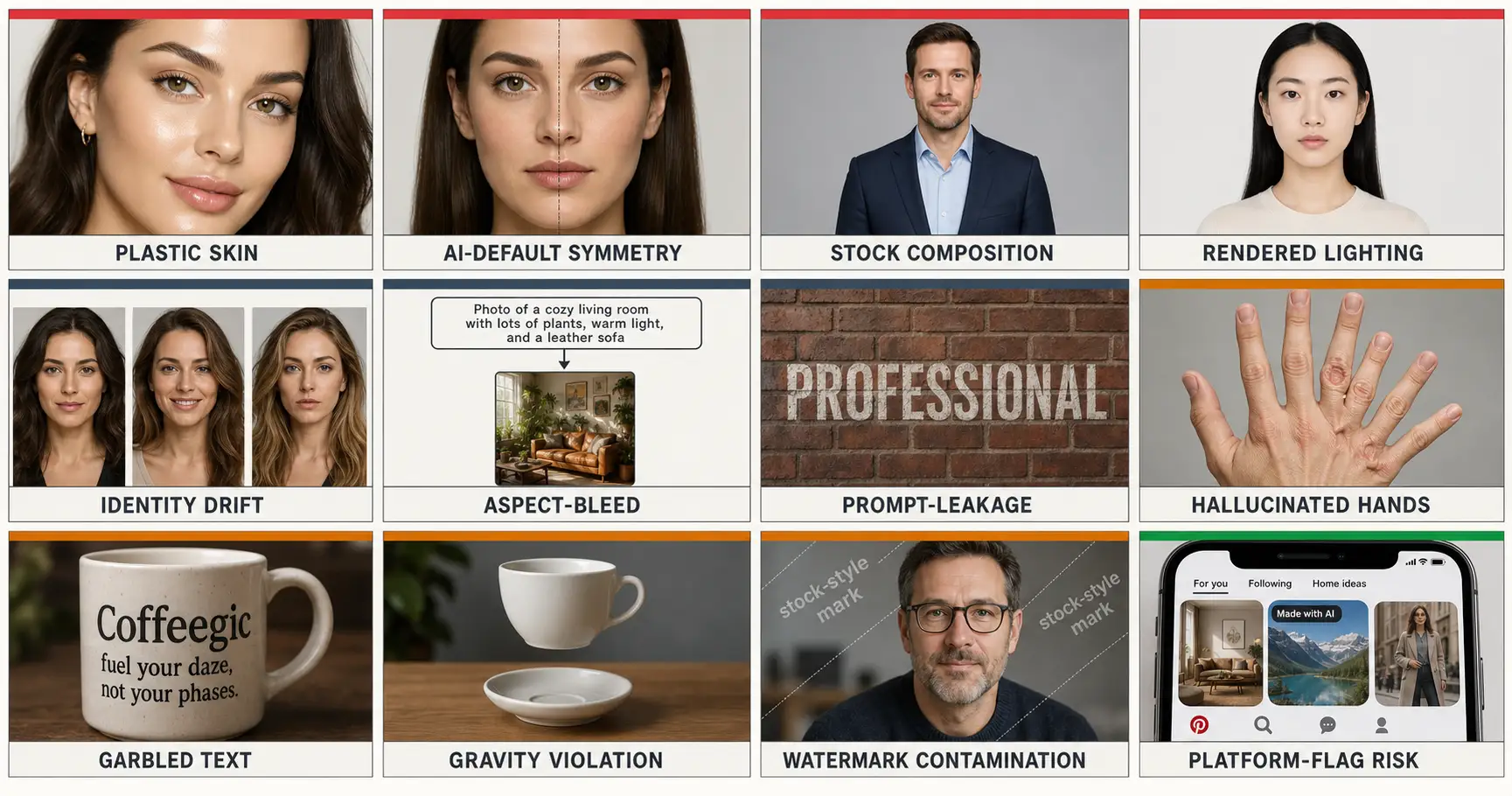
You generated an image. You stared at it. Something specific is broken. Six fingers on the hand. Gibberish on the sign. A square output when you asked for widescreen. A faint stock-photo watermark you didn’t put there. You can see it. You can’t name it. You type “AI mess up hands” into Google and find a hundred Reddit threads with no shared vocabulary. As of 2026, AI image generators produce 12 named failure modes (five widely seen, seven less widely named), and this page is the taxonomy. One label per mode. One root cause per mode. One fix pointer per mode. By the end you can name any of them in three words.
Why a taxonomy, and why twelve
There are five AI image failures most people can describe. Porcelain skin. The face that drifts when you change the lighting. The stock-headshot composition every prompt seems to return. The flat front-light. The Pinterest pin that gets labeled “Made with AI” and quietly throttled. Most readers have seen all five. Reddit threads have named them informally. Our own pillar piece on why AI images look fake walks through them.
The other seven are the ones the field talks about without naming. Hallucinated hands, the universal in-joke. Garbled text on every storefront sign. Gravity violation, where the coffee never actually pours. Aspect-bleed, where you asked for 16:9 and got a square back. Prompt-leakage, where the literal word “professional” shows up painted on the brick wall. Watermark contamination, where the model hallucinates a faint Getty-shaped pattern across the corner. And AI-default symmetry, where both halves of a face line up too perfectly to be human.
Without names you cannot compare notes. You cannot search effectively. You cannot pick the right fix, because every fix family sits underneath one specific root cause. So the entire taxonomy collapses into a clean four-by-twelve shape: four root causes (model default, prompt structure, training distribution, platform detection) covering all twelve named modes. Same root cause means same rewrite family. Same rewrite family means you do not have to memorize twelve fixes; you have to identify which of four categories the failure belongs to.
How we tested across 125 production prompts
The twelve modes were not theorized. They are what kept showing up across the 125-prompt production library we shipped this year, covering twenty-five use-case subcategories: portraits, products, posters, holiday cards, Pinterest wallpapers. Every prompt was authored against the same eight ironclad rules and tested across the four leading 2026 image models: GPT-Image-2 from OpenAI, Nano Banana Pro on Google DeepMind’s Gemini 3 Pro Image, Midjourney v8.1, and Flux 2 Pro from Black Forest Labs. GPT-Image-2 sits at or near the top of the LMArena image leaderboard as of mid-2026; the failure modes are not specific to it. Across the corpus, the same twelve recurred. Different rates per model. Same twelve modes.
The taxonomy tree
The four root causes are not abstractions; each one corresponds to a specific layer of the system that produced the failure. Model default = the training-distribution mean surfacing as the default output. Prompt structure = where you put words in the prompt body, and how attention weights them. Training distribution = data biases baked into what the model has been shown (hand poses, written text, physics, watermarked stock). Platform detection = the AI labels Pinterest and Meta apply at upload, outside the model entirely. The tree below shows which mode lives under which cause.
The four root-cause categories cover all twelve named failure modes. The same rewrite family applies to every mode in the same group, so naming the root cause narrows the fix to a handful of moves.
That tree is the map. The data chart below shows the same twelve modes in row form with the rewrite move for each, useful as a scan if you already know which mode you are debugging. The sections after that walk every leaf in order, one mode per section, with a paired side-by-side image of the failure and the fix.
Eight of the Twelve Failures Live Inside the Model; Three Live in How You Prompt; One Lives Outside the Model Entirely
The Lifehackedai taxonomy distributes the twelve modes across four root causes: model default and training distribution each account for four modes, prompt structure accounts for three, and platform detection accounts for one. The split matters because the fix surface is different for each group. Model-side failures fight the model. Prompt-side failures fight your token positions. Platform-side failures fight upload behavior.
| Failure mode | Root cause | Rewrite move |
|---|---|---|
| Plastic Skin | Model default | Micro-imperfection trio: visible pores, micro-asymmetry, fine micro-texture |
| AI-default Symmetry | Model default | Explicit micro-asymmetry tag in prose body |
| Stock Composition | Model default | Compositional fractions: three-quarter angle, 50-70% frame, head 1/7 height |
| Rendered Lighting | Model default | Directional cinematic key at 45° from upper-left, cool fill on shadow side |
| Identity Drift | Prompt structure | Identity-Lock structure: identity tokens before transformation, repeated at close |
| Aspect-Bleed | Prompt structure | State aspect ratio at both START and END of prose body |
| Prompt-Leakage | Prompt structure | Keep instructional language out of describable-scene tokens (move to Rules block) |
| Hallucinated Hands | Training distribution | Explicit anatomical constraints, or crop hands out of frame |
| Garbled Text | Training distribution | Hardcode exact letters, lock typography style, forbid gibberish in Rules |
| Gravity Violation | Training distribution | Specify physical contact points and weight cues explicitly |
| Watermark Contamination | Training distribution | Explicitly forbid watermarks and stock-photo aesthetics in Rules |
| Platform-Flag Risk | Platform detection | Blend real-photo cues (paper grain, environmental shadow), disclose where required |
The chart’s eight-three-one split tells you how much agency you have at each layer. The eight model-side failures (model default plus training distribution) can be fought with prompt language, but they will not disappear without a different model. They are baked into what the network was shown. The three prompt-structure failures are entirely yours. The one platform-detection failure happens after the image is already finished.
Plastic Skin
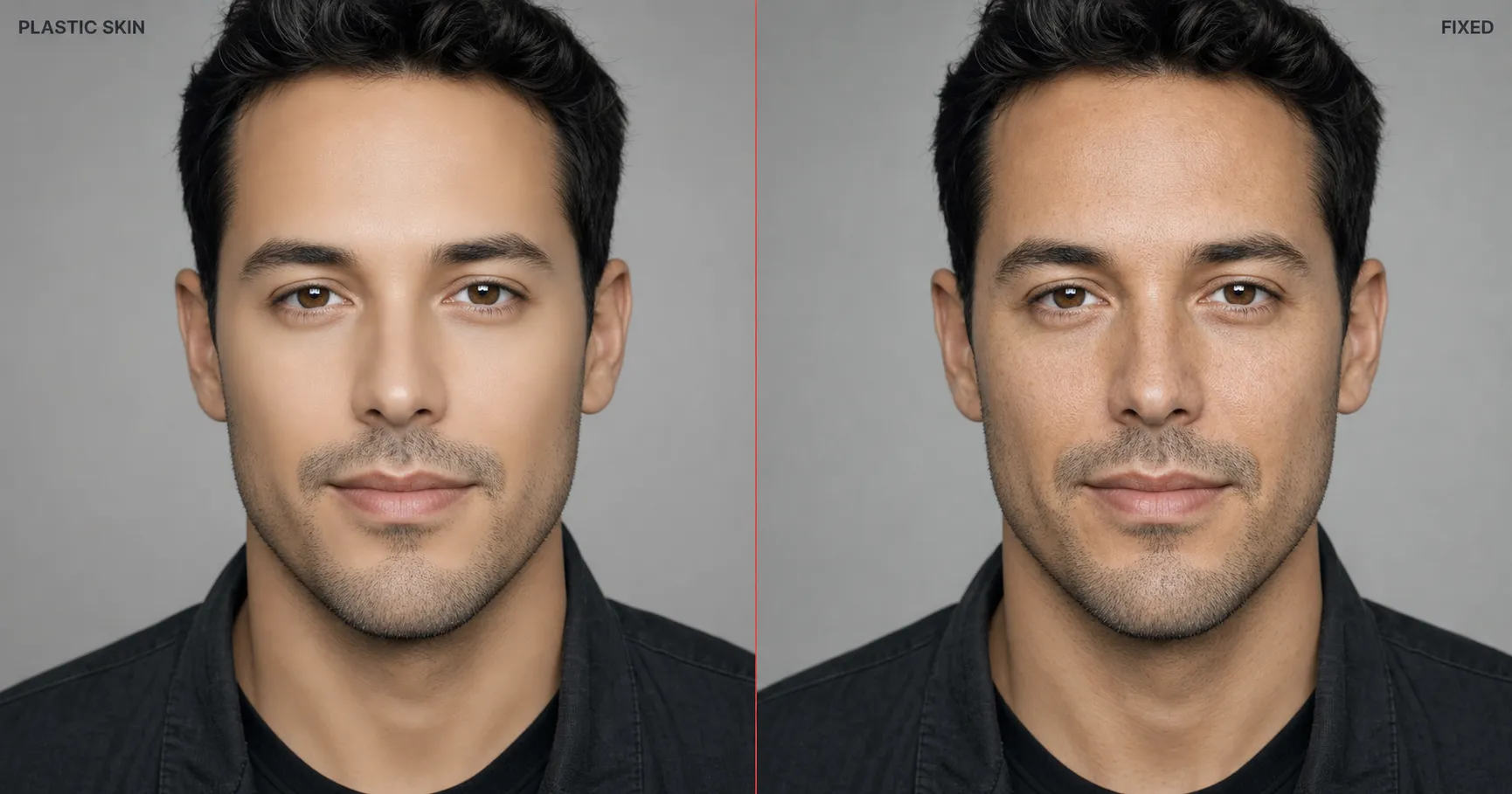
Plastic Skin is what you get when the prompt body asks for “good skin” or “smooth skin” or “beautiful face.” Every major image model in 2026 returns porcelain: airbrushed, waxy, doll-smooth, zero pores, no asymmetry. Reddit threads call it “AI plastic.” It is the single fastest tell that an image was AI-generated, and it appears on GPT-Image-2, Nano Banana Pro, Midjourney v8.1, and Flux 2 Pro alike.
Root cause: model default. The model’s default is the statistical mean of its training distribution, and the portrait stock that dominated that distribution had already been airbrushed upstream. A decade of editorial retouching wiped pores off most labeled face data before the model ever saw it. So when the prompt does not fight back, the average pore count of the training set wins.
The fix is the micro-imperfection trio, written into the prompt body as a literal substring: visible pores, micro-asymmetry, fine micro-texture, no porcelain smoothing. Four concrete texture targets the model can render. For the full mechanism (why every model has the same default, why a four-word phrase reliably overrides it across model swaps), see the AI plastic skin deep dive.
AI-default Symmetry
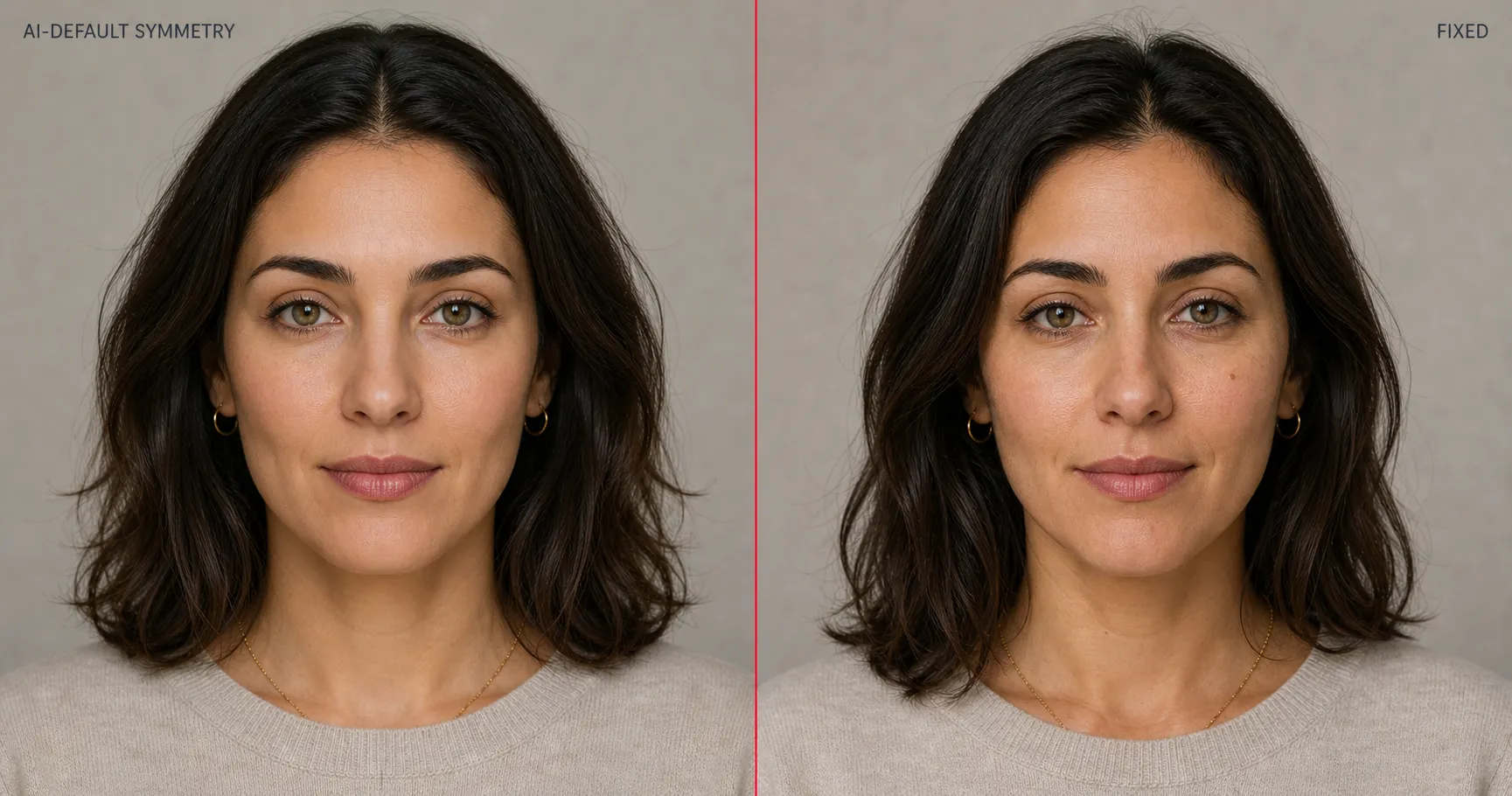
AI-default Symmetry is when the rendered face is too symmetric to be human. Both eyes at the exact same height. Both corners of the mouth at the exact same level. Both eyebrows arched identically. No natural micro-variation anywhere. The face reads as uncanny because real faces never look like this, and you know it the moment you see it even if you cannot name what is wrong.
Root cause: model default. Closely related to Plastic Skin and produced by the same training-distribution mean. Stock-photo portraits favor frontal, balanced compositions where micro-asymmetries are subdued by the lighting and pose. The model learned that “balanced face” was the safe default and removes the asymmetries that mark a face as photographed rather than rendered.
The fix is short. Add the literal phrase “micro-asymmetry” to the prompt body, alongside the rest of the micro-imperfection trio. One eye slightly higher than the other; one corner of the mouth a few millimeters above the other; one eyebrow with a slightly different arch. The model renders asymmetry happily when asked; it just does not volunteer it.
Stock Composition

Stock Composition is what happens when the prompt body says “flattering composition” or “well-framed” or “professional composition.” The model returns a dead-centered, front-facing mid-shot with the body squared exactly to the camera, head occupying the dead center of the frame. It looks like a typical headshot-agency stock photo from a corporate site because that is what most labeled portrait training data looks like.
Root cause: model default. “Flattering” averages into “centered” across the training distribution. Every flattering adjective in the prompt becomes a directive to converge on stock-headshot composition.
The fix is compositional fractions, dropped into the prose body verbatim: three-quarter angle, body angled to camera, subject 50-70% of frame, head 1/7 of frame height. Numbers do not average into stock defaults the way “flattering” does. Three-quarter angle tells the model to rotate the body by about thirty degrees; 50-70% frame occupancy tells it where to crop; 1/7 frame height tells it where the eyeline lands.
Rendered Lighting
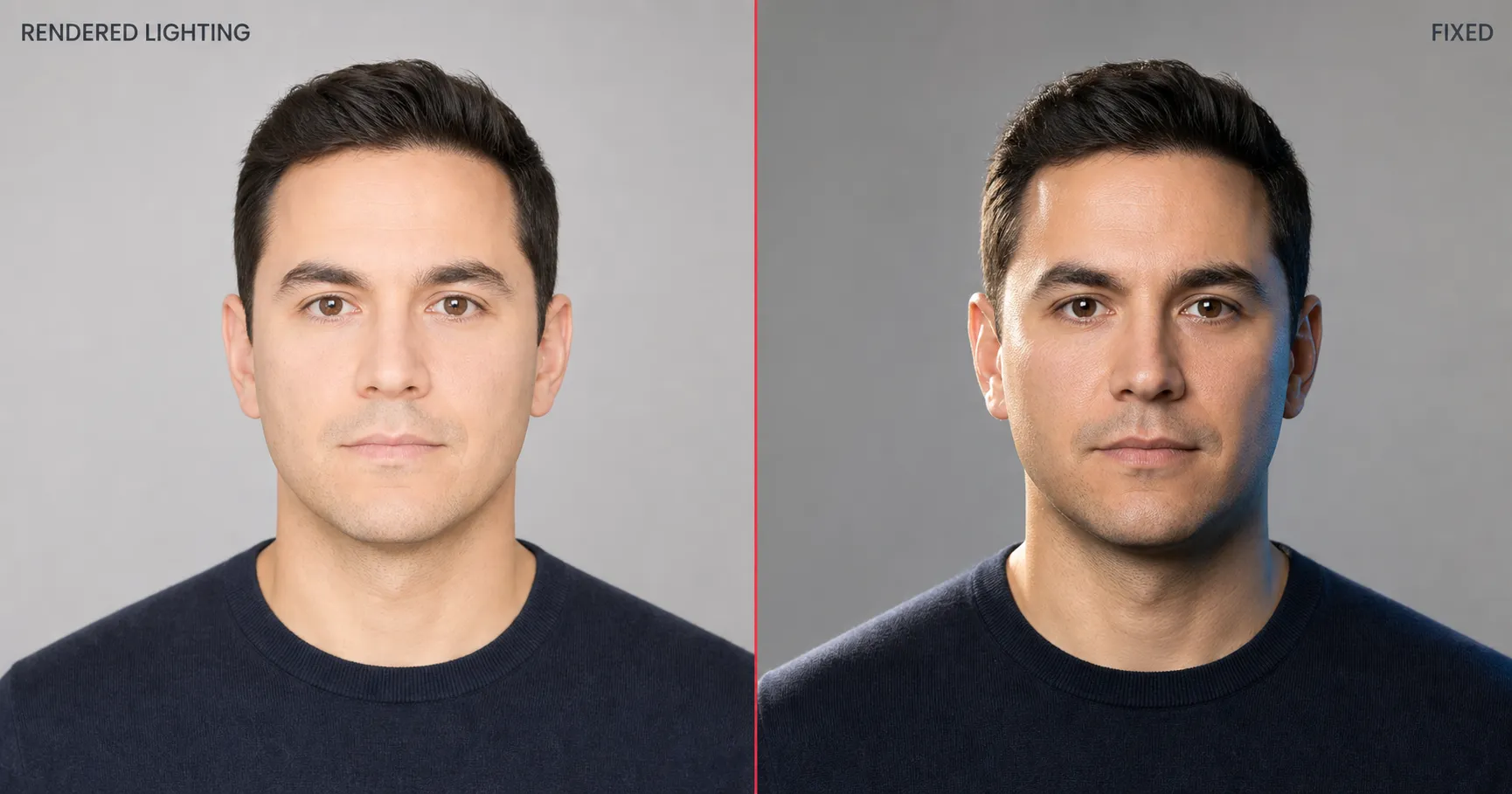
Rendered Lighting is what “good lighting” gives you. A flat, evenly distributed frontal wash with no directional shadow on the face, no jaw shadow, no nose-bridge shadow, no eyelid shadow. The face looks slightly two-dimensional, no depth, no modeling. The kind of lighting you get from a built-in webcam in a brightly lit room. It is the second-most-common AI tell after Plastic Skin.
Root cause: model default. The model’s interpretation of “good” is “even,” because even is the safest average across portrait stock. Front-light is the most-photographed setup in headshot training data; flat front-light wins.
The fix is a directional light spec with motivated direction and motivated fill: directional cinematic key light from upper-left at 45°, cool fill on shadow side. Three lighting parameters the model can solve for unambiguously instead of one adjective to average. The output gets a defined editorial shadow under the jaw, a visible catchlight in the eye, and the kind of topography a portrait photographer would have produced on the day.
Identity Drift
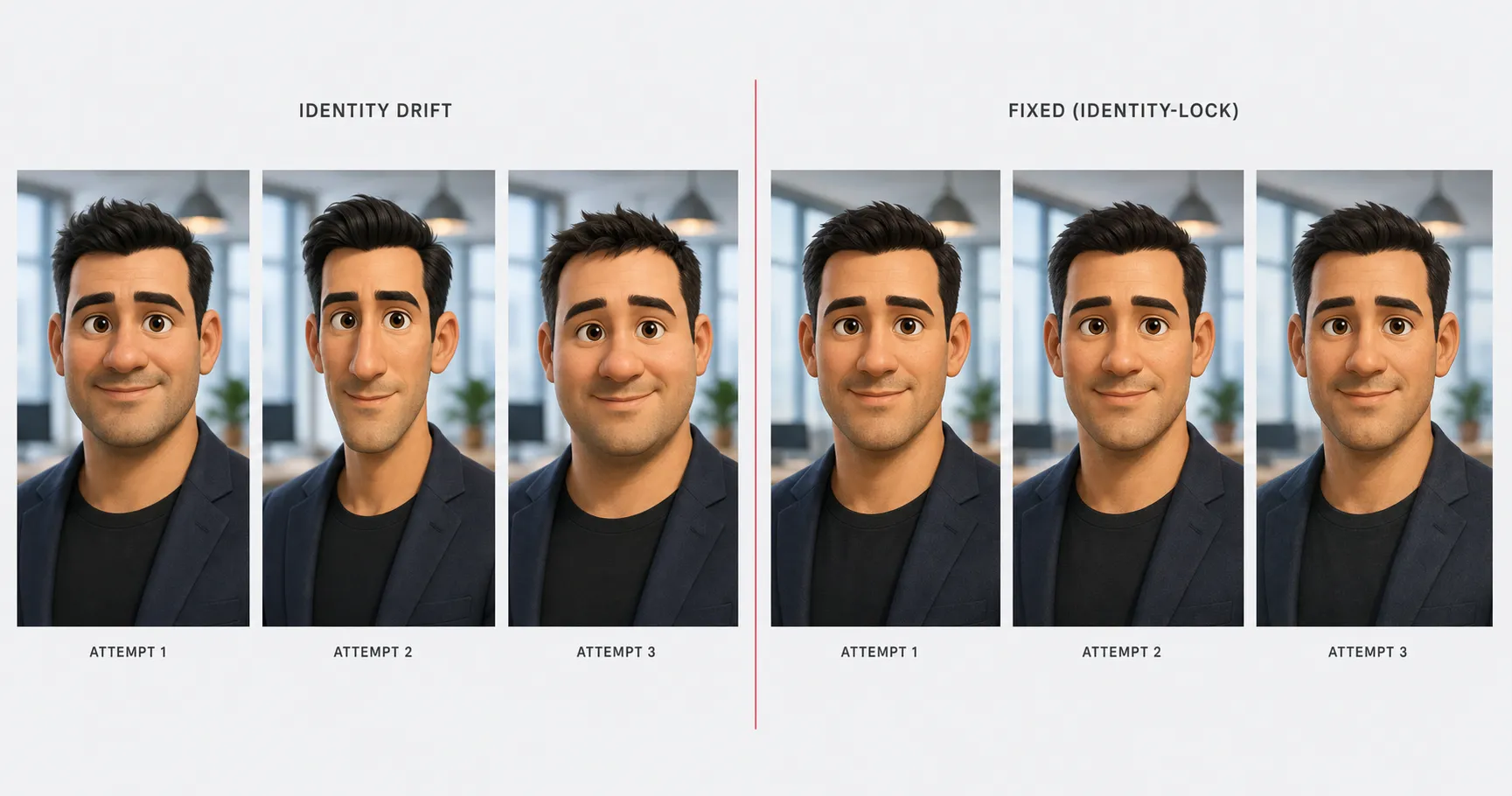
Identity Drift is when you upload a reference photo of yourself, ask the model to transform you into a Pixar-style executive portrait, render three attempts, and watch your face change across all three. Jaw width drifts. Nose shape drifts. Eye spacing drifts. The hairline migrates. You can tell it is supposed to be the same person; you can also tell the person changed.
Root cause: prompt structure. LLM-based image models attend most heavily to the opening and closing tokens of the prose body and discount the middle. Documented attention behavior from the original Transformer paper through the positional-bias literature (“Lost in the Middle,” Liu et al. 2023) describes non-uniform attention favoring sequence endpoints. When identity tokens (face shape, hairline, eye spacing) get placed mid-prompt and the transformation language (“in the style of Pixar / Ghibli / 90s anime”) sits at the end where attention concentrates, the transformation wins and the identity dissolves.
The fix is the Identity-Lock structure: identity tokens BEFORE any transformation language, then repeated at the close. Front-load the face. Restate it at the end. For the four-line prompt structure that operationalizes this, see the Identity-Lock technique.
One paste-ready AI move a week. The kind of tactical rewrite this article describes, applied to a different failure mode, sent every Sunday. Subscribe to the newsletter for the weekly hack and the rotating starter pack of paste-ready prompts.
Aspect-Bleed
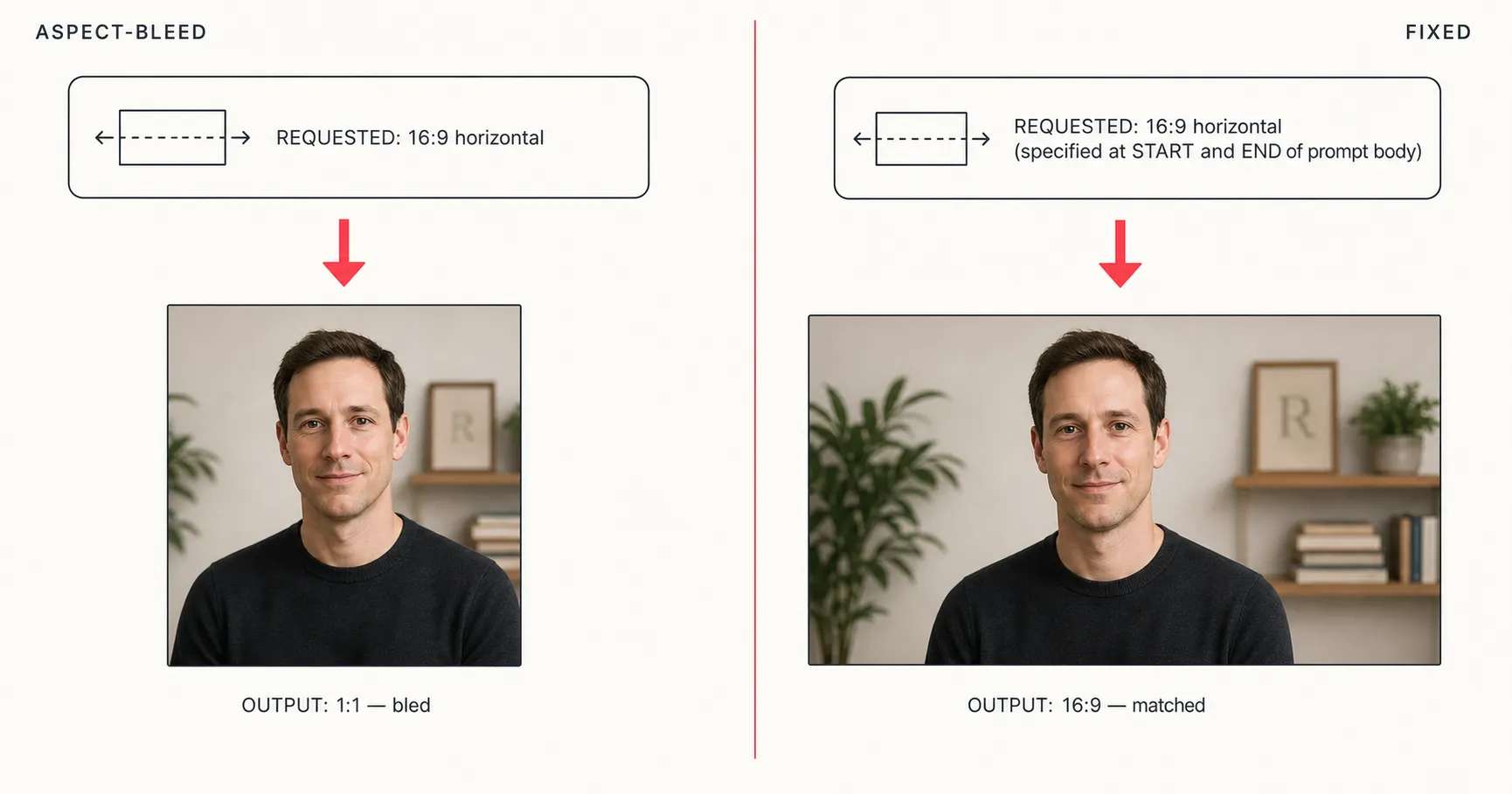
Aspect-Bleed is the failure mode where an AI image generator produces a final image with a different aspect ratio than the one specified in the prompt, typically because the aspect ratio appeared only once in the prompt’s middle section. You wrote “16:9 horizontal cinematic editorial portrait.” You got a square back. Across our corpus, the bleed happens to roughly one in seven outputs when the aspect is named only once mid-prompt.
Root cause: prompt structure, same mechanism as Identity Drift. Attention weights the opening and closing tokens most heavily; an aspect ratio buried in the middle gets discounted by whatever transformation, style, or scene language follows it. The model defaults to its model-side aspect prior, which is usually square or 4:5 for portrait stock.
The fix is the first-and-last-token rule applied to aspect specification. State “1200×630, horizontal 16:9” at the START of the prose body and again at the END, after the rest of the scene description. Two anchors, weighted at the two attention peaks. For the full mechanism and the per-model failure rates we observed, see the first-and-last-token rule deep dive.
Prompt-Leakage
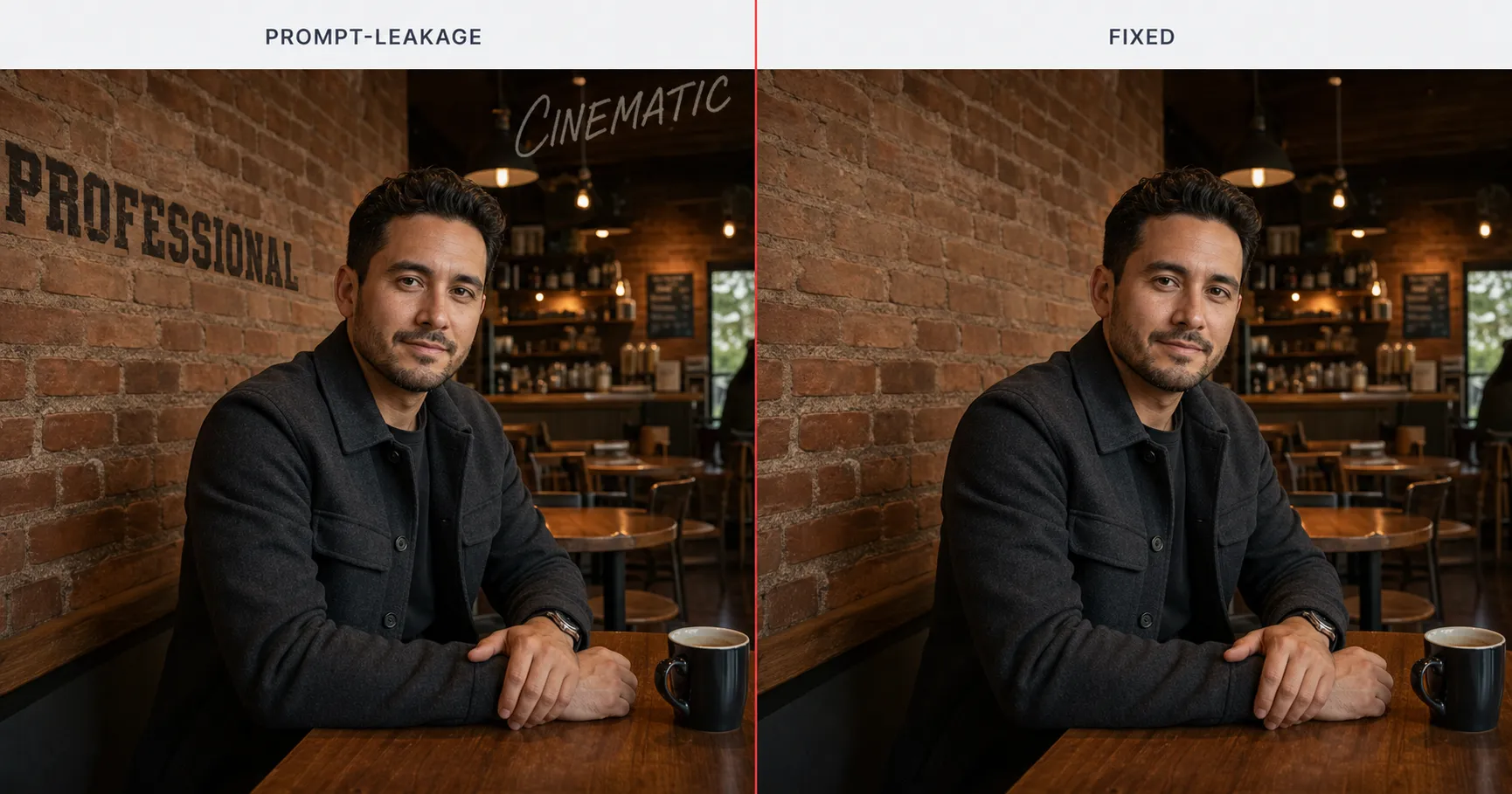
Prompt-Leakage is when instructional language intended for the model leaks into the rendered image as visible content. The literal word “professional” appears painted on the brick wall behind the subject. The word “cinematic” shows up in faint script across the upper-right corner of the sky. Sometimes “high quality” or “8k” leaks as small print on a sign. The model treated your instruction as something to render, not something to obey.
Root cause: prompt structure. When instructional terms sit in the prose body (the section the model parses as “describe this scene to me”), those words become part of the scene description. The model has no clean signal telling it that “professional” is an instruction modifier rather than a noun belonging on the wall.
The fix is to move instructional language out of describable-scene tokens. The prompt artifact format we ship uses three labeled blocks: a Generate-this-image prose body for the scene, a Rules-the-AI-must-follow bullet list for instructions, and a Replace-these-placeholders block for variables. Instructions like “professional,” “high-quality,” “no watermark,” and “single output image” belong in the Rules block, never in the prose body. Once instruction terms leave the prose, the rendered scene stops carrying them.
Hallucinated Hands
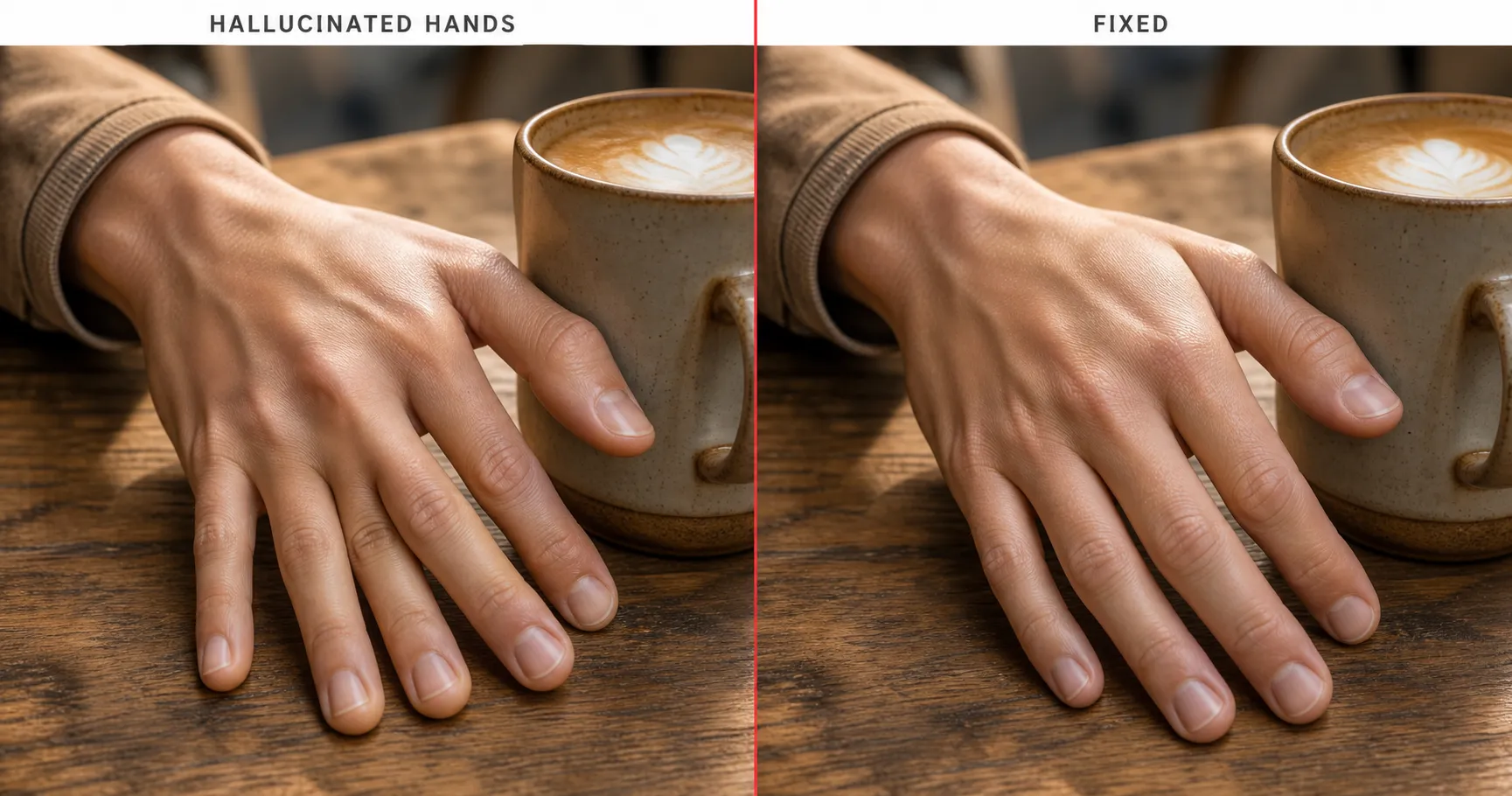
Hallucinated Hands is the universally recognized AI failure that, paradoxically, has no agreed formal name. Six fingers. Missing fingers. A thumb that bends at an unnatural angle. Melted geometry around the knuckles where one knuckle smoothly blends into the next. It has been retreating since 2023 as models improved, but it is not yet extinct. Close-up hand shots still fail at meaningful rates across all four 2026 leaders.
Root cause: training distribution. Hand poses are wildly under-represented in usable training data relative to other body parts. Most photographs in the training set do not contain clear hand close-ups; the hands that are present span thousands of orientations (gripping a mug, holding a phone, gesturing mid-sentence, folded together). The model averages across all that and lands on a “hand-shape” that is fingers-and-knuckles-shaped without being anatomically committed.
The fix has two paths. The first is explicit anatomical constraints in the prompt body: “five fingers, knuckles clearly articulated, thumb visible, fingertips making clear contact with the surface.” The second is to crop the hand out of the frame entirely. A portrait that ends at the wrists never has to render a hand. Use the second path when the hand was not load-bearing for the shot.
Garbled Text
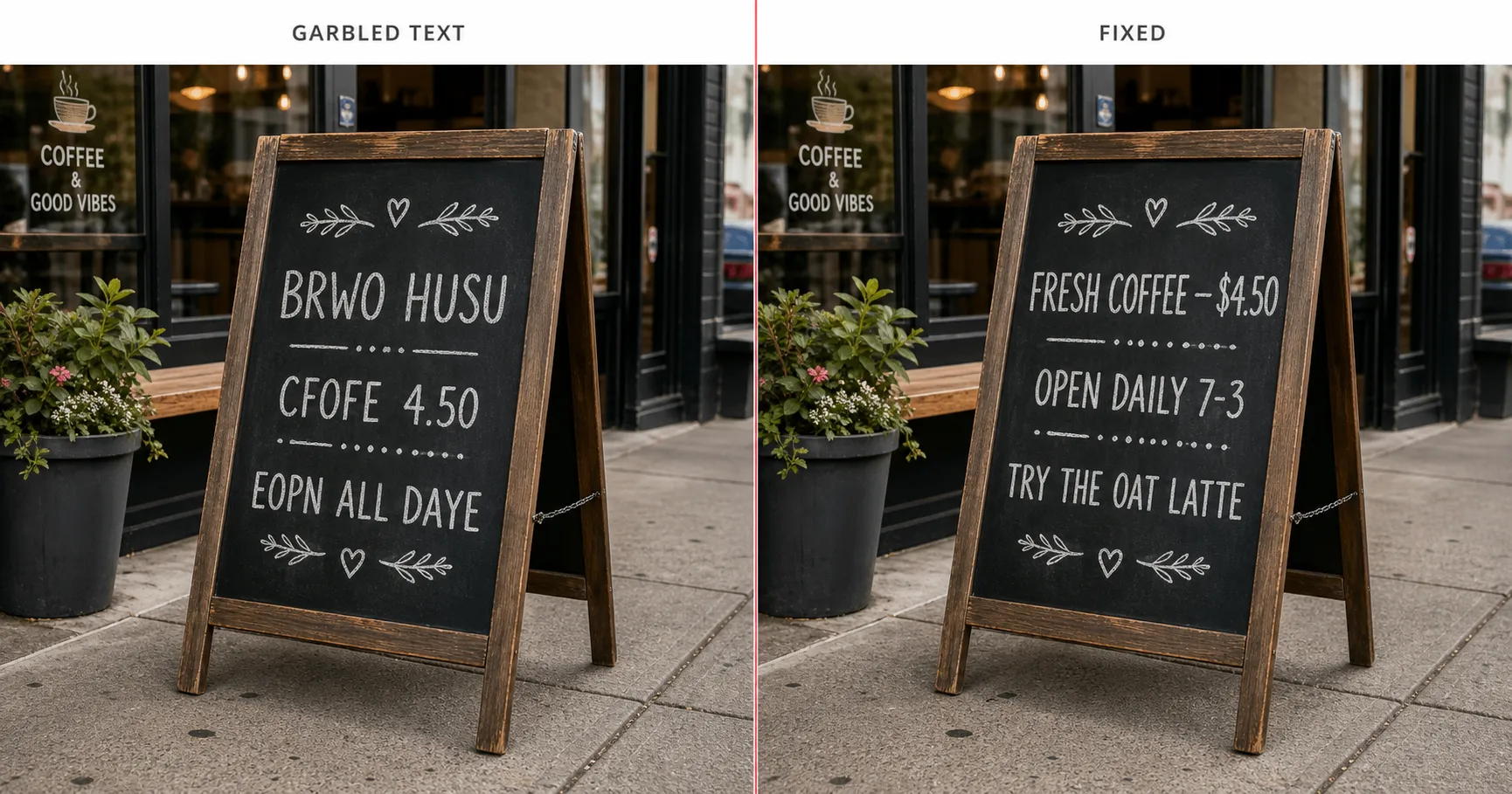
Garbled Text is what you get on every storefront sign, menu, mug, t-shirt, or poster the model has ever been asked to render. The letterforms have the SHAPE of words (recognizable as Latin script) but the letters assemble into nonsense. “BRWO HUSU” instead of “BREW HOUSE.” “CFOFE 4.50” instead of “COFFEE 4.50.” The hand-lettering style is convincing; the spelling is not.
Root cause: training distribution. The model approximates the visual shape of words by averaging the letter-shapes it has seen, but it does not know which sequence of letters produces an actual word in any given context. Real text on real signs in the training set is rendered, photographed, compressed, and re-rendered enough times that the model’s representation of “letters in a sign” is a smeared average of how letters look, not what they spell.
The fix is to hardcode every visible letter the model should render. Write the exact text you want in the prompt body (“the chalkboard sign reads ‘FRESH COFFEE $4.50’ on the top line and ‘OPEN DAILY 7-3’ below it”) and lock the typography style (chalk hand-lettering, slab serif sign-paint, etc.). Then add a Rules-block line explicitly forbidding placeholder gibberish: “no Lorem Ipsum, no garbled text, all visible text rendered exactly as specified.” Hardcoded letters plus a typography lock plus an explicit gibberish ban gets you legible text across every major model.
Gravity Violation
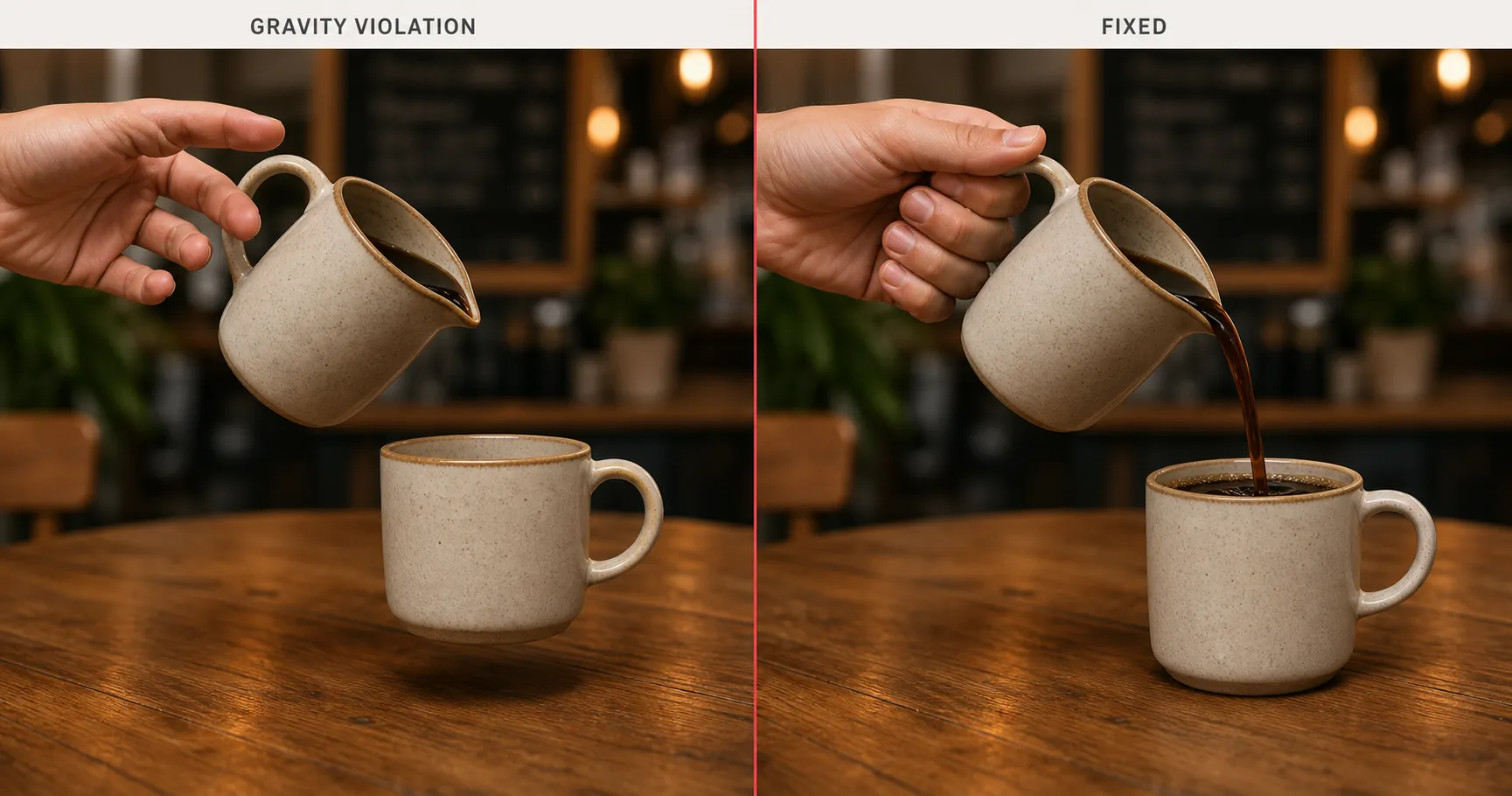
Gravity Violation is when objects in the rendered image fail basic physics. Coffee cups hover an inch above saucers with no contact shadow. Liquids fail to pour from tilted pitchers; the cup stays empty even though the pitcher is angled. Hair defies gravity in still scenes. Hands grasp at air, fingertips floating millimeters from the surfaces they are supposed to grip. The composition is otherwise correct; the physics is not.
Root cause: training distribution. Training data captures static states far more often than dynamic physical interactions. A photographer is more likely to have shot “person holding a coffee mug” than “person mid-pour.” The model sees a million labeled cups but very few labeled streams of liquid; it sees a million labeled hands but very few labeled grip contacts. The result is a model that knows what objects look like but is less practiced at how they touch.
The fix is to specify physical contact points and weight cues explicitly. Instead of “person pouring coffee,” write “right hand gripping the pitcher handle, fingers wrapped around the ceramic, thumb pressed against the top, a visible stream of dark coffee arcing from the spout into the mug, contact shadow under the mug confirming weight.” Name the contacts. Name the weight. The model renders what it is told to render.
Watermark Contamination

Watermark Contamination is when an AI image you never watermarked comes back with a faint Getty-shaped or Shutterstock-shaped pattern across the corner or center of the image. Repeating diagonal geometric shapes evoking a stock-agency mark. Sometimes the mark is faint enough to miss on first glance; sometimes it is bold enough to ruin the image entirely. You did not ask for it. The model produced it anyway.
Root cause: training distribution. Stock-photo libraries dominated the labeled “professional photograph” training data, and many of those images carried agency watermarks. The model learned that “professional photograph” includes the visual texture of a watermark; it absorbed the mark as a stylistic feature of the high-quality photo aesthetic, not as a separate overlay it should ignore. Anything that asks for a stock-style scene risks the model recreating the watermark unprompted.
The fix is to explicitly forbid the watermark and the stock-photo aesthetic in the Rules block of the prompt. “No watermarks, no agency-shaped marks, no stock-photo overlays, no diagonal repeating logos.” Pair it with a positive prompt-body specification that pushes the image away from the stock register: “editorial photograph,” “documentary photograph,” “personal photograph” instead of “professional photograph.” Removing the trigger phrasing plus an explicit negative removes the contamination.
Platform-Flag Risk
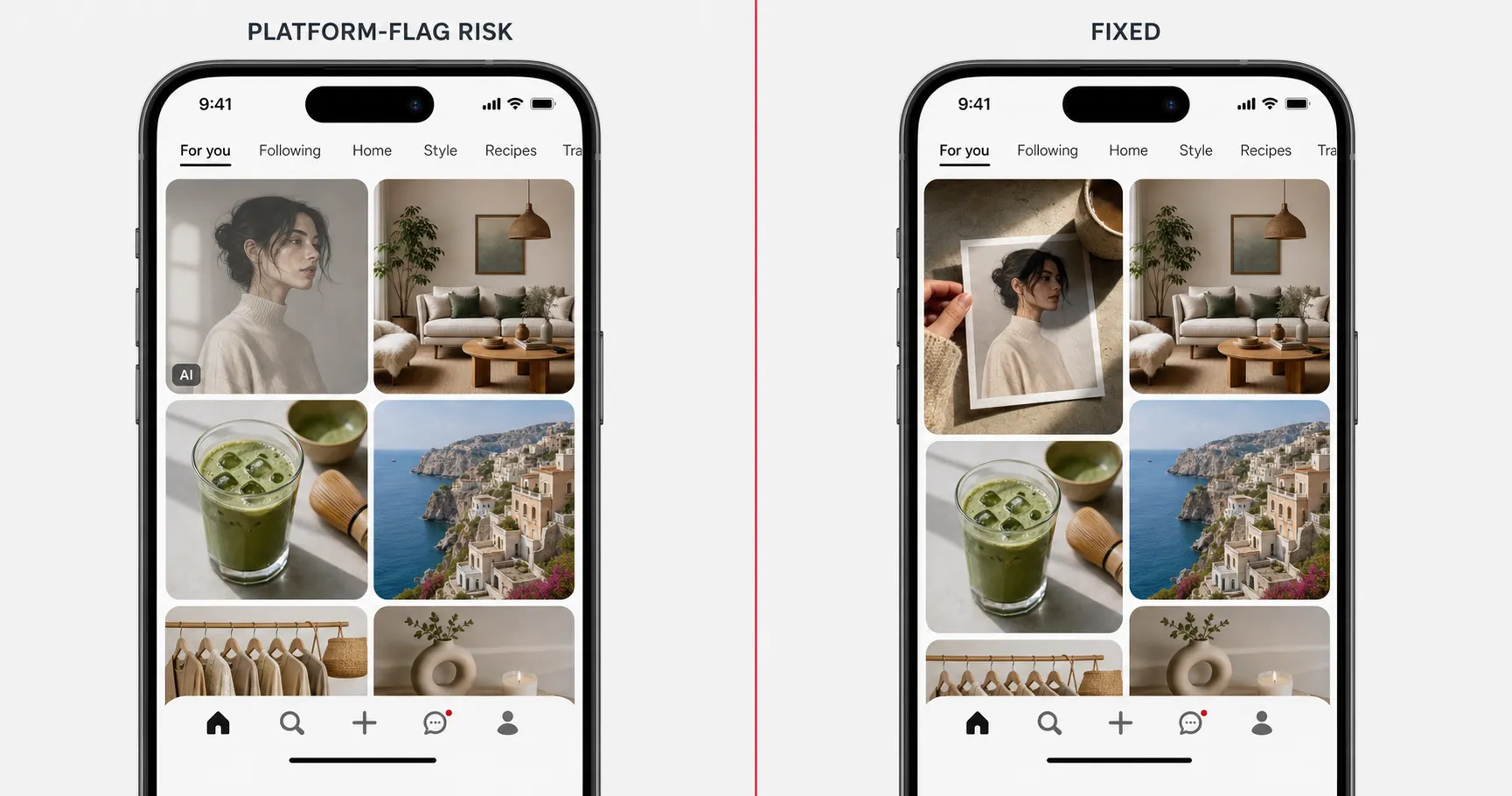
Platform-Flag Risk is the failure mode that lives entirely outside the model. Your image clears every model-side check. The skin looks real, the lighting is directional, the composition is editorial, the hands are correct, the text is legible. Then you upload it to Pinterest, Instagram, or Meta, and the platform labels it “Made with AI” or applies its “AI info” tag, and your reach quietly drops. Pinterest’s Gen AI Pin labels are live, and users can opt into seeing fewer AI Pins across multiple categories; Meta uses “AI info” and treats undisclosed AI use as an account-level signal.
Root cause: platform detection. C2PA metadata, model-side watermarking, and visual-pattern classifiers all run at upload. The model produced a fine image; the platform decided to call it.
The fix has two paths. First, blend in real-photo cues: paper grain texture, environmental shadows from a real-photographed element, depth-of-field artifacts a real lens would produce. These cues do not lie about the image being AI-generated; they raise the percentage of “real photo” signals high enough to clear the classifier threshold on platforms that gate at probability. Second, disclose where required. Meta’s policy treats undisclosed AI use as the higher risk. For the broader treatment of how each platform’s detection works in 2026 and what overrides exist, see the shipped pillar on why AI images look fake, which covers Platform-Flag Risk as Fix #5.
The bigger pattern: concrete beats adjective
Twelve named failure modes. One underlying move applies to every one. Every fix in the taxonomy is a variant of the same rewrite: replace the vague language that produced the failure with a concrete technical parameter. Plastic Skin = “visible pores, micro-asymmetry, fine micro-texture.” Hallucinated Hands = “five fingers, knuckles clearly articulated.” Garbled Text = the exact letters hardcoded plus a locked typography style. Aspect-Bleed = the ratio stated at both start and end. The pattern generalizes cleanly: concrete technical parameters defeat vague adjectives wherever the prompt body would otherwise leave the model to average toward a default. The full methodology that produced this taxonomy is the anti-plastic method anchor.
For day-to-day debugging, the consolidated reference card below collapses the entire taxonomy into one table you can scan in fifteen seconds. Name the mode, find the root cause, apply the rewrite move.
| Failure mode | Root cause | Rewrite move | Deep dive |
|---|---|---|---|
| Plastic Skin | Model default | Visible pores, micro-asymmetry, fine micro-texture | AI plastic skin fix |
| AI-default Symmetry | Model default | Explicit “micro-asymmetry” in prose body | This article (§AI-default Symmetry) |
| Stock Composition | Model default | Three-quarter angle, subject 50-70% frame, head 1/7 height | This article (§Stock Composition) |
| Rendered Lighting | Model default | Directional cinematic key at 45° from upper-left, cool fill on shadow side | This article (§Rendered Lighting) |
| Identity Drift | Prompt structure | Identity-Lock structure, identity first AND last | Identity-Lock technique |
| Aspect-Bleed | Prompt structure | State aspect ratio at both START and END of prose body | First-and-last-token rule |
| Prompt-Leakage | Prompt structure | Move instructional language into the Rules block, out of describable-scene tokens | This article (§Prompt-Leakage) |
| Hallucinated Hands | Training distribution | Explicit anatomical constraints, or crop hands out of frame | This article (§Hallucinated Hands) |
| Garbled Text | Training distribution | Hardcode exact letters, lock typography style, forbid gibberish in Rules | This article (§Garbled Text) |
| Gravity Violation | Training distribution | Specify physical contact points and weight cues explicitly | This article (§Gravity Violation) |
| Watermark Contamination | Training distribution | Explicitly forbid watermarks and stock-photo aesthetics in Rules | This article (§Watermark Contamination) |
| Platform-Flag Risk | Platform detection | Blend real-photo cues, disclose where required | Why AI images look fake (Fix #5) |
FAQ
Q: Why does AI mess up hands?
A: Hallucinated Hands is a training-distribution failure. Hand poses are wildly under-represented in labeled training data relative to other body parts, and the hands that are present span thousands of orientations. The model averages across all of that and lands on a fingers-and-knuckles-shaped object that is not anatomically committed to five fingers, correct knuckle articulation, or a normal thumb angle. The fix is to constrain anatomy explicitly in the prompt body (“five fingers, knuckles clearly articulated, thumb visible”) or to crop hands out of the frame where they were not load-bearing.
Q: Why does AI image text look like gibberish?
A: Garbled Text is also a training-distribution failure. The model approximates the visual SHAPE of words by averaging the letter-shapes it has seen, but it does not reliably know which sequence of letters produces an actual word in any given context. The fix is to hardcode every visible letter you want rendered, lock the typography style (chalk hand-lettering, slab serif, etc.), and add a Rules-block line forbidding Lorem-Ipsum-style gibberish. Hardcoded letters plus a typography lock gets you legible text on signs, mugs, posters, and t-shirts.
Q: Why does my AI image come out in the wrong aspect ratio?
A: That is Aspect-Bleed, a prompt-structure failure. Image models attend most heavily to the opening and closing tokens of the prose body, and an aspect ratio named only once in the middle gets discounted by whatever style and scene language follows it. The fix is the first-and-last-token rule: state the aspect ratio at both the START and the END of the prose body (“1200×630, horizontal 16:9” up front, then again after the rest of the scene description).
Q: Why do AI portraits always look fake or plastic?
A: Plastic Skin is the most cited reason and is a model-default failure. Every leading image model returns porcelain-smooth, airbrushed, poreless skin when the prompt body asks for “good skin” or “smooth skin.” Stock-portrait training data was airbrushed upstream before the model ever saw it, so the model’s default for “skin” is the airbrushed mean. The fix is the micro-imperfection trio written into the prompt body: visible pores, micro-asymmetry, fine micro-texture, no porcelain smoothing.
Q: What are the most common AI image errors?
A: Twelve modes, grouped by root cause. Model default produces Plastic Skin, AI-default Symmetry, Stock Composition, and Rendered Lighting. Prompt structure produces Identity Drift, Aspect-Bleed, and Prompt-Leakage. Training distribution produces Hallucinated Hands, Garbled Text, Gravity Violation, and Watermark Contamination. Platform detection produces Platform-Flag Risk on upload. Same root cause means same rewrite family; once you can name the category, the fix narrows to a handful of moves.
Key Takeaways
- Twelve named AI image failure modes recur across the four leading 2026 image models. Five are widely seen (Plastic Skin, Identity Drift, Stock Composition, Rendered Lighting, Platform-Flag Risk) and seven are less widely named (AI-default Symmetry, Aspect-Bleed, Prompt-Leakage, Hallucinated Hands, Garbled Text, Gravity Violation, Watermark Contamination).
- Four root causes cover all twelve: model default, prompt structure, training distribution, platform detection. Same root cause means same rewrite family.
- Eight modes (model default plus training distribution) trace to the model’s learned defaults. Three modes (prompt structure) are entirely in your control. One mode (platform detection) lives at upload time, outside the model entirely.
- Every fix is a variant of the same rewrite move: replace vague language with concrete technical parameters at the right token positions. “Good skin” becomes “visible pores”; “professional composition” becomes fractions; “16:9” gets stated at both START and END.
- The taxonomy is a snapshot of 2026. Some modes (Hallucinated Hands especially) have retreated since 2023 but are not gone. New model releases will surface new modes; the four root causes will outlive specific entries.
What this taxonomy does not claim
Twelve is not an upper bound. Model releases will surface new failure modes the field has not yet named, and a few of these entries will fade as the underlying mechanisms improve. Hallucinated Hands has retreated since 2023 and may keep retreating, though it is not yet eliminated. Platform-Flag Risk will shift as Pinterest, Meta, and TikTok update their detection rules; the others depend on training pipelines that change with every model generation. This page is a snapshot, not a doctrine. The four root causes are the part that should outlive the specific entries; every new failure mode the field surfaces will sit under model default, prompt structure, training distribution, or platform detection. The names of the modes are useful; the categories are durable.
The full corpus of 125 production prompts where these twelve modes were named and avoided lives in the image prompts pack, the production library built around the rewrite rule that fixes every entry on this page.