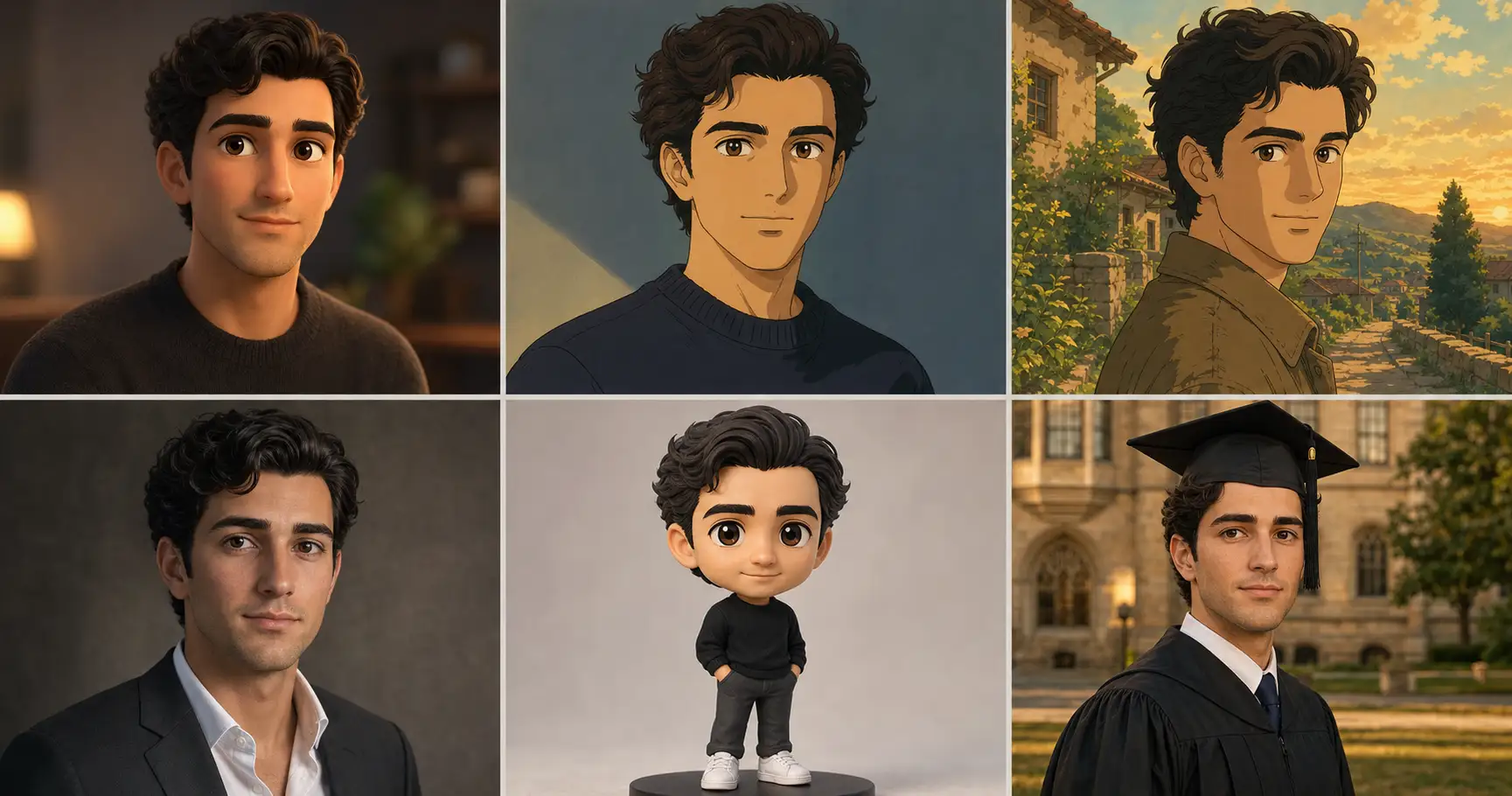
You uploaded a clear front-facing photo of yourself. You asked ChatGPT to turn you into a Pixar character. You rendered three attempts. All three look Pixar. All three are also three different people who are all sort of you. The jaw drifts in attempt one. The eye spacing drifts in attempt two. The hairline migrates in attempt three. In 2026 this is the single most-cited reason headshots and gift portraits get rejected by the subject, and the fix is not another adjective. It is a four-line prompt structure called the Identity-Lock.
Why your face keeps slipping
Identity Drift is the named failure mode. It is the prompt-structure entry in our 12 named failure modes of AI image generation. You uploaded a reference photo. You asked the model to transform you into something stylized. You rendered three attempts. The transformation worked; the face changed. Across our 125-prompt production corpus, this is the failure subjects flag faster than any other, faster than plastic skin, faster than stock composition, faster than aspect bleed.
The cause is mechanical and older than any of these image models. LLM-based image generators attend most heavily to the opening and closing tokens of the prose body and discount the middle. The mechanism traces to the original Transformer architecture from Vaswani et al. in 2017, where the self-attention layer learned to weight positions non-uniformly. Liu et al. (2023) named the practical consequence in “Lost in the Middle: How Language Models Use Long Contexts”, measuring a U-shaped accuracy curve as a function of where the relevant information sat in the prompt. Information at the start, fine. Information at the end, fine. Information in the middle, lost. This is the first-and-last-token rule, and it is documented behavior, not vibe.
Now stack that against where you put your identity tokens. You opened the prompt with the style verb (“A Pixar-style portrait of me”) and piled the transformation language up at the end as you iterated. Identity sat in the middle, buried under modifiers. The model dutifully attended to the front (Pixar) and the back (Pixar lighting, Pixar pose), and gave less weight to the middle (the face you uploaded). You can write “preserve identity” twelve more times in the middle and the model will keep discounting all twelve copies, because that is where attention is thin. The fix is not louder language. The fix is moving the binding to a position where attention is high.
The Identity-Lock technique, line by line
Identity-Lock is a four-line prose-body structure. Line 1 anchors face geometry at the front of the body. Lines 2 and 3 carry the transformation and the scene through the discounted middle. Line 4 restates the identity anchor (plus aspect ratio and output format) at the close. Two anchors at the two attention peaks. The middle carries whatever you want to swap; the anchors carry what must not move.
The structure inherits from our eight ironclad rules for AI image prompts: identity preservation is rule five (highest priority when faces are involved), and aspect ratio plus identity plus output format must appear at both START and END of the prose body (rule two). Identity-Lock is what those two rules look like when you stop treating them as a checklist and start treating them as a positional pattern.
Line 1. Identity anchor
Line 1 names face geometry in concrete recognition points. Not “preserve identity.” Not “same face.” Concretely: same face shape, same hairline, same inter-pupillary eye spacing, same nose shape and bridge, same jaw width, same mouth. Six specific anchors the model can solve for. If you uploaded a reference photo, Line 1 also names “the same person shown in the supplied reference image” so the model binds the upload to the geometry call.
Line 2. Transformation
Line 2 carries the style verb. Pixar, Ghibli, 90s anime, editorial portrait at 85mm and f/1.4, chibi figurine, Ivy graduation portrait. This is what you came to ask for, and it sits in the discounted middle because that is the right place for it. Style is replaceable; identity is not. The middle is exactly where you want the swappable layer to live.
Line 3. Scene
Line 3 carries the look. Lighting, composition, attire, background. Directional cinematic key light from upper-left at 45 degrees, three-quarter angle, warm-grey paper backdrop. Also in the middle, also discounted, also fine. Like the transformation, the scene is editable on the next render.
Line 4. Identity restate + aspect + format
Line 4 closes the prose body by restating the identity anchor (same face geometry as the supplied reference) plus the aspect ratio plus the output format. This is the back-load attention peak. The model finishes reading the prose body with identity ringing in its ears, and the rendered face holds.
Show the full promptTap to expand
Paste this into your AI (ChatGPT, Claude, Gemini, Midjourney chat surface).
REQUIRED upload before pasting: one clear front-facing photo of the subject’s face, eyes open, even lighting, no sunglasses, no heavy filter.
Each of the four lines below corresponds to one role in the structure. Line 1 anchors identity at the front of the prose body. Lines 2 and 3 carry the transformation and the scene through the middle. Line 4 re-anchors identity (plus aspect ratio and output format) at the back.
Generate this image:
A {ASPECT_RATIO} {FORMAT_TYPE} portrait of the same person shown in the supplied reference image, preserving the source face geometry as the highest-priority constraint: same face shape, same hairline, same inter-pupillary eye spacing, same nose shape and bridge, same jaw width, same mouth, identifiable as the same person at a glance. The subject is rendered in {TRANSFORMATION_STYLE}, with {SCENE_DESCRIPTION}. End the prose body by restating the constraint: same face geometry as the supplied reference (hairline, eye spacing, nose, jaw, mouth), {ASPECT_RATIO} {FORMAT_TYPE}, single composed output image.
Rules the AI must follow:
- Identity preservation is the highest-priority constraint, face geometry must match the supplied reference image
- Aspect ratio: {ASPECT_RATIO}, locked at start and end of the prose body
- No Lorem Ipsum, no garbled text, all visible text rendered exactly as specified
- Single image output, no moodboard, no contact sheet, no variant grid
- Realistic micro-imperfections required (visible pores, micro-asymmetry, fine micro-texture for photographed renders; respect stylistic textures for animated renders)
- All visible text in English Latin script
- Output the image directly without explaining the prompt back
Replace these placeholders with your details:
{ASPECT_RATIO}= 1200x630 horizontal 16:9{FORMAT_TYPE}= editorial portrait{TRANSFORMATION_STYLE}= 3D Pixar / Disney character render with soft cinematic studio lighting{SCENE_DESCRIPTION}= a warm-grey paper backdrop with soft directional key light from upper-left at 45 degrees
Bonus tips. To swap the transformation entirely, change {TRANSFORMATION_STYLE} to one of: 90s anime cel-shaded portrait with hand-drawn ink linework; Studio Ghibli golden-hour storybook scene; 85mm editorial executive portrait at f/1.4; chibi 3D figurine character with large-head proportions; Ivy League graduation portrait in cap and gown. Line 1 and Line 4 do not change. The same identity anchor pair carries every transformation.
What it looks like when it works
The hero grid at the top of this article is the proof-of-versatility frame. Same source face, six transformations, identity locked across every panel. Pixar, 90s anime, Ghibli, editorial portrait, chibi, Ivy graduation. The variable is the transformation, not the face. The variable is also not the model. Every panel was rendered on GPT-Image-2 against the same Founder reference photo from our realistic founder headshot prompt. Same model, same reference photo, six different style verbs in Line 2.
The diptych below is the proof-of-fix frame, isolated to one transformation so the contrast is unambiguous.
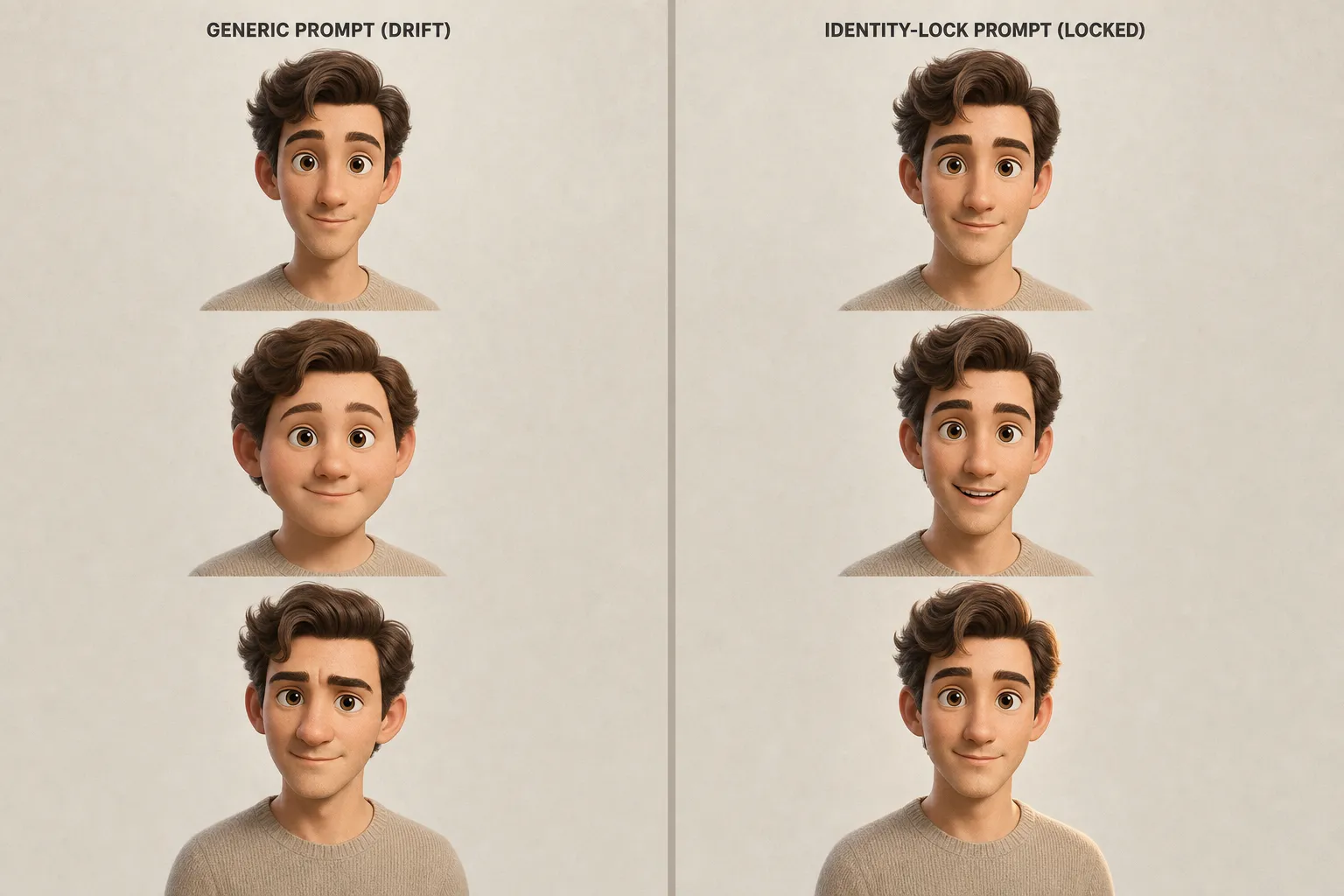
The left side is what happens when the prompt body opens with the transformation and never re-anchors identity. Three Pixar attempts, three visibly different faces. The right side is the same model, same reference, same Pixar transformation, with Line 1 and Line 4 in place. Three Pixar attempts, one face. The variable that changed was not the model. The variable that changed was the position of identity tokens in the prose body.
Identity-Lock also does not constrain the transformation. The right-side faces still differ in expression, in lighting, in pose. The lock binds the face geometry; it leaves the rest of the rendering free to vary. Across our 125-prompt production library, the same four-line skeleton survives every category in the corpus, from LinkedIn headshots to dating-profile photos to graduation portraits at every Ivy League campus to the illustrated keepsakes in our city hall wedding photos guide, where the whole point is that both faces still read as the couple. The middle two lines change between categories. The first and last lines hold.
One paste-ready AI move a week, the kind of structural rewrite this article describes, applied to a different failure mode every Sunday. Subscribe to the newsletter and we send you the weekly hack plus the rotating starter pack of paste-ready prompts.
Four ways Identity-Lock still fails
Identity-Lock raises your floor. It does not make the floor disappear. Across the corpus, four named drift sub-modes still show up at low single-digit rates even when both anchors are in place. The four-cell gallery below names them.
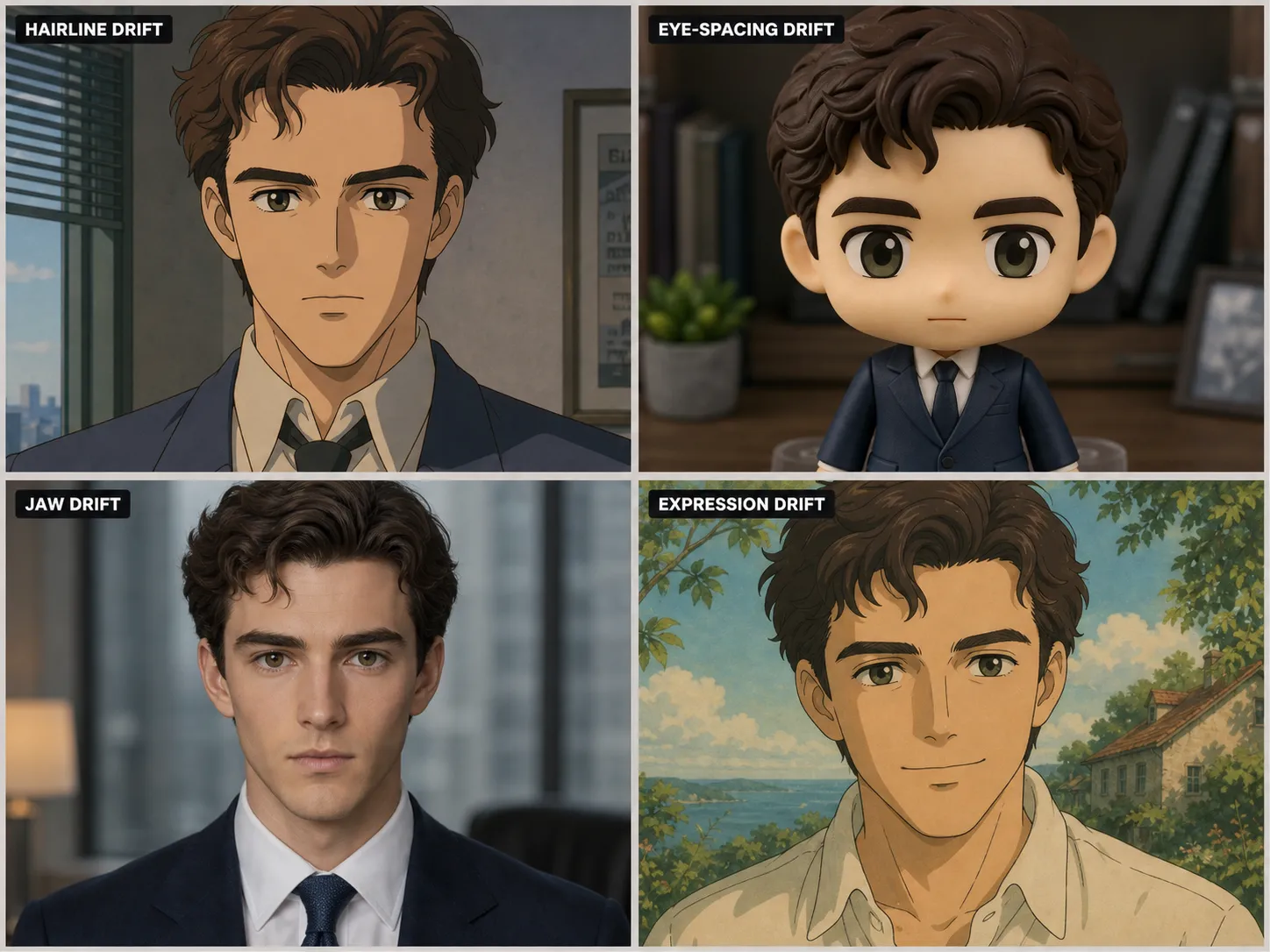
Hairline drift. The hairline migrates forward or backward by roughly a centimeter on the rendered face. Most visible on 90s anime and Pixar transformations, where stylistic conventions about character hairlines outweigh the geometry call. Fix: add “front hairline shape preserved at the temple-to-temple distance shown in the reference” to Line 1.
Eye-spacing drift. Inter-pupillary distance widens or narrows by a perceptible amount. Most visible on chibi figurine transformations, because chibi style conventions favor wider-set eyes for cuteness. Fix: add the literal phrase “inter-pupillary distance preserved exactly as shown in the reference” to Line 1.
Jaw drift. Jaw narrows or pointifies, most often on executive editorial renders where the model defaults toward magazine-cover jaw geometry. Fix: add “jaw width and angle preserved at the source reference’s exact proportions” to Line 1.
Expression drift. Face geometry holds, but the expression shifts (neutral source rendered with a slight smirk, or smiling source rendered as serious). Less load-bearing than the other three; fix only if expression is important. Add a one-line expression spec to Line 3 (“subject’s expression matches the reference: neutral mouth, eyes engaged with camera”).
All four sub-modes share a root cause. Stylistic conventions inside Line 2’s transformation language are still averaging the face toward the style’s prior. Line 1’s geometry call is winning the larger battle and losing the small one. The fix is more concrete recognition points in Line 1, not more force in Line 4.
Why this works across model swaps
Positional attention is structural to LLM-based image models, not an artifact of any single one. That is why Identity-Lock survives model swaps. The first-and-last-token attention peaks show up in GPT-Image-2, in Nano Banana Pro running on Google DeepMind’s Gemini 3 Pro Image, in Midjourney v8.1, and in Flux 2 Pro alike, because all four are descended from the same Transformer architecture that named the attention layer in the first place.
The specific surfaces each model exposes for identity work are different. GPT-Image-2 from OpenAI ships a multi-turn editing surface where the prior turn’s identity context carries forward, which gives Line 1 and Line 4 extra purchase across edits within the same session. Nano Banana Pro on Gemini 3 Pro Image blends up to eight reference images while preserving subject identity, which is essentially Identity-Lock applied to a wider reference set. As of mid-2026 GPT-Image-2 sits at or near the top of the LMArena image leaderboard, and Nano Banana Pro is in the same conversation. When the next-generation models ship, the structure does not need a rewrite, because the structure is binding to the architecture, not the version. When the model changes, the rule does not.
FAQ
Q: Why does my AI face look different every time I generate?
A: Because identity tokens sit in the middle of your prompt and transformation tokens sit at the end, and LLM-based image models attend most heavily to the opening and closing positions. The middle gets discounted. The transformation wins; your face dissolves. The fix is positional, not adjective. Move identity to the front of the prose body, restate it at the close, and the face holds across renders.
Q: How do I keep the same face across AI image generations?
A: Use the Identity-Lock structure. Line 1 anchors face geometry (face shape, hairline, eye spacing, jaw width, nose shape) at the front of the prose body. Lines 2 and 3 carry the transformation and the scene through the middle. Line 4 restates identity plus aspect ratio plus output format at the close. Two anchors at the two attention peaks. Across our 125 production prompts the structure holds the face through Pixar, 90s anime, Studio Ghibli, executive portrait, chibi figurine, and Ivy graduation transformations on the same source reference.
Q: Does Identity-Lock work with reference image uploads?
A: Yes, and the reference upload is where it lands hardest. The prose body Identity-Lock anchors tell the model which features of the uploaded photo to preserve as it transforms the rest. Without the front-loaded anchor, the upload becomes loose inspiration; with it, the upload becomes a binding constraint. GPT-Image-2’s multi-turn editing surface and Nano Banana Pro’s multi-reference blending both expose this preservation channel explicitly.
Q: Why does adding the phrase “same face” to my prompt not work?
A: Because “same face” is a vague adjective the model has no concrete target for. Replace it with the geometry the model can actually solve for: same face shape, same hairline, same inter-pupillary eye spacing, same nose shape and bridge, same jaw width, same mouth. Five concrete recognition points beat one vague preservation request, and front-loading them at the attention peak beats burying them mid-prompt.
Q: Does GPT-Image-2 hold a face better than Midjourney v8.1?
A: In our 125-prompt corpus across Pixar, anime, Ghibli, executive portrait, chibi, and graduation transformations, GPT-Image-2 held identity more reliably than Midjourney v8.1 on long prompts where transformation language sat at the end. The full per-model comparison ships in our 2026 model benchmark. Identity-Lock raises the floor on both; the prompt structure is the bigger lever than the model swap.
Key Takeaways
- Identity Drift is a positional problem. LLM-based image models attend most heavily to opening and closing tokens of the prose body; the middle gets discounted. Identity-Lock works because it puts the face at the two attention peaks.
- The structure is four lines. Line 1 anchors face geometry. Lines 2 and 3 carry the transformation and the scene through the middle. Line 4 restates identity plus aspect ratio plus output format at the close.
- The technique works across model swaps because positional attention is structural to LLM-based image models, not specific to GPT-Image-2 or Nano Banana Pro or any single version.
- Identity-Lock raises the floor on identity preservation but does not eliminate residual drift. Hairline, eye-spacing, jaw, and expression drift still show up at low rates. The fix is more concrete recognition points in Line 1, not more force in Line 4.
Two anchors, four lines, one face
Identity-Lock is not a clever new prompt template anyone invented. It is the smallest possible artifact that respects what the attention layer was doing in the first place. Concrete face geometry at the front, transformation and scene through the middle, identity restated at the back. Drop the four lines into ChatGPT today, replace the placeholders, render three attempts. The face holds. Or skip the prompt entirely: AI Avatar Studio applies Identity-Lock automatically to build an avatar set from a single selfie. The full 125-prompt production library with this structure pre-loaded into every category lives at the image prompts pack.