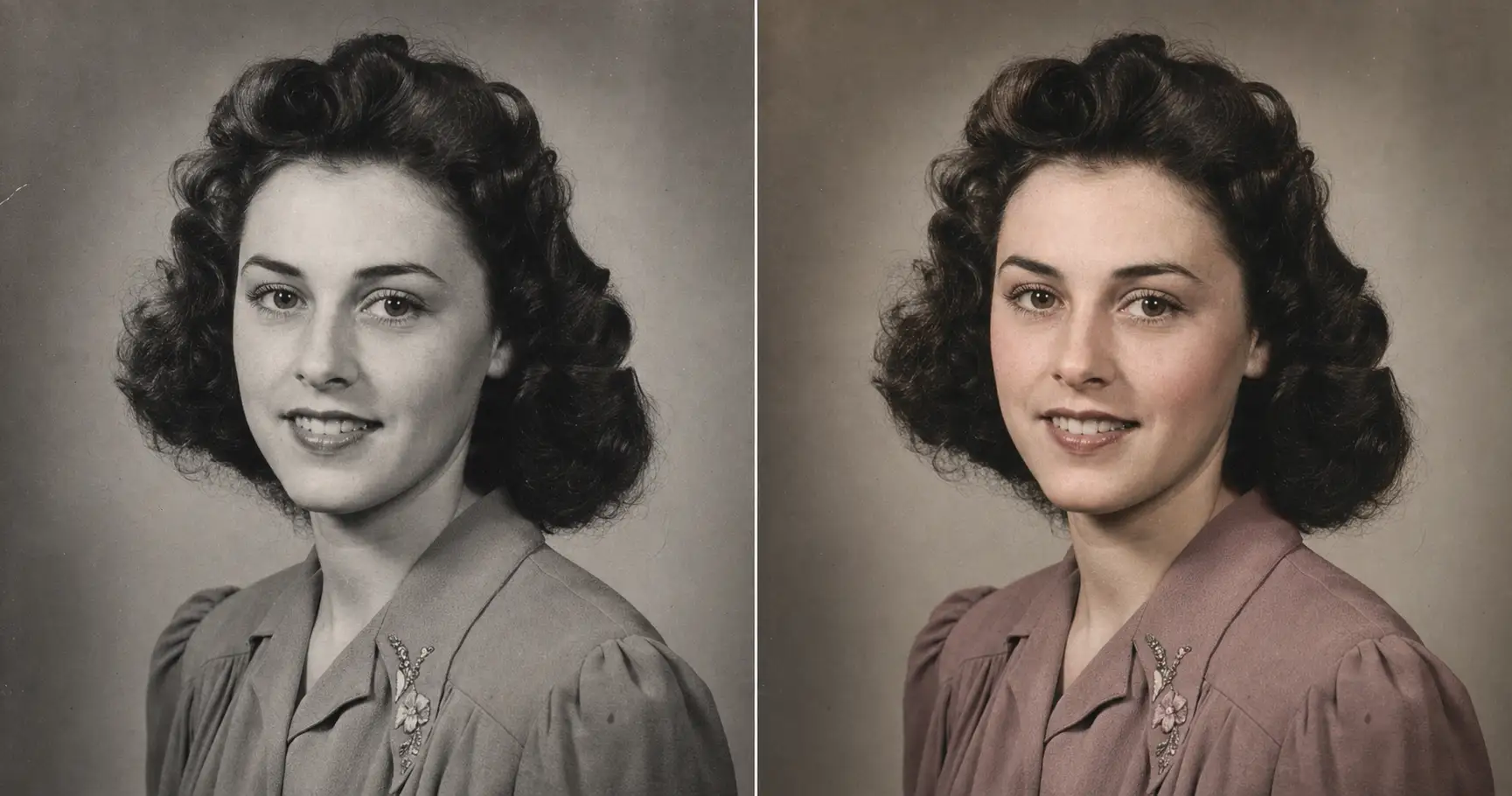
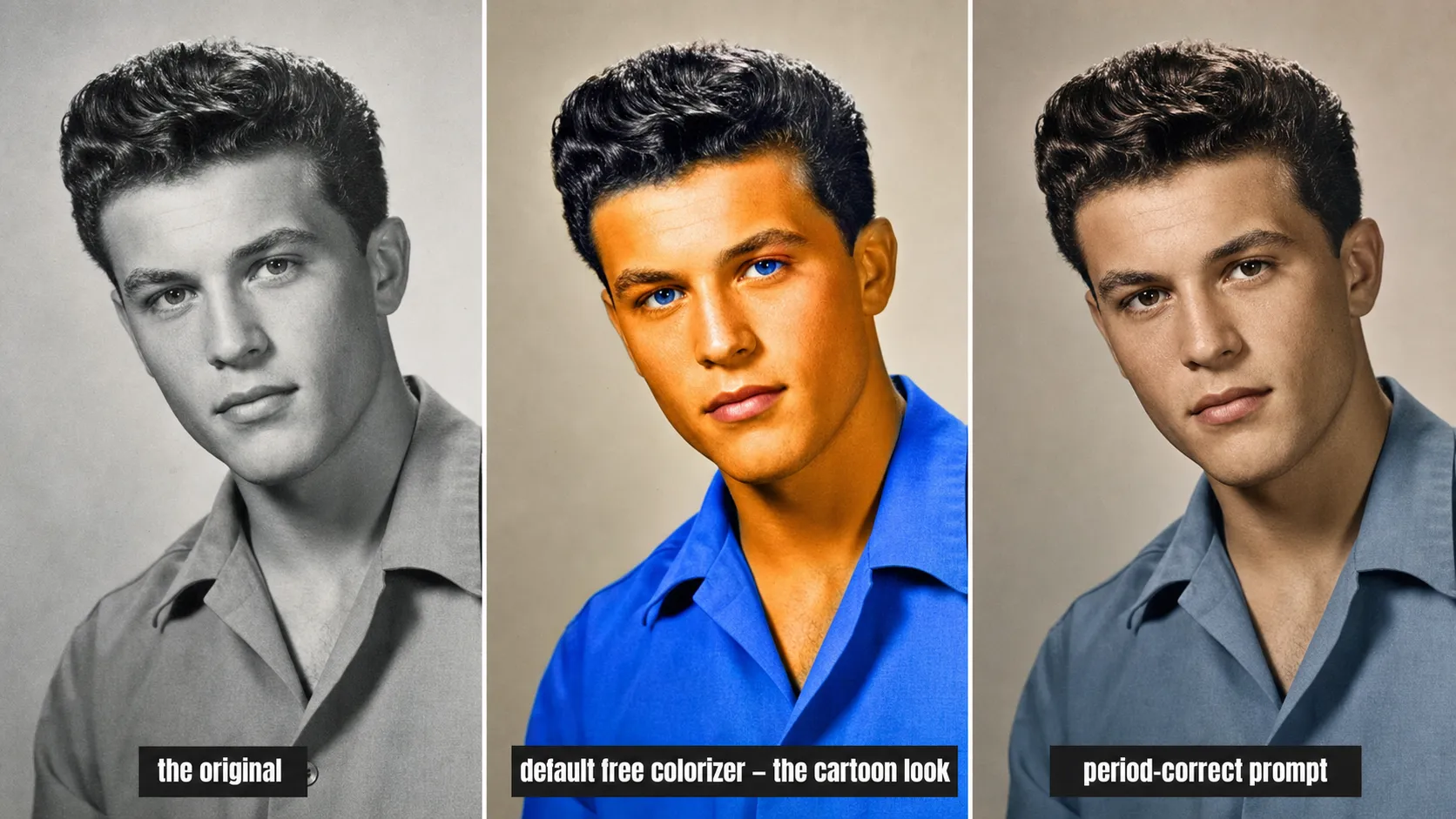
You scan your great-grandmother’s 1940s portrait, drop it into a free colorizer, and wait. What comes back has orange skin, candy-blue eyes, and a dress in a blue that didn’t exist on film yet. It looks like a coloring book. The strange part is that the photo isn’t the problem and the tool isn’t really the problem. The color is the problem, and the color is the one thing you can fix.
Why free colorizers turn Grandma into a cartoon
Default AI colorizers have a quiet habit: they guess loud. They reach for the most vivid plausible color, push the saturation up because a punchy demo sells better, and hand you skin the color of a traffic cone.
It helps to know what the AI is actually doing. Modern AI colorization started with a 2016 paper out of UC Berkeley by Richard Zhang and his colleagues, and the paper was honest about the goal. It set out to produce a plausible, realistic color version of a photo, not to recover the colors that were really there. Those colors are gone. The moment a photo is shot in black-and-white, the actual hues are not stored anywhere. The AI is making an educated guess from patterns, and Zhang’s team measured exactly how good the guess was with a colorization Turing test: the abstract reports that their method “fools humans on 32% of the trials.”
So the tool is doing its job. It produces a plausible guess. The trouble is that “plausible to the model” and “right for 1944” are different targets, and nothing in a default colorizer tells it to aim for the second one. Left alone, it leans on the boring, vivid center of its training data, which is the same reason most AI photos look fake in the first place. On a fresh selfie that’s a small annoyance. On your great-grandmother’s portrait it’s the whole ballgame.
Which means the fix isn’t a different colorizer. It’s telling the AI which decade it’s painting in.
What you need before you start
Three things, all of which you already have.
- A clear phone snapshot of the print. A photo taken with your phone, in good light, on a flat surface. No scanner. No app. No skill required in either.
- The prompt below. Paste-and-go, with two lines to swap.
- An AI image tool you’ve already opened once. ChatGPT, Claude, Gemini, or anything else that takes a photo upload and returns an image.
The work isn’t in the scan. It’s in the two lines that name the era.
The prompt: paste, name the era, upload
Upload the phone snapshot of the print first. Then paste the block below into ChatGPT (or Claude, Gemini, or any AI image tool), and swap the two lines for your decade and your known colors.
Show the full promptTap to expand
Paste this into your AI (ChatGPT, Claude, Gemini, …).
REQUIRED upload before pasting: the original black-and-white, sepia, or faded photo. A clear phone snapshot of the print is fine. Without it the AI will invent a different photo entirely.
Swap two lines: {ERA_AND_PALETTE} (which decade and palette) and {SUBJECT_NOTES} (any colors you actually know; leave blank if none).
Generate this image:
A single photoreal colorized version of the uploaded black-and-white (or sepia, or faded) photograph, returned in the same aspect ratio and composition as the original. Identity preservation is the highest-priority constraint — match every person in the uploaded photo’s bone structure, eyes, nose, lips, proportions, hairline, age, and expression exactly; do not invent new facial features, do not modernize anyone’s appearance, do not change anyone’s age. Add believable, period-correct color appropriate to {ERA_AND_PALETTE}: keep skin tones natural with real undertone (never orange, never uniform tan), keep clothing and object colors consistent with the dyes, fabrics, and film of that decade, and hold overall saturation deliberately restrained to match the muted color of period film and careful hand-coloring, not modern digital vibrance. Use {SUBJECT_NOTES} to color any items whose real color is known. Where the true color of a specific item is unknown, choose the most historically plausible muted option rather than a vivid guess. Preserve authentic film grain, paper-print micro-texture, and natural skin micro-texture: visible pores, fine lines, slight asymmetry. The final image looks like a believable period color photograph that could have been shot on the color film of that era, returned in the same aspect ratio and composition as the original.
Rules the AI must follow:
- Aspect ratio: match the uploaded photo’s original aspect ratio exactly; do not crop, do not re-frame, do not change the composition.
- Identity is the highest-priority constraint: every face must remain unmistakably the same person; do not prettify anyone, do not adjust noses, jaws, or eye shapes, do not change ages, do not remove glasses, beards, moles, or scars.
- Period-correct palette only: skin with natural undertone (no orange, no candy color), clothing and object colors consistent with the era’s dyes and fabrics, restrained low-to-moderate saturation matching period film; no neon, no electric blues, no modern HDR vibrance.
- Realistic film and skin texture required: preserve natural film grain, subtle paper grain, and natural skin micro-texture (visible pores, fine lines, slight asymmetry); no AI-plastic smoothing, no porcelain skin, no airbrushed look.
- Plausible over vivid for unknowns: where a specific item’s true color is unrecorded, pick the most historically likely muted color, not the most eye-catching one; do not invent saturated colors to make the photo pop.
- No new objects, no new people, no new background elements; do not change the original framing or pose; if any date, studio name, or handwriting exists on the original, preserve it exactly.
- Single image output: one colorized photo, same aspect ratio as the original; no before/after split, no side-by-side, no contact sheet.
- Output the image directly without explaining the prompt back. All incidental text in English Latin script.
Replace these placeholders with your details:
{ERA_AND_PALETTE}= a 1940s formal studio portrait, muted mid-century dyes, low saturation (or pick yours, e.g. “a 1920s sepia portrait”, “a 1968 faded color snapshot”, “a 1944 wartime group photo with olive-drab uniforms”){SUBJECT_NOTES}= her eyes were brown and the dress was dusty blue (or describe yours, naming any colors you actually know: “his uniform was US Army olive drab”, “the car was dark green”; leave blank if you know none)
Bonus tips. To recover a faded color print rather than a true black-and-white, change the era line to “a faded 1960s/1970s color print, recover the original muted color, do not over-saturate.” For a sepia photo, add “remove the uniform amber sepia tone and replace it with believable separated period color.” To print large, add to {SUBJECT_NOTES}: “upscale to print-ready quality at 8x10 while preserving authentic grain.”
Two things to know about that block before you paste it.
- {ERA_AND_PALETTE} is the line that does the heavy lifting. “A 1940s formal studio portrait, muted mid-century dyes, low saturation.” That single phrase tells the AI which fabrics, which dyes, and which film to imitate, and it’s the instruction the cartoon version was missing.
- {SUBJECT_NOTES} is where you spend any color you actually know. “Her eyes were brown and the dress was dusty blue.” If you know nothing, leave it blank and the prompt tells the AI to pick the most historically likely muted color instead of the most eye-catching one.
Those two lines are what the colorization service charges $35 to do by hand.
Why this prompt gives period-correct color, not cartoon
The difference between believable and garish is four rules. Each one is doing a specific job, and dropping any one of them brings the cartoon back.
- Period-correct palette is locked. The prompt names the era and tells the AI to match that decade’s dyes, fabrics, and film. A 1940s dress lands in a muted mid-century tone instead of a 2020s electric teal. The era line is the steering wheel.
- Saturation is held down. Period film and careful hand-coloring were muted by today’s standards. The prompt tells the AI to keep saturation restrained, which is the single rule that kills the candy-color look. Zhang’s team noted that the vivid, over-saturated default is baked into how these models are trained; this rule overrides it.
- Identity is the highest-priority constraint. Color gets added; the face does not get redrawn. The AI is told to match bone structure, eyes, nose, lips, hairline, and age exactly. The wrinkles stay. The person stays.
- Real film and skin texture is required. Natural grain, paper texture, visible pores. No porcelain smoothing, no airbrushed plastic. Real photographs have texture, and the colorized one has to keep it.
The shorthand is: the prompt is allowed to add believable color, and only believable color. Restraint is the whole difference between a colorized photo and one a clown got to.
Five photo types and what to write in the era line
Same prompt. Five different photos. What changes between them is one line. The shape of the prompt is the shape of the answer.
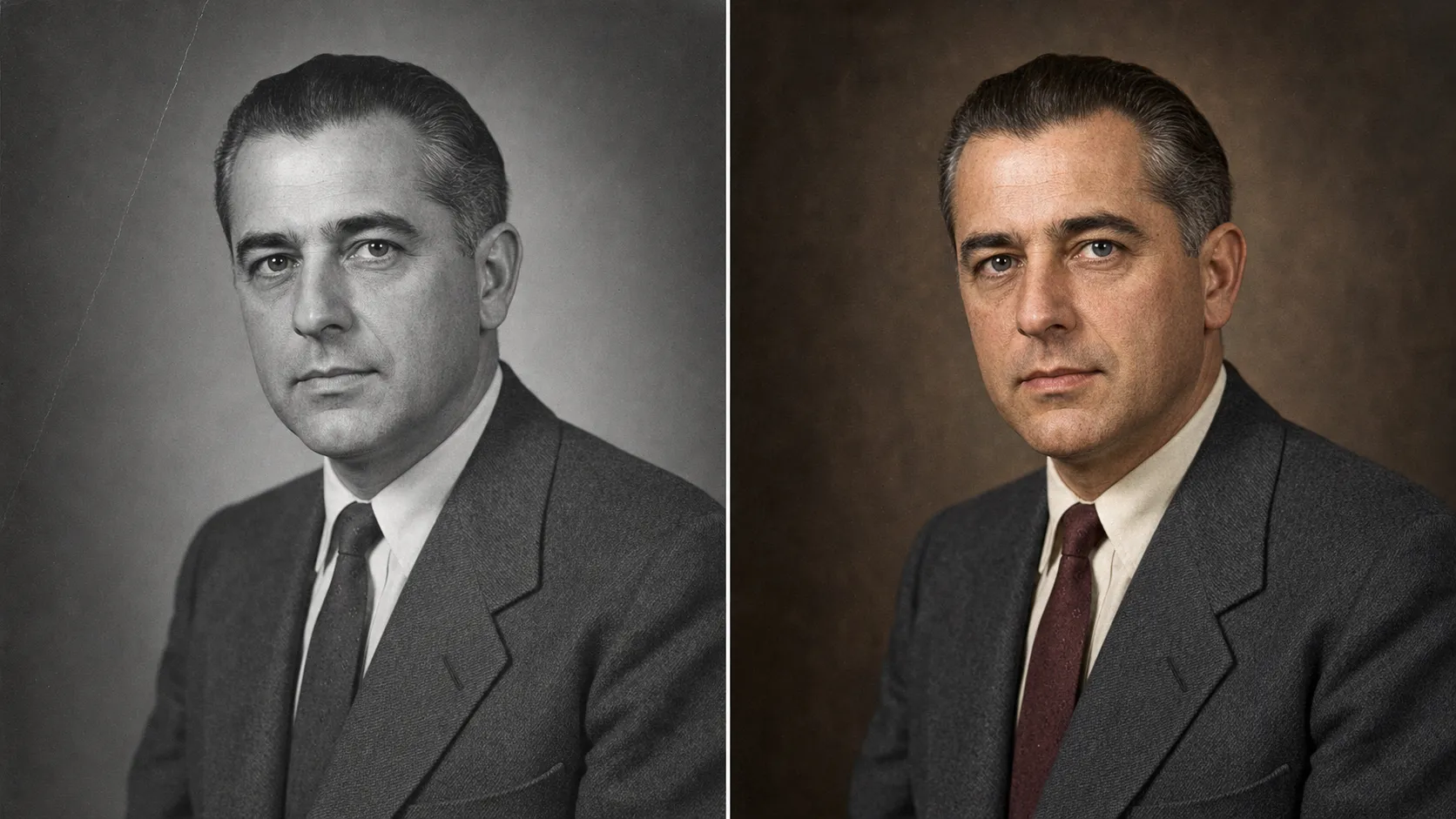
1940s studio portrait
{ERA_AND_PALETTE} = “a 1940s formal studio portrait, muted mid-century dyes, low saturation.” The suit lands charcoal, the tie a muted maroon, the skin a believable warm tone instead of orange. Nothing in the frame is louder than 1940s film would have allowed, which is exactly why it reads as a photograph from then and not a filter from now.
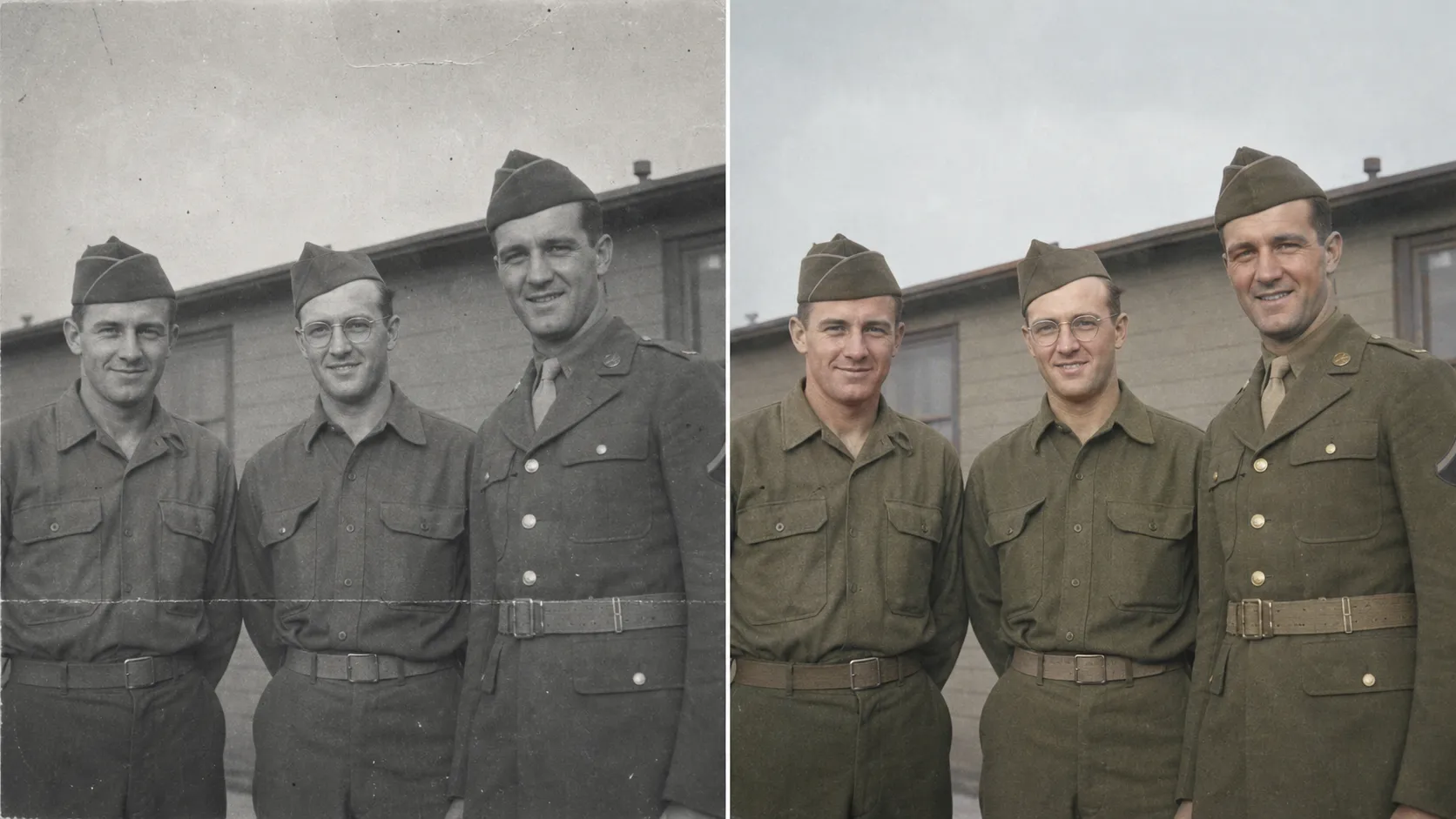
1944 wartime group
{ERA_AND_PALETTE} = “a 1944 wartime photo, muted olive-drab uniforms, chalky 1940s color film,” and {SUBJECT_NOTES} = “US Army olive-drab uniforms, dull brass buttons.” Uniforms are the case where naming the color matters most. Left to guess, the AI tends to brighten military green into something vivid and wrong. Spend the {SUBJECT_NOTES} line on it and the olive drab stays drab.
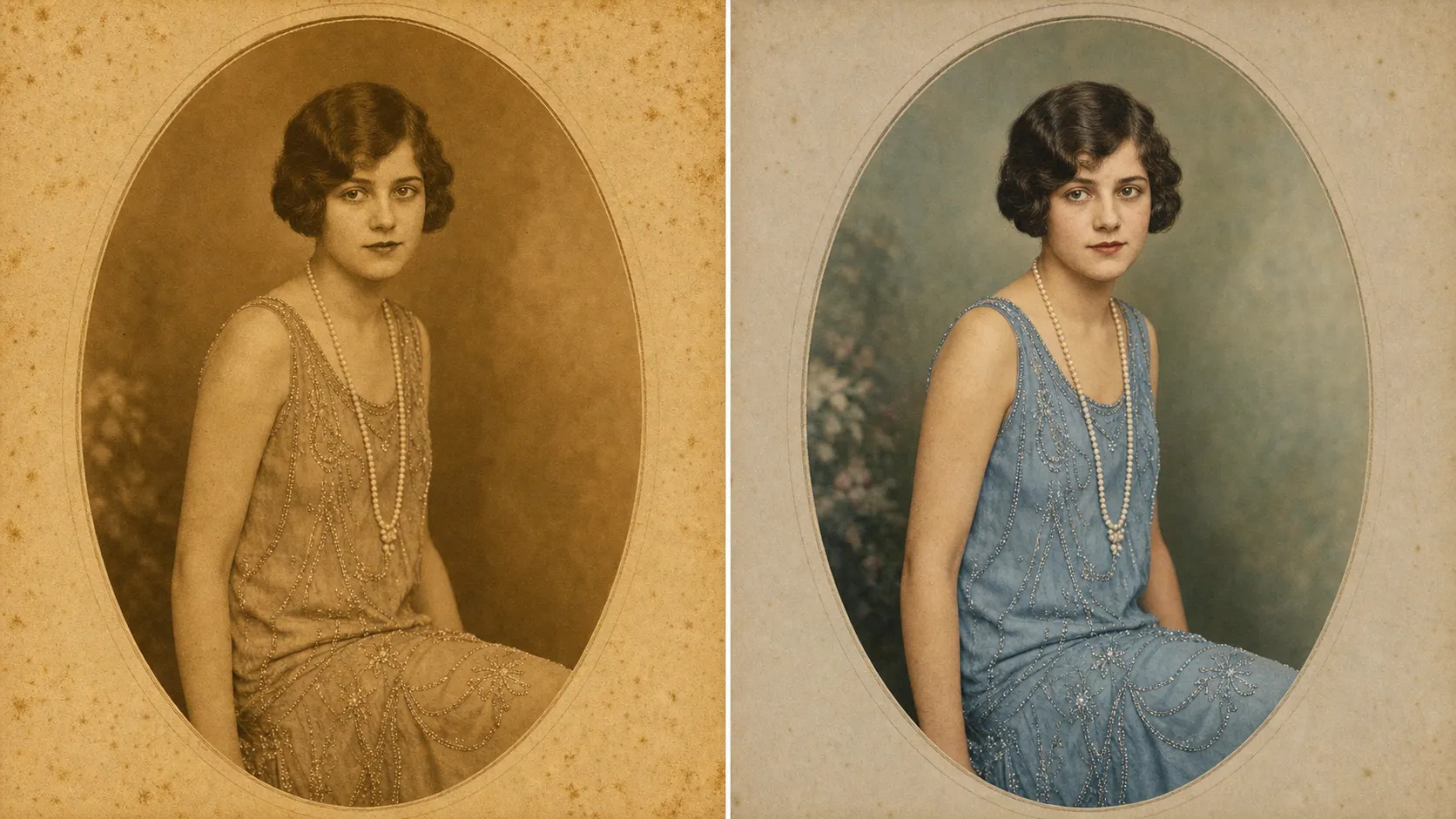
1920s sepia
{ERA_AND_PALETTE} = “a 1920s portrait, remove the uniform amber sepia and replace it with believable separated period color, gentle saturation.” Sepia is its own problem, because everything is already one color. The instruction that does the work is “separated”: it tells the AI to break the single amber tone into distinct, gentle hues rather than just tinting the whole thing a different shade.
1968 faded color print
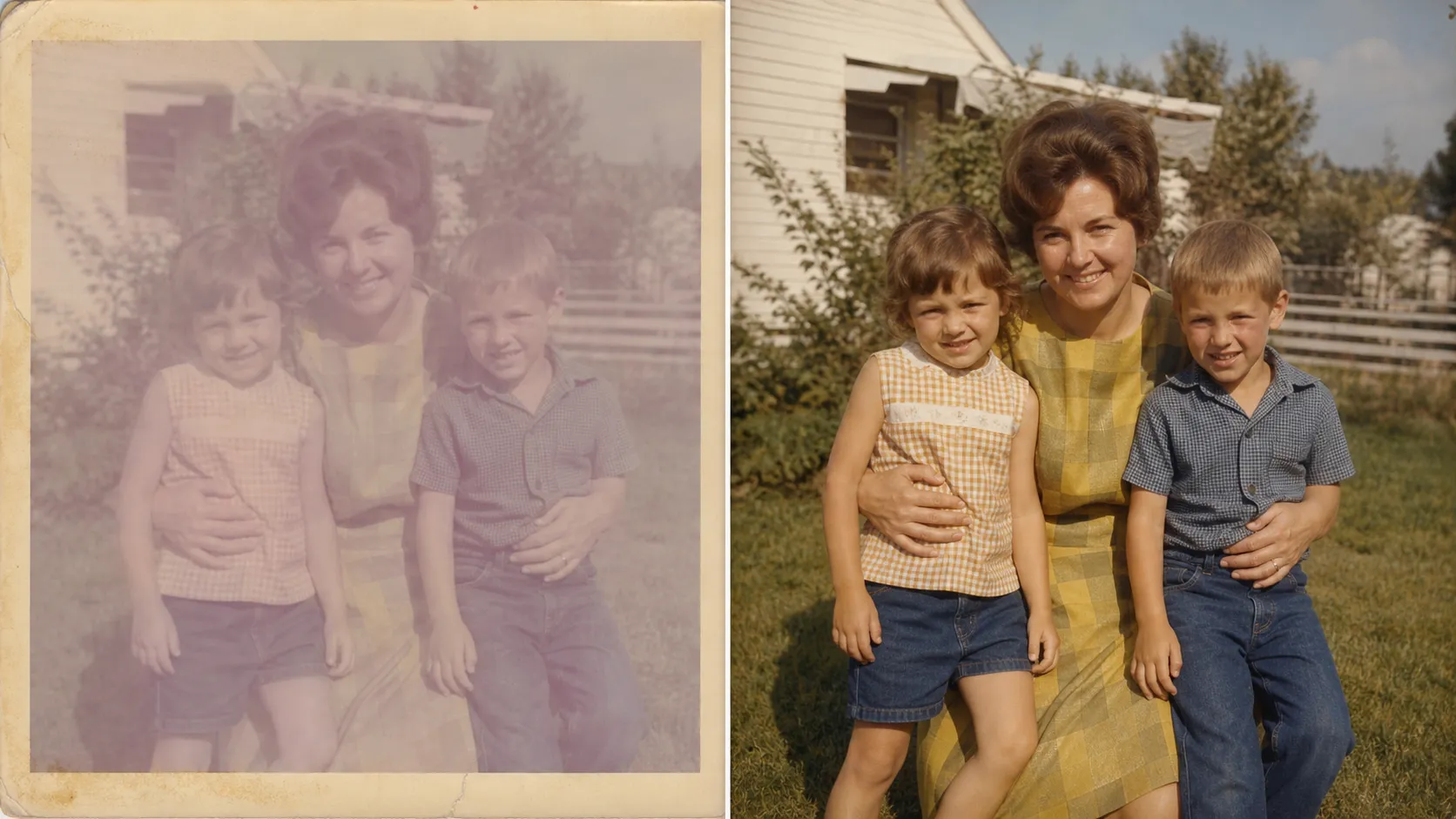
{ERA_AND_PALETTE} = “a faded 1968 color print, recover the original muted late-1960s color, do not over-saturate.” This one isn’t black-and-white at all. It’s a color print that collapsed toward magenta-grey in a sunny window for fifty years. The word “recover” matters: there’s faint real color still in the print, and the AI’s job is to bring it back at period strength, not to invent a brighter version.
The cartoon versus the correct one
The middle panel is what a default free colorizer hands you: orange skin, candy-blue eyes, a shirt in a blue no 1950s dye could make, skin smoothed to plastic. The right panel is the same photo with the four rules applied. Same face in all three. The only thing that changed between the middle and the right is restraint, and restraint is the entire job.
One block. Five era lines. Screenshot the next card and send it to the sibling who has a shoebox of these too.
One paste-ready AI move a week, the kind you can use on a Tuesday or a Sunday. Subscribe to the newsletter and the welcome email comes with a free starter kit of prompts.
When AI color is a guess, and when to overrule it
Honesty here saves you from framing a confidently-wrong photo.
AI colorization is reliable where color follows a pattern. Skin, sky, grass, water, common clothing: the model has seen a million of each and guesses them well. It gets shaky on anything specific whose true color was never recorded in the grey, which is the underconstrained problem Zhang’s 2016 paper named at the start. The AI cannot know that your grandfather’s car was the dark green it actually was. It will pick a plausible color, and plausible is not the same as his.
There are two ways to overrule the guess. The cheap one is the {SUBJECT_NOTES} line: if you know a color, name it, and the prompt obeys. The expensive one is a human. Flat-rate online colorization services charge roughly $35 to $80 per photo for an artist to do it by hand. When the color has to be documented rather than merely believable, that’s a job for a hand colorist who works from the record: matching a uniform to its regulation color, a car to its factory paint code, instead of guessing. The most famous colorization project of the last decade, Peter Jackson’s 2018 documentary They Shall Not Grow Old, restored and colorized First World War footage with exactly that kind of painstaking, reference-checked work. That level of verification is what the $200-to-$800 archival quote is buying.
Here is where the $35-to-$80 you do not spend goes when you do not spend it.
| The prompt ($0 if you have ChatGPT) | The pack ($19, paste-ready) | Online colorization service | Hand colorist + historical research | |
|---|---|---|---|---|
| Cost | $0 with the AI image tool you already have | $19 one-time for the full pack of prompts | $35–$80 per photo, flat | $200–$800+ per photo for archival work |
| Turnaround | ~10 minutes | ~10 minutes once you’ve pasted | 1–4 business days | Weeks |
| Period-correct color | Locked by the prompt’s palette rule | Same prompt, same lock | Depends on the artist | Best-in-class, verified against records |
| Identity fidelity | Locked by the prompt’s first rule | Same lock | Usually safe (human artist) | Best-in-class |
| Iterations | Unlimited until the color reads right | Unlimited | Limited revision rounds | Limited revision rounds |
| Best for | A normal family photo where plausible period color is enough | The same job + the other family-photo jobs | A photo you’d rather hand to a person | A museum-grade or genealogical record where the color must be verified |
| Worst for | A uniform or artifact whose exact color must be documented | Same as the prompt | Light jobs you could do in ten minutes | Light family snapshots (overspending) |
Colorizing is usually the second job, not the first. If the print is also yellowed, creased, or torn, restore the photo first without changing the face, then colorize the clean version. If you’d rather not paste a prompt at all, colorize it in the Studio from one snapshot, with the identity and palette locks handled for you. Or if you’d rather paste-and-go on the next family-photo job, the colorize prompt and the rest of the family-photo set sit inside the $19 image prompt pack, all built with the same identity and palette locks.
Knowing where the guess ends is what keeps a plausible color from getting hung on the wall as if it were a true one. Run the everyday family photos yourself. Send the records that have to be right to someone who works from the record.
FAQ
Q: Can I colorize a black and white photo, and will it actually look real?
A: Yes. Any AI image tool that accepts a photo upload can colorize a black-and-white print, and the result can look genuinely believable. The catch is that “believable” and “real” are not the same thing. The AI is guessing plausible color from patterns it learned, not recovering the color that was actually there, so the way to get a result that reads as real is to constrain the guess. The prompt in this article does that: it tells the AI which decade it is painting in and holds the saturation down to period levels. That single instruction is the difference between a photo your family recognizes and a cartoon.
Q: Can I colorize old photos for free, or do I need to pay?
A: You can do it for free with the AI image tool you already have open. ChatGPT, Claude, and Gemini all accept a photo upload and can return a colorized image, and the prompt here is tool-agnostic, so whatever you already have an account on works. Free online colorizers exist too, but most of them either watermark the result, shrink it to a low resolution, or give you the cartoon color this article is built to avoid. The paid lane, an online colorization service, runs $35 to $80 per photo for a human to do by hand.
Q: Will the colors be historically accurate?
A: Plausible, not verified. The 2016 UC Berkeley paper that kicked off modern AI colorization, by Richard Zhang and colleagues, framed the goal as producing a plausible, realistic colorization rather than recovering the true colors, which are gone the moment a photo is shot in black-and-white. The AI is reliable on things that follow patterns, like skin, sky, and grass. It guesses on anything specific, like the exact color of one dress or one car. If a color has to be right rather than merely plausible, name it in the prompt or send the photo to a hand colorist who works from the record.
Q: Will colorizing change my grandmother’s face?
A: Not with this prompt. The same identity drift that makes default AI tools redraw a face during restoration shows up during colorization too, because the tool treats your photo like any other image and quietly “improves” it. This prompt makes identity preservation the highest-priority constraint and names the features the AI is forbidden to change: bone structure, eye shape, nose, lips, hairline, age. The AI is allowed to add color. It is not allowed to change the person.
Q: Does it work on a phone photo of the print, or do I need a scanner?
A: A phone photo is enough. Lay the print on a flat surface in good even light, take a straight-on snapshot, and upload that. No scanner, no app. The only thing to avoid is glare on the print or a steep angle, and both are obvious when you preview the snapshot before uploading. If the print is also damaged, faded, or creased, the restoration job and the colorization job can be asked for in the same prompt.
Key Takeaways
- The cartoon color free colorizers produce is a prompt problem, not a tool limit. Default tools guess a vivid palette and crank saturation; the fix is telling the AI which decade it’s painting in.
- AI colorization is plausible, not true. The 2016 UC Berkeley paper by Richard Zhang’s team set out to produce realistic color rather than the true original color, and its colorization Turing test fooled viewers 32% of the time. The color you get is a guess, so the win is in constraining the guess.
- Four rules carry the result: lock the period palette, hold saturation down, lock identity as the highest priority, and keep real film and skin texture. Drop any one and the cartoon comes back.
- The cost gap is real: $0 in the tool you already have, or $19 for the full pack of prompts, versus $35 to $80 for an online colorization service, versus $200 to $800 and up for archival hand colorization where the color must be verified against the record.
The face you can finally see in color
Go back to the great-grandmother’s portrait from the top. Run it through the pack of prompts with the era line set to her decade, and the second one done well isn’t a coloring-book version of her. It’s a believable photograph of a person your family will recognize, in color, maybe for the first time.
What’s the one black-and-white photo in your drawer you’ve always wanted to see the way they actually saw it?