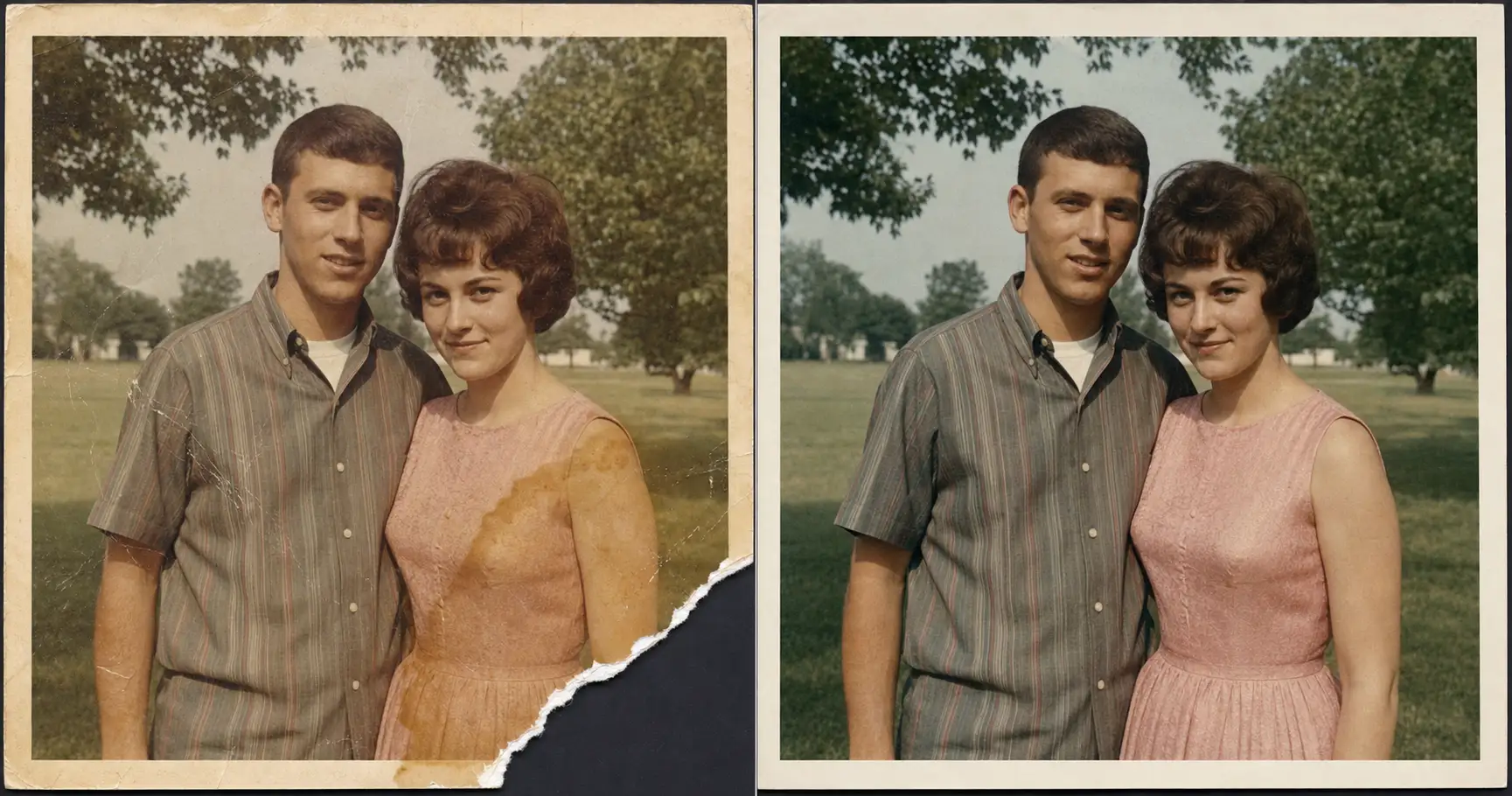
She found it in the bottom of the shoebox: the only photo of her parents on the porch, the lower corner torn clean off, an amber stain blooming across her mother’s shoulder. Every restore website she’d tried handed it back with the corner “fixed,” meaning a different porch railing the AI had invented, and her mother’s face smoothed into a stranger’s. The damage wasn’t the problem. The problem was the AI inventing what was never there.
Why a torn photo is a different repair job than a faded one
Fading and physical damage feel like the same problem. They aren’t, and the difference is the whole article.
A faded photo is missing color. The AI can re-derive color, because the shapes are all still there and color follows from them. That’s the all-purpose case the restore-an-old-photo prompt handles in ten minutes. A torn corner or a scratch through a face is missing something harder to replace. It’s missing information. There is a hole where pixels used to be, and the AI has to decide what goes in it.
Left to its defaults, the AI decides by inventing. It fills the hole with whatever the surrounding image makes plausible, the same way it would generate any image from scratch. That’s the quiet habit behind why most AI photos look fake in the first place: the model leans on the boring center of its training data and draws something generic but convincing. On a fresh image that’s a curiosity. On a torn family photo it’s a forgery. You get a corner that was never there and, if the damage crossed a face, a person who was never born.
So physical damage needs one rule that fading repair doesn’t. Repair the damage by continuing what surrounded it. Never invent what filled it.
That single line is the difference between a photo of your parents and a photo of two strangers on a porch that looks a little like your parents. Everything below is built to enforce it.
What you need before you start
Three things, all of which you already have.
- A clear phone snapshot of the damaged print. Lay it flat in good light and take a straight-on photo. Hold a fragile or water-warped print by its edges, the way archivists handle originals, and once you’ve snapped it the repair itself never touches the original again.
- The prompt below. Paste-and-go, two lines to swap.
- An AI image tool you’ve opened at least once. ChatGPT, Claude, Gemini, or any tool that takes a photo upload and returns an image.
No scanner. No Photoshop. The work isn’t in the scanner. The work is in the one no-invention rule.
The prompt: paste it, name the damage, upload
Upload the phone snapshot of the damaged print first. Then paste the block below into ChatGPT, Claude, or Gemini, and name your damage in the two placeholders.
Show the full promptTap to expand
Paste this into your AI (ChatGPT, Claude, Gemini, or any tool that accepts a photo upload and returns an image).
REQUIRED upload before pasting: the original torn, scratched, or water-damaged photo. This is what the AI repairs. Without it the AI has nothing to anchor on and will invent a different photograph entirely. A clear phone snapshot of the print is enough; no scanner needed.
{DAMAGE_TYPE} is the physical damage in plain English. {REPAIR_NOTES} is where exactly it is, plus the one guardrail that keeps the AI from inventing. Swap both for your print.
Generate this image:
A single photoreal repaired version of the uploaded damaged photograph, returned in the same aspect ratio and composition as the original. Identity preservation is the highest-priority constraint: match every person in the uploaded photo’s bone structure, eyes, nose, lips, proportions, hairline, age, and skin tone exactly; do not invent new facial features, do not modernize anyone, do not change anyone’s age. Repair the physical damage described in {DAMAGE_TYPE} such as torn edges and corners, deep scratches, water stains and amber tide-lines, mold and foxing speckle, surface abrasion, and rebuild clean color and tonal range so the photo looks the way it would have on the day it was taken. The single most important rule for physical damage: reconstruct ONLY what was clearly there in the surrounding image. Where a corner or edge is torn off, continue the existing background, border, and surface that already surround the gap; do not invent a new object, a new person, a new face, or a new scene to fill it. Address {REPAIR_NOTES} specifically and obey its guardrail. Keep the era period correct with the same hairstyles, clothing, accessories, furniture, and background as the original. Preserve authentic film grain, paper-print micro-texture, and natural skin micro-texture where it exists; no AI-plastic smoothing, no porcelain skin. The final image looks like a well-preserved original print, not a digitally retouched modern photo, in the same aspect ratio as the original.
Rules the AI must follow:
- Aspect ratio: match the uploaded photo’s original aspect ratio exactly; do not crop, do not re-frame, do not change the composition; stated at the start and the end of the prompt
- Identity is the highest-priority constraint: every face must remain unmistakably the same person; do not “prettify” anyone, do not adjust noses, jaws, or eye shapes, do not change ages, do not remove glasses, beards, moles, or scars
- Reconstruct only what was clearly there: fill a torn or missing area only by continuing the background, border, and surface that already surround it; do NOT invent new objects, new people, new faces, or new background scenes for any missing region
- Leave large missing regions alone: if an area is too large to reconstruct from what surrounds it, such as an entire face, an entire person, or a whole half of the photo, do not fabricate its contents; leave it as in the source rather than guessing
- Period accuracy: keep hairstyles, clothing, fabrics, jewelry, makeup, eyewear, furniture, and background consistent with the original era; no modern updates
- Realistic film and paper texture required: preserve natural film grain, subtle paper grain, and natural skin micro-texture with visible pores, fine lines, and slight asymmetry; no AI-plastic smoothing, no airbrushed look
- No new objects, no new people, no new background elements, no text, no captions, no watermarks, no date stamps added; if a date, studio name, or handwriting exists on the original, preserve it exactly
- Single image output: one repaired photo, same aspect ratio as the original; no before/after split, no side-by-side, no contact sheet
- Output the image directly without explaining the prompt back
- All text in English Latin script if any incidental signage appears
Replace these placeholders with your details:
{DAMAGE_TYPE}= a torn-off lower-right corner and a long scratch across the background (or describe yours, e.g. “amber water stain over the left side”, “mold speckle across the top”, “deep crease and a torn edge”){REPAIR_NOTES}= rebuild the torn corner only by continuing the existing grass and photo border that surround it, do not invent anything new there; remove the scratch but keep both faces exactly as they are (or describe yours plus the one guardrail that protects what matters: name the spot, then say what the AI must NOT invent)
Bonus tips. Keep a large color photo in color and a black-and-white print in black-and-white by adding “keep the photo black-and-white, do not colorize” to {REPAIR_NOTES}; physical-damage prompts will sometimes drift toward color on an old monochrome print. For a stain that sits over a face, add “the face under the stain must stay the same person, do not redraw the features.” For print-ready output above 8x10, add “upscale to print-ready quality at 11x14 while preserving authentic grain.”
Two lines do the work here, and they do different jobs.
{DAMAGE_TYPE}is the physical damage in plain English. “Torn lower-right corner and a long scratch across the background.” “Amber water stain over the left side.” “Mold speckle across the top.” The plainer the better.{REPAIR_NOTES}is the line that keeps the AI honest. It names where the damage is and then states the guardrail: rebuild the corner only from the existing grass and border, invent nothing new there. Name the spot, then name what the AI must not invent.
Those two lines do the job a restoration shop wants $200 for, minus the one thing the shop won’t do to you, which is hand back a corner it made up.
The one rule that keeps the AI honest
The prompt body states it once and means it the whole way down: reconstruct only what was clearly there. Physical damage comes in four common shapes, and the rule bends a little for each. Same prompt every time. What changes is the line in {REPAIR_NOTES}.
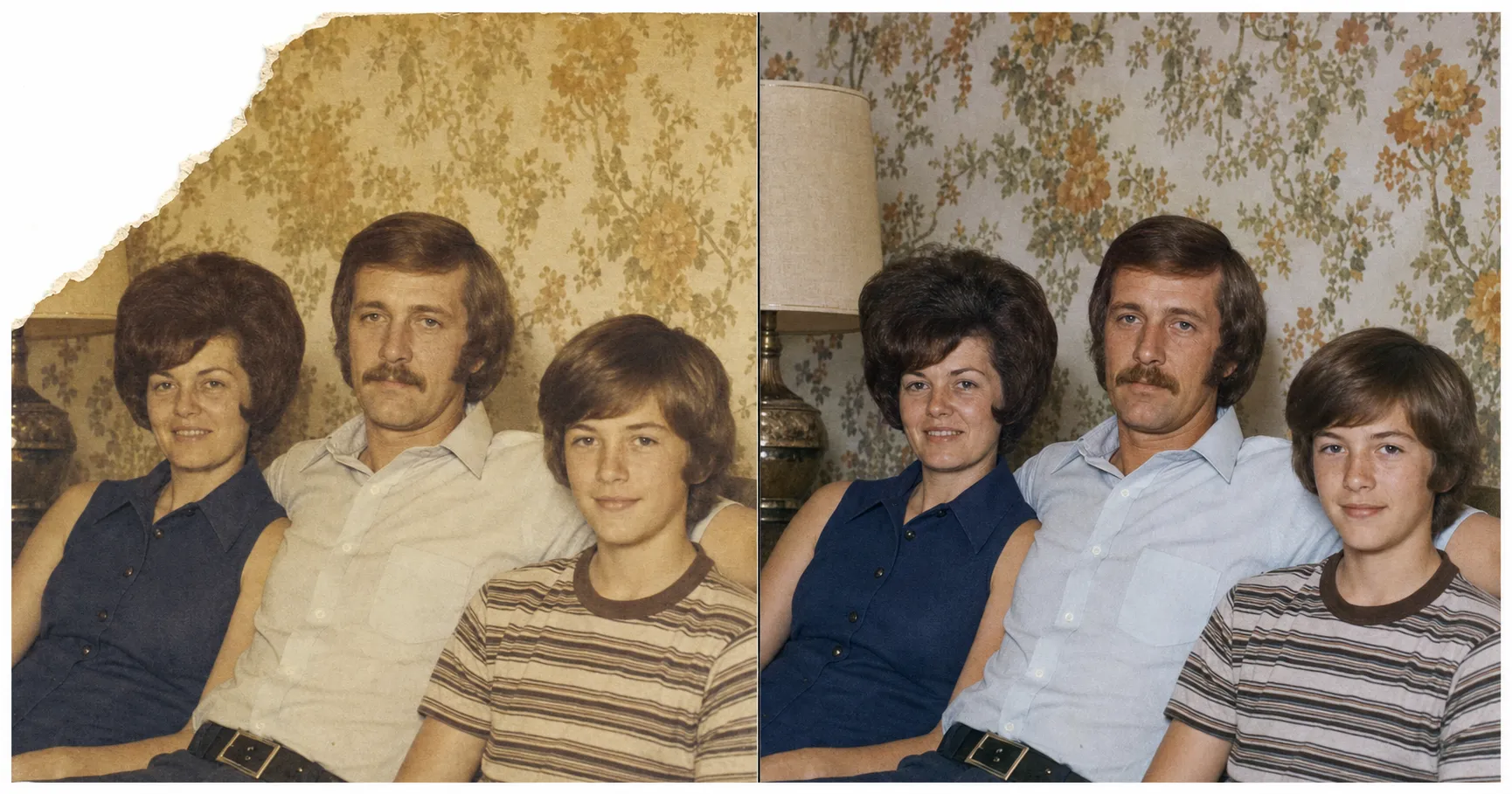
A torn corner or edge
{REPAIR_NOTES} = “rebuild the torn corner only by continuing the wallpaper and the lamp that surround the tear; do not invent a new object or a new person there.” A torn corner usually sits over background, not over a face, which is why it’s the easiest case to win. The AI has plenty of surrounding image to extend inward. The danger isn’t that it can’t rebuild the corner. The danger is that it rebuilds too much and invents a guest, a window, a second lamp. The guardrail stops the over-eager fill.
A deep scratch across a face
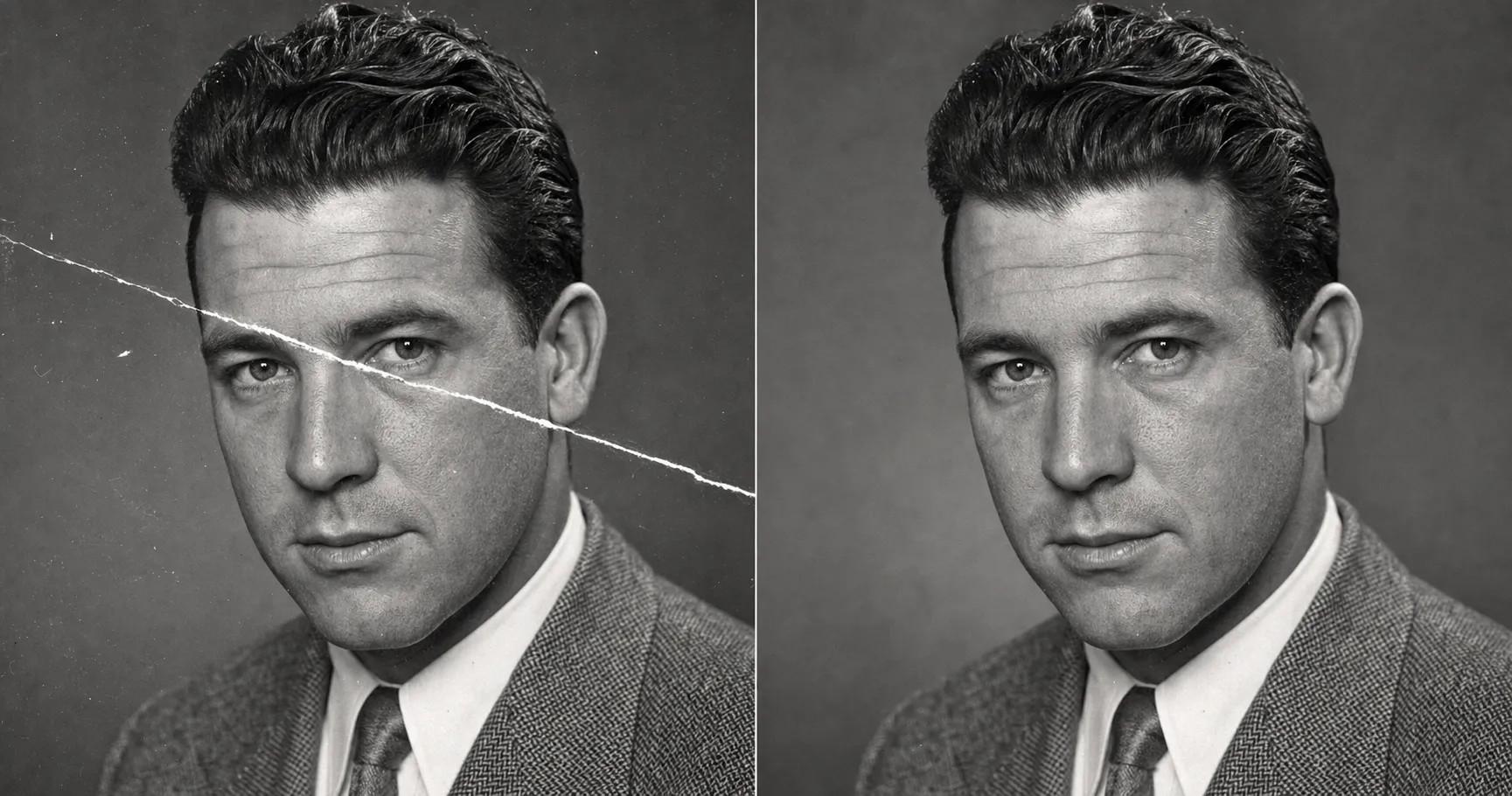
{REPAIR_NOTES} = “remove the scratch across the cheek and eye, but reconstruct that strip only from the face visible on both sides of the scratch line; keep the exact bone structure, eye shape, and hairline; keep the photo black-and-white.” This is the toughest test the prompt gets in normal use. A scratch through a face is a thin missing strip with the real face still intact on either side of it. Tell the AI to anchor to that visible face and it reconstructs the strip honestly. Leave it to defaults and it redraws the whole face, smoother and younger and not quite the person.
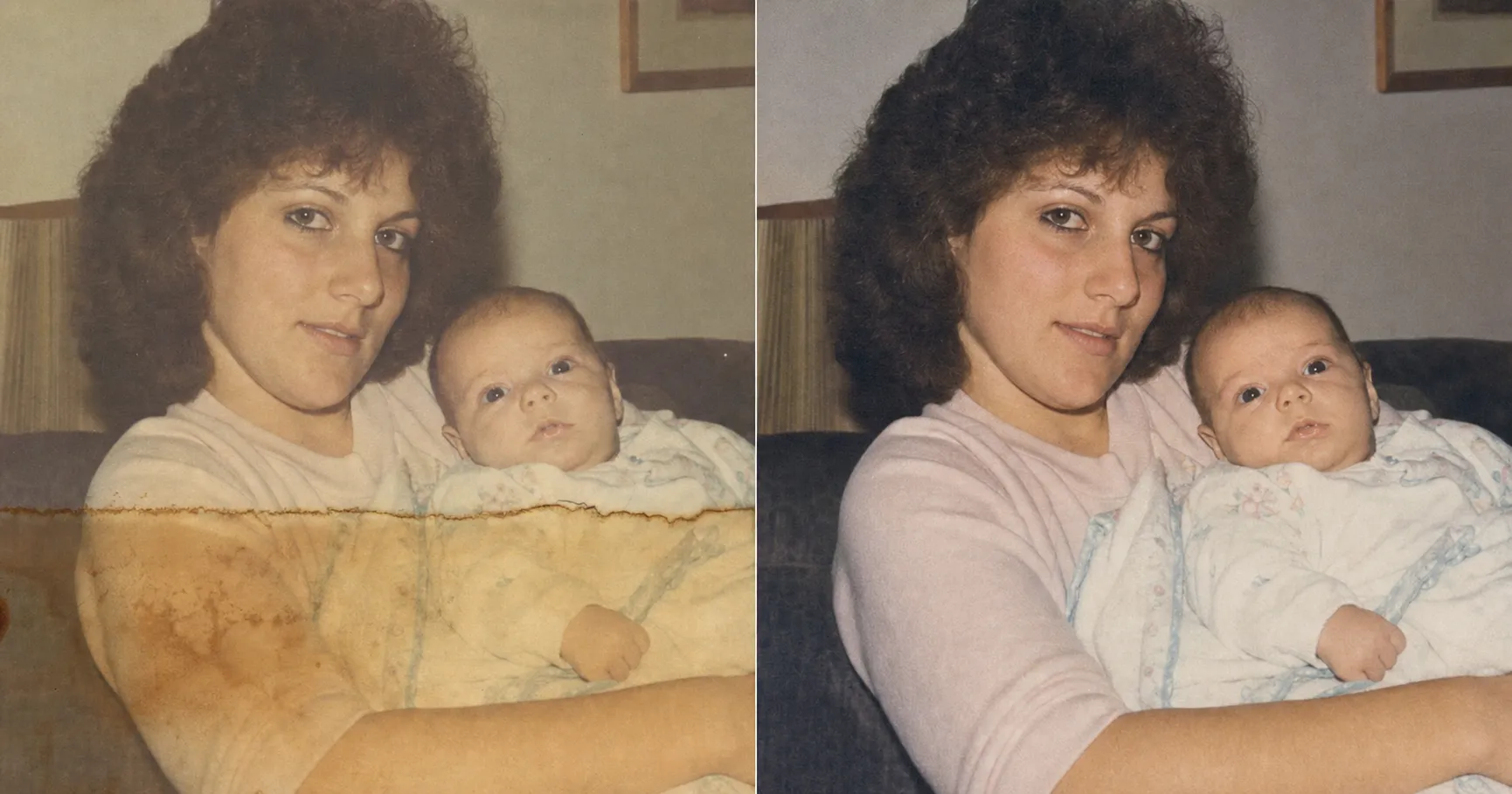
A water stain or amber bloom
{REPAIR_NOTES} = “lift the amber water tide-line and the stain bloom over the arm; rebuild the arm and blanket only from the surrounding undamaged image; the face under the stain must stay the same person.” A water stain is gentler than a tear, because it usually discolors the surface rather than destroying it. The Northeast Document Conservation Center, in its leaflet on the emergency salvage of wet photographs, treats most water-damaged photographs as recoverable, and the digital repair follows the same logic. The stain lifts. The trap is a stain that sits partly over a face, where the AI is tempted to “clean up” the features under it. The guardrail keeps the face the face.
Mold or foxing speckle
{REPAIR_NOTES} = “clear the reddish-brown foxing spots and dark mold speckle, but keep the genuine paper grain and the real skin texture; do not smooth the face; keep the sepia tone.” Mold and foxing are the many-small-spots case, and the temptation here runs the opposite way. To clear hundreds of tiny spots the AI wants to smooth everything, and a smoothed face is a plastic face. The guardrail tells it to clean the spots and keep the grain. Clear the speckle, keep the texture.
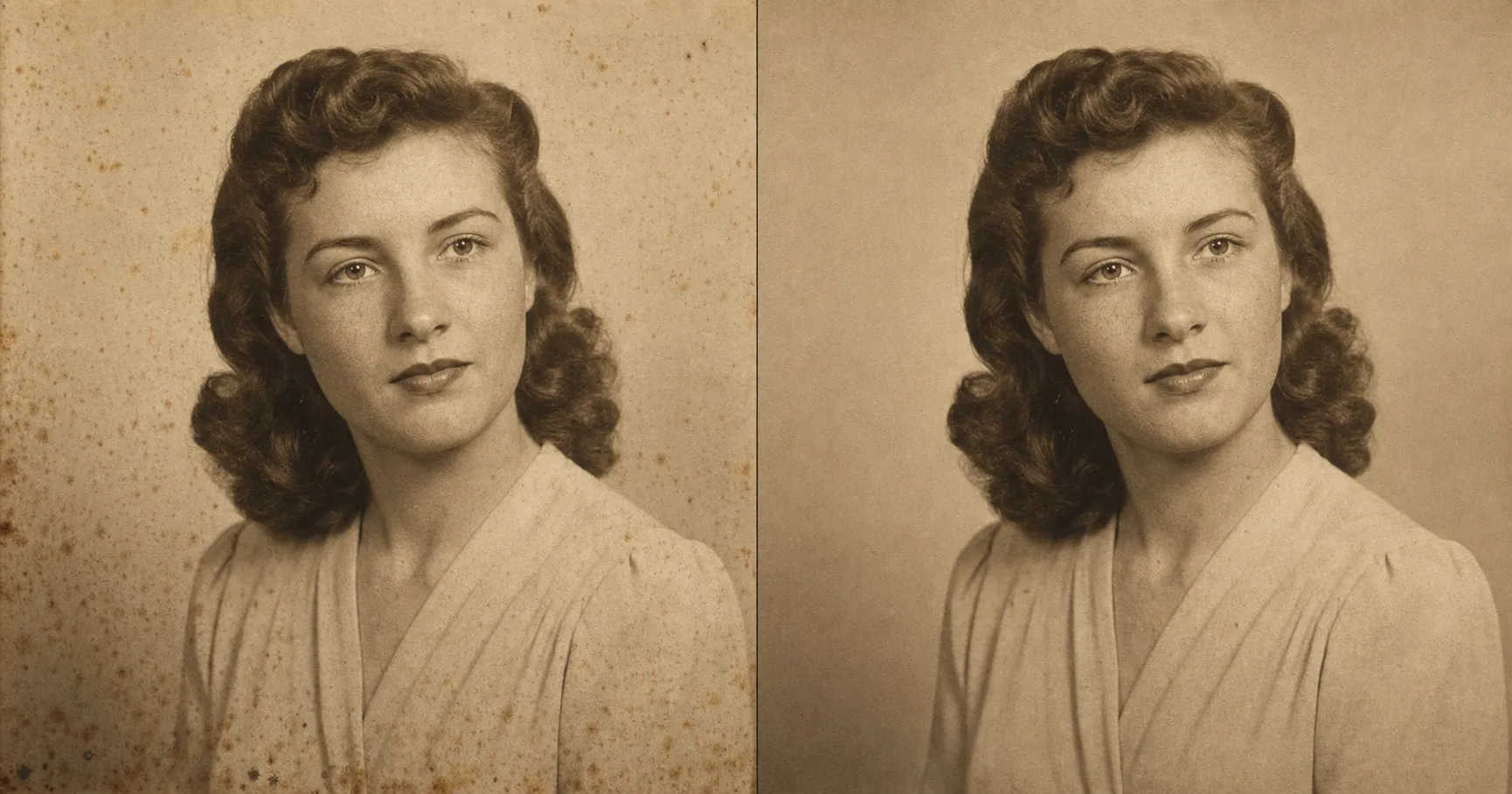
The pattern under all four is one sentence. Rebuild only the edge that was there, never draw me a new one.
One block, four damage types. Screenshot the next card and send it to whoever in the family is the keeper of the shoebox.
One paste-ready AI move a week, the kind you can use on a Tuesday or a Sunday, plus a free starter kit of brand-grade image prompts the moment you sign up. Subscribe to the newsletter.
When to send it to a human instead
Honesty here saves you the spend on a job the prompt was never going to win.
The whole prompt rests on reconstructing what was clearly there. So the prompt fails, by design, exactly when there’s nothing clearly there to reconstruct from. A torn corner of grass has grass all around it. A torn-off face has nothing around it that says who that person was, because the part that made them that person is the part that’s gone. Forcing the AI to fill it is forcing it to invent a stranger, which is the one outcome this whole article exists to prevent.
So the line is simple. If the missing region is background, border, or surface, run it yourself. If the missing region is a face or a whole person, send it to a hand retoucher who can rebuild from other photos of the same human. Severe water damage that has dissolved the emulsion, fire damage, and mold that has eaten through the image fall on the same side of the line.
Here is where the money goes, and where the AI quietly stops being the right tool.
| The prompt: $0 if you have ChatGPT | The pack: $19, paste-ready | Local restoration shop | High-end hand retoucher | |
|---|---|---|---|---|
| Cost | $0 with the AI image tool you already have | $19 one-time for all 125 prompts | $50–$300 per photo, mid-band around $200 | $300+ per photo for severe jobs |
| Turnaround | About ten minutes | About ten minutes once pasted | 1–4 weeks | 2–6 weeks |
| Iterations | Unlimited until the corner reads right | Unlimited | None. You get what they send | Limited revision rounds |
| Invents content? | Never, if you keep the no-invention rule in {REPAIR_NOTES} | Same rule, same lock | Depends on the retoucher | A skilled human can responsibly rebuild from references |
| Best for | Torn edges, scratches, water stains, mold speckle on a print whose faces are still readable | The same job plus 124 other family-photo and gift prompts | Mid-damage prints you would rather not risk | Whole face or whole region physically gone |
| Worst for | A whole face torn off, where there is nothing to reconstruct from | Same as the prompt | Light damage you could fix in ten minutes | Light damage, where you would be overspending |
If you’d rather not paste a prompt at all, repair it in the Studio from one snapshot, with the reconstruct-only-what-was-there rule handled for you. Or if you’d rather paste-and-go on the next damaged print, the repair prompt and the rest of the family-photo toolkit sit inside the $19 image prompt pack, one of the 125 prompts in it, all built with the same reconstruct-only-what-was-there rule.
FAQ
Q: Can torn photos really be repaired, or will the AI just invent a fake corner?
A: Torn photos can be repaired, and the whole game is in one line of the prompt. Left to its defaults, an AI fills a torn corner with whatever seems plausible, which is how you get a corner that was never there. The prompt below forbids that. It rebuilds a missing edge only by continuing the background, border, and surface that already surround the tear. If a torn area is too large to reconstruct from what’s around it, the prompt is told to leave it alone rather than guess. So a torn corner of grass and sky comes back clean. A torn-off face does not come back at all, which is the honest answer and the safe one.
Q: Can water damaged pictures be restored if the stain covers a face?
A: Usually yes, as long as the face is still readable under the stain. A water stain and an amber tide-line are a color-and-surface problem, not a missing-information problem, so the AI can lift the stain and rebuild the color underneath. The line that matters is in {REPAIR_NOTES}: tell it the face under the stain must stay the same person and its features must not be redrawn. If the water damage has physically dissolved the emulsion and taken the face with it, that’s the one case where there’s nothing left to restore from, and a hand retoucher is the right call.
Q: How do I remove a deep scratch that runs across someone’s face?
A: A scratch across a face is the toughest test the prompt gets in normal use, and it passes by anchoring. The face is still visible on both sides of the scratch line, so the AI is told to reconstruct the scratched strip only from the face that surrounds it, not to redraw a new one. In {REPAIR_NOTES} you write something like “remove the scratch across the cheek but keep the exact bone structure, eye shape, and hairline.” Keep a black-and-white print black-and-white while you’re at it, or it will sometimes drift toward color.
Q: Is there a free way to do this, or do I need a paid photo-repair website?
A: You can do it free in a tool you already have. ChatGPT, Claude, and Gemini all accept a photo upload and return an image, and the prompt is tool-agnostic, so whatever you already have an account on is fine. The paid repair websites you’ve seen ads for are running their own version of the same idea, often with the same face-changing default this prompt is built to switch off. If your tool throttles image generation on the free tier, the workaround is patience, not a subscription.
Q: What if a whole corner or a whole face is torn off?
A: Then you’ve hit the line where AI stops being the right tool. The prompt reconstructs only what was clearly there in the surrounding image. A torn corner of background or border has plenty around it to rebuild from. A torn-off face has nothing, because the information that made it that person is the exact thing that’s gone. Forcing the AI to fill it means forcing it to invent a stranger. Send that one to a hand retoucher who can responsibly rebuild from other photos of the same person.
Key Takeaways
- Physical damage is not the same job as fading. Fading is missing color the AI can re-derive; a torn corner or scratched face is missing information the AI is tempted to invent. That temptation is the whole risk.
- The fix is one line, not a new tool: reconstruct only what was clearly there. A torn edge is rebuilt by continuing the background and border that surround it, never by drawing a new one.
- One prompt covers four physical-damage types. Torn corner, scratch across a face, water stain, mold and foxing speckle. What changes between them is a single guardrail line in
{REPAIR_NOTES}naming what the AI must not invent. - Know the line where AI stops. If the missing region is background, run it yourself for $0. If a whole face or region is physically gone, a hand retoucher at $300-plus is the honest call, because there is nothing left to reconstruct from.
What’s the one print you’ve been afraid to touch?
There’s usually one. The torn one, the stained one, the one with the scratch through someone’s face, the one you’ve never let anyone “fix” because you were afraid of what you’d get back. That fear was correct, right up until the rule changed it.
Find that print. Snap it, paste the prompt, and name the one thing the AI must not invent. Then look only at the spot that was damaged and check that it’s a plain continuation of what surrounded it, not a corner someone made up. When it is, the photo on your table is the photo from the shoebox, repaired and still true.
If the print’s real problem is a different one, the rest of the family-photo toolkit is built the same honest way: colorizing a black-and-white photo without cartoon color, and fixing a blurry old photo without the AI inventing fake detail. The repair prompt above and the 124 others in the pack cover the rest of what a normal lifetime of photos asks of you.